
HD 4 - Sennheiser
2 | HD 4.40BT Important safety instructions Important safety instructions X Read this instruction manual carefully and completely before using the product. X Always include this instruction manual when passing the product on to third parties. X Do not use an obviously defective product. X Only use the product in environments where Bluetooth® wireless transmission
Download HD 4 - Sennheiser

Information
Domain:
Source:
Link to this page:
Documents from same domain

MOMENTUM Wireless M2 AEBT - Sennheiser
assets.sennheiser.comThe MOMENTUM Wireless (M2 AEBT) Bluetooth The MOMENTUM Wireless (M2 AEBT) headphones comply with the Bluetooth technology 4.0 standard and are compatible with all Bluetooth 1.1, 1.2, 2.0, 2.1, 3.0 and 4.0 devices with the following profiles: • Headset Profile (HSP) 1.2 - provides the basic functionalities used by the

CX True Wireless - assets.sennheiser.com
assets.sennheiser.comNotes on the ingress protection rating of the earbuds The earbuds feature an IPX4 ingress protection rating which means they are protected from the ingress of water (according to the Inter-national Protection Rating (IP code), IEC standard 60529, tested under laboratory conditions). The earbuds can be used in the rain, for example. However ...
SDW 5000 Series - Sennheiser
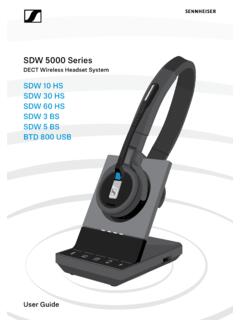
assets.sennheiser.comDepending on the variant you can plug in the headset system to your fixed line phone and/or your computer. Via the Bluetooth dongle BtD 800 UsB you can connect mobile phones or Bluetooth headsets. Additionally you can plug a UsB headset or speakerphone in the UsB port or the busy light UI 10 BL in the back of the

PXC 550 - Sennheiser
assets.sennheiser.com2 | PXC 550 Important safety instructions Important safety instructions X Read this instruction manual carefully and completely before using the product. X Always include this instruction manual when passing the product on to third parties. X Do not use an obviously defective product. Preventing damage to health and accidents X Protect your hearing from high volume …

HD 4.50BTNC/HD 4 - Sennheiser
assets.sennheiser.com2 | HD 4.50BTNC/HD 4.50R Important safety instructions Important safety instructions X Read this instruction manual carefully and completely before using the product. X Always include this instruction manual when passing the product on to third parties. X Do not use an obviously defective product. X Only use the product in environments where Bluetooth® wireless …
MB 660 wireless ANC headset
assets.sennheiser.comto the HSP. If a function, such as voice control, is not supported by the HSP profile, the HFP takes place. • Audio/Video Remote Control Profile (AVRCP) 1.5 – used to control music on the Bluetooth device from the headset (play, pause, skip music track, etc.). • Advanced Audio Distribution Profile (A2DP) 1.3 – used by a Bluetooth device

HD 450BT - Sennheiser
assets.sennheiser.comThe LED dis-plays the charge status: Right R 2 HRS USB-A USB-C LED Off * Using the headphones 12 | HD 450BT Connecting the headphones to a Bluetooth device To be able to use the Bluetooth connection, you must register both devices (headphones and e.g. smartphone) once. This process is

GSP 670 Gaming Headset with low latency connection and ...
assets.sennheiser.comAug 30, 2019 · the headset complies with the Bluetooth 5.0 standard. Bluetooth de vices need to support the “hands free profile” (hFP), the “headset profile” (hsP) or the “advanced audio distribution profile” (A2DP). the headset can save up to eight paired devices. If you pair the headset with a ninth device, the first

Digital Wireless Headphone System - Sennheiser
assets.sennheiser.comSennheiser head-phones sound exceptionally good at low and medium volume levels. ... – operated only within the permissible temperature range, ... Separate the transmitter and other wireless devices in a room by at least 50 cm/20” to avoid interference.

MOMENTUM True Wireless - Sennheiser
assets.sennheiser.comMOMENTUM True Wireless | 5 Product overview Charging case M3IETW C LED displays the charging process/charge status of the rechargeable battery of the charging case or of the earbuds (when inserted into the charging case) Input for USB-C connector for charging the rechargeable batteries LED button activates the LED display for 5 seconds
Related documents

Sky±HD User Guide
storage.sky.comFinding a specific channel in TV Guide 19 Seeing what’s on the HD channels 20 Identifying HD programmes 20 Going back to the channel you last watched 21 Finding out more about a programme with the i button 21 Codes used in the programme information banner 22
Sky±HD User Guide
storage.sky.comFinding a specific channel in TV Guide 19 Seeing what’s on the HD channels 20 Identifying HD programmes 20 Going back to the channel you last watched 21 Finding out more about a programme with the i button 21 Codes used in the programme information banner 22
QUICK REFERENCE INSTRUCTIONS - Abbott Laboratories
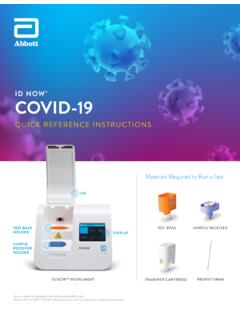
dam.abbott.comID NOW™ COVID-19 QUICK REFERENCE INSTRUCTIONS 1 30°C 15°C 2 4 6 3 30°C 15°C Do not open the sample receiver before placing in the instrument. 5 Back Print Test Results User ID: admin 9/Mar/2020 4 :14pm Procedural Control Valid patid COVID-19: Positive + + Refer to Product Insert instructions for retest procedure in the case of an Invalid ...

DStv HD DECODER QUICK GUIDE
go.dstv.comDStv HD Decoder Quick Guide 19 Watching TV To see what’s on other channels, press GRID and use the arrows to move the highlight. You can also press OK to tune to a selected channel. To change the aspect ratio, select another language or to display subtitles, press OPTIONS. Quick Tip To change aspect ratio .
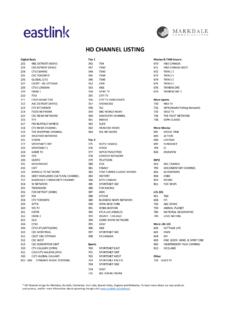
Eastlink HD Channel Listing
www.eastlink.ca* HD Channel listings for Markdale, Dundalk, Flesherton, Irish Lake, Beaver Valley, Eugenia and Kimberley. To learn more about our new products and services, and for more information about upcoming changes visit

Intel® Core™ i5 Desktop Processors Comparison Chart
www.intel.comi5-9600 9th Gen Q2'19 BX80684I59600 LGA1151 3.10 4.60 9 6/6 65 W UHD 630 350/1150 Yes 2 2666/NA/NA i5-9500 9th Gen Q2'19 BX80684I59500 LGA1151 3.00 4.40 9 6/6 65 W UHD 630 350/1100 Yes 2 2666/NA/NA i5-9500F 9th Gen Q2'19 BX80684I59500F LGA1151 3.00 4.40 9 6/6 65 W No N/A Yes 2 2666/NA/NA

Getting started with Logitech HD Webcam C270
www.logitech.com® HD Webcam C270 Features 1. Microphone 2. Lens 3. Activity light 4. Flexible clip/base 5. Logitech Webcam Software 6. Product documentation. 4 English Logitech HD Webcam C270 Thank you for buying a Logitech webcam! Use this guide to set up your Logitech webcam ... 繁體中文 19 Getting started with
![123Movies~Watch!! [ The New Mutants ] Online Full Free HD](/cache/preview/8/0/8/b/f/c/4/b/thumb-808bfc4bbdc821cc8f7068963d7e8c31.jpg)
123Movies~Watch!! [ The New Mutants ] Online Full Free HD
www.sog.unc.eduBRRip is a video that has been encoded at HD resolution (usually 1080p) which is then transcribed to SD resolution. Watch The New Mutants The BD / BRRip Movie in DVDRip resolution looks better, however, because the encoding is from a higher quality source. ... 11/25/2020 1:19:27 PM ...