ImageJ Basics
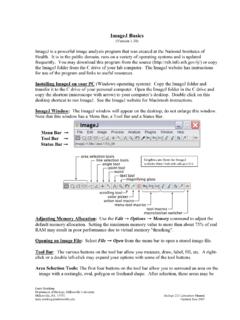
Move the box to the desired location and permanently set the text in place with Edit → Draw (or Ctrl+D). Use the color picker tool to select font color. Magnifying Glass: Left-click on the image to magnify; right-click to reduce the image size. Scrolling Tool: This button allows you to move an image if it is larger than the window.
Download ImageJ Basics

Information
Domain:
Source:
Link to this page:
Documents from same domain

Automated Segmentation and Morphometry of Cell and …
imagej.nih.govAutomated Segmentation and Morphometry of Cell and Tissue Structures. Selected Algorithms in ImageJ 5 2.2Open source software There are numerous …

ImageJ User Guide - National Institutes of Health
imagej.nih.govImageJ User Guide IJ1.46r Tiago Ferreira Wayne Rasband Tuesday2nd October,2012 Foreword TheImageJUserGuide providesadetailedoverviewofImageJ(andinherentlyFiji ...
Photonic Solutions for Biotechnology and Medicine Image ...
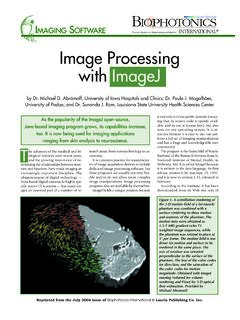
imagej.nih.govranging from skin analysis to neuroscience. by Dr. Michael D. Abràmoff, University of Iowa Hospitals and Clinics; Dr. Paulo J. Magalhães, University of Padua; and Dr. Sunanda J. Ram, Louisiana State University Health Sciences Center Image Processing with ImageJ it not only is in the public domain (mean-ing that its source code is openly avail-

ImageJ Macro Language Programmer’s Reference Guide v1
imagej.nih.govJan 01, 1970 · To test the macro, use the editor's Macros>Run Macro command (or press ctrl-r). To save it, use the editor's File>Save As command. In the Save As dialog box, enter "Hello_World.txt" as file name, then click "Save". The macro will be automatically i-nstalled as a "Hello World" command in the Plugins menu when you restart ImageJ,
Examples of Image Analysis Using ImageJ
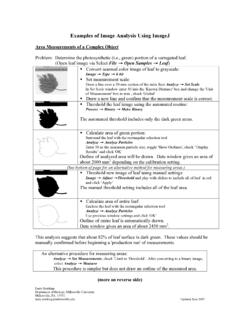
imagej.nih.govTwenty five embryos are counted, numbered and outlined. The data window lists the area (in um2) for each embryo. These data could be copied to a spreadsheet. Threshold: 0-0 Count: 25 Total Area: 3177.6 µm^2 Average Size: 127.1 µm^2 Area Fraction: 3.72% A summary of the particle count is also shown in another data window.

ImageJ Batch Processing
imagej.nih.govMACRO Uses the ImageJ macro language. This language is used by the ImageJ macro tools. This is the correct option for automatically generating script commands to use in the BATCH COMMAND plugin JAVASCRIPT Uses the JavaScript programming language. PLUGIN Uses the Java programming language. This can be used to generate a Java plugin to be ...

How to Use the ND2 Reader Image J Plugin
imagej.nih.govImageJ ND2 Reader Plugin November 2007 Page 2 5. Run through the rest of the installation of the plug-in, this should install within 1 minute. 6. Open up the ImageJ Application by double clicking on this icon: 7. The plug in to open the ND2 files will be available from the Plugins Menu and is named “ND to Image6D.” 8.
Related documents
![arXiv:1411.1784v1 [cs.LG] 6 Nov 2014](/cache/preview/f/a/6/8/3/a/5/7/thumb-fa683a5739b507f70aa173f9c218eee1.jpg)
arXiv:1411.1784v1 [cs.LG] 6 Nov 2014
arxiv.orgexamples were used as training set. Images with multiple tags were repeated inside the training set once for each associated tag. For evaluation, we generate 100 samples for each image and find top 20 closest words using cosine similarity of vector representation of the words in the vocabulary to each sample. Then we select
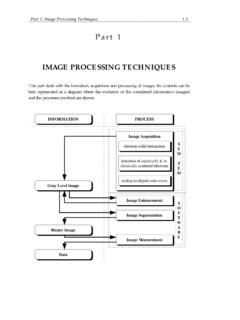
IMAGE PROCESSING TECHNIQUES
users.ncsa.illinois.eduAn image is the optical representation of an object illuminated by a radiation source. The following elements are present in an image formation process: an object, a radiation source ... Backscattered electrons are detected by a set of 2 solid state detectors, mounted close above. 1.4 …

Image Resolution versus Image Size What resolution should ...
lib2.colostate.eduAn image with a resolution of 72 has 72 dots in a linear inch. The higher the resolution of an image, the better the quality of image you have. The image size is determined by the resolution multiplied by the height and the width of the image. Your height and width will be determined by how you received the image, be it a camera, scan, etc.

Unsupervised Image-to-Image Translation Networks
arxiv.orgUnsupervised image-to-image translation aims at learning a joint distribution of images in different domains by using images from the marginal distributions in individual domains. Since there exists an infinite set of joint distributions that can arrive the given marginal distributions, one could infer nothing about the joint
Poisson Image Editing - Department of Computer Science
www.cs.jhu.eduimage via a sparse set of its edge elements (edgels). To suppress an Permission to make digital/hard copy of part of all of this work for personal or classroom use is granted without fee provided that the copies are not made or distributed for profit or commercial advantage, the copyright notice, the title of the

A Point Set Generation Network for 3D Object ...
openaccess.thecvf.comA Point Set Generation Network for 3D Object Reconstruction from a Single Image Haoqiang Fan ∗ Institute for Interdisciplinary Information Sciences Tsinghua University fanhqme@gmail.com Hao Su∗ Leonidas Guibas Computer Science Department Stanford University {haosu,guibas}@cs.stanford.edu Abstract Generation of 3D data by deep neural ...

Lecture 2 Image Processing and Filtering
courses.cs.washington.edu• Recall: m is the median of a set of values iff half the values in the set are <= m and half are >= m. • Median filtering of image I: For each location (x,y), sort intensity values in its neighborhood, determine median intensity value, and assign that value to I(x,y) • …

Lenovo ESXi Custom Image and VUM Guide
download.lenovo.com1 Lenovo ESXi Custom Image and VUM Guide Lenovo ESXi Custom Image and VMware Update Manager (VUM) Guide Oct. 5th, 2021

How to set up an electronic signature for pdf documents
www.bmcc.nsw.gov.aub. Scan the page as an image file (either as a jpg, tiff etc) but not a pdf file. c. Crop the image – crop the image to the size of your signature d. Save the image of your signature to your computer with a file extension of .jpg or .tiff 2. Set up the signature in Adobe: a. Select Sign tab b.