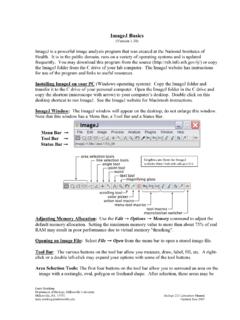
ImageJ Basics
Setting Measurement Scale. Draw a line between two points of known distance such as a ruler on the photograph. Go to Analyze → Set Scale. In the Set Scale window the length of the line, in pixels, will be displayed. Type the known distance and units of measure in the appropriate boxes and click OK. Measurements will now be shown using these ...
Download ImageJ Basics

Information
Domain:
Source:
Link to this page:
Documents from same domain

Automated Segmentation and Morphometry of Cell and …
imagej.nih.govAutomated Segmentation and Morphometry of Cell and Tissue Structures. Selected Algorithms in ImageJ 5 2.2Open source software There are numerous …

ImageJ User Guide - National Institutes of Health
imagej.nih.govImageJ User Guide IJ1.46r Tiago Ferreira Wayne Rasband Tuesday2nd October,2012 Foreword TheImageJUserGuide providesadetailedoverviewofImageJ(andinherentlyFiji ...
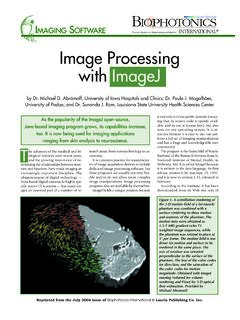
Photonic Solutions for Biotechnology and Medicine Image ...
imagej.nih.govranging from skin analysis to neuroscience. by Dr. Michael D. Abràmoff, University of Iowa Hospitals and Clinics; Dr. Paulo J. Magalhães, University of Padua; and Dr. Sunanda J. Ram, Louisiana State University Health Sciences Center Image Processing with ImageJ it not only is in the public domain (mean-ing that its source code is openly avail-

ImageJ Macro Language Programmer’s Reference Guide v1
imagej.nih.govJan 01, 1970 · To test the macro, use the editor's Macros>Run Macro command (or press ctrl-r). To save it, use the editor's File>Save As command. In the Save As dialog box, enter "Hello_World.txt" as file name, then click "Save". The macro will be automatically i-nstalled as a "Hello World" command in the Plugins menu when you restart ImageJ,
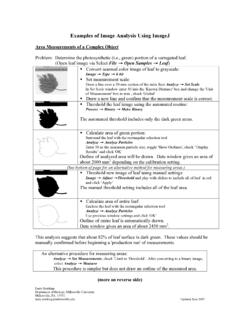
Examples of Image Analysis Using ImageJ
imagej.nih.govTwenty five embryos are counted, numbered and outlined. The data window lists the area (in um2) for each embryo. These data could be copied to a spreadsheet. Threshold: 0-0 Count: 25 Total Area: 3177.6 µm^2 Average Size: 127.1 µm^2 Area Fraction: 3.72% A summary of the particle count is also shown in another data window.

ImageJ Batch Processing
imagej.nih.govMACRO Uses the ImageJ macro language. This language is used by the ImageJ macro tools. This is the correct option for automatically generating script commands to use in the BATCH COMMAND plugin JAVASCRIPT Uses the JavaScript programming language. PLUGIN Uses the Java programming language. This can be used to generate a Java plugin to be ...

How to Use the ND2 Reader Image J Plugin
imagej.nih.govImageJ ND2 Reader Plugin November 2007 Page 2 5. Run through the rest of the installation of the plug-in, this should install within 1 minute. 6. Open up the ImageJ Application by double clicking on this icon: 7. The plug in to open the ND2 files will be available from the Plugins Menu and is named “ND to Image6D.” 8.
Related documents

Converting Units of Measure
www.mathematicshed.comLength Metric System 1 millimeter = 1/1,000 meter 1 centimeter = 1/100 meter 1 decimeter = 1/10 meter 1 meter (basic unit of length) 1 dekameter = 10 meters 1 kilometer = 1,000 meters American and British Units 1 inch = 1/36 yard = 1/12 foot 1 foot = 1/3 yard 1 yard (basic unit of length) 1 mile = 1,760 yards = 5,280 feet Conversion Factors
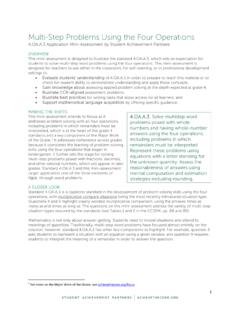
Multi-Step Problems Using the Four Operations
achievethecore.orgmeasurement, express measurements in a larger unit in terms of a smaller unit. Record measurement equival ents in a two-column table. For example, know that 1 ft is 12 times as long as 1 in. Express the length of a 4 ft snake as 48 in. Generate a conversion table for feet and inches listing the number pairs (1, 12), (2, 24), (3, 36), …

Skill and Practice Worksheets - LPS
sites.lps.org1.3 Speed Problems 1.3 Problem Solving Boxes (template for solving ... Dimensional analysis is used to solve problems that involve converting between different units of measurement. 1. Circle the conversion factor you would choose to solve the following problems. ... length on a fraction of the distance between the Earth’s equator and the ...