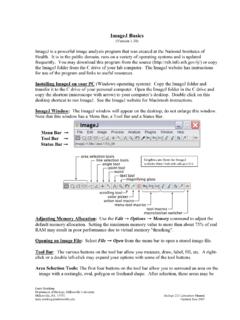
ImageJ Basics
Adjusting Memory Allocation: Use the Edit → Options → Memory command to adjust the default memory allocation. Setting the maximum memory value to more than about 75% of real RAM may result in poor performance due to virtual memory "thrashing". Opening an Image File: Select File → Open from the menu bar to open a stored image file.
Download ImageJ Basics

Information
Domain:
Source:
Link to this page:
Documents from same domain

Automated Segmentation and Morphometry of Cell and …
imagej.nih.govAutomated Segmentation and Morphometry of Cell and Tissue Structures. Selected Algorithms in ImageJ 5 2.2Open source software There are numerous …

ImageJ User Guide - National Institutes of Health
imagej.nih.govImageJ User Guide IJ1.46r Tiago Ferreira Wayne Rasband Tuesday2nd October,2012 Foreword TheImageJUserGuide providesadetailedoverviewofImageJ(andinherentlyFiji ...
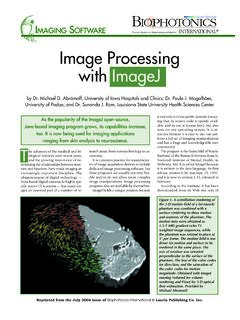
Photonic Solutions for Biotechnology and Medicine Image ...
imagej.nih.govranging from skin analysis to neuroscience. by Dr. Michael D. Abràmoff, University of Iowa Hospitals and Clinics; Dr. Paulo J. Magalhães, University of Padua; and Dr. Sunanda J. Ram, Louisiana State University Health Sciences Center Image Processing with ImageJ it not only is in the public domain (mean-ing that its source code is openly avail-

ImageJ Macro Language Programmer’s Reference Guide v1
imagej.nih.govJan 01, 1970 · To test the macro, use the editor's Macros>Run Macro command (or press ctrl-r). To save it, use the editor's File>Save As command. In the Save As dialog box, enter "Hello_World.txt" as file name, then click "Save". The macro will be automatically i-nstalled as a "Hello World" command in the Plugins menu when you restart ImageJ,
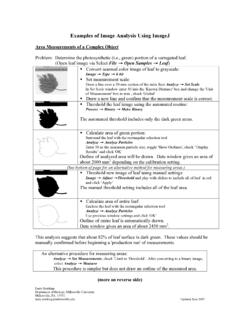
Examples of Image Analysis Using ImageJ
imagej.nih.govTwenty five embryos are counted, numbered and outlined. The data window lists the area (in um2) for each embryo. These data could be copied to a spreadsheet. Threshold: 0-0 Count: 25 Total Area: 3177.6 µm^2 Average Size: 127.1 µm^2 Area Fraction: 3.72% A summary of the particle count is also shown in another data window.

ImageJ Batch Processing
imagej.nih.govMACRO Uses the ImageJ macro language. This language is used by the ImageJ macro tools. This is the correct option for automatically generating script commands to use in the BATCH COMMAND plugin JAVASCRIPT Uses the JavaScript programming language. PLUGIN Uses the Java programming language. This can be used to generate a Java plugin to be ...

How to Use the ND2 Reader Image J Plugin
imagej.nih.govImageJ ND2 Reader Plugin November 2007 Page 2 5. Run through the rest of the installation of the plug-in, this should install within 1 minute. 6. Open up the ImageJ Application by double clicking on this icon: 7. The plug in to open the ND2 files will be available from the Plugins Menu and is named “ND to Image6D.” 8.
Related documents
CorelDRAW Graphics Suite 2021 Quick Start Guide
product.corel.comCorelDRAW Graphics Suite 2021 CorelDRAW® Graphics Suite2021 offers fully-integrated applications — CorelDRAW® 2021, Corel PHOTO-PAINT™ 2021, and Corel® Font Manager 2021 — and complementary plugins that cover everything from vector illustration and page layout, to photo editing, bitmap-to-vector tracing, web graphics, and font management.
Introduction to Microsoft PowerPoint - University of South ...
uscm.med.sc.eduLayout” options. 3. Click once on the option of your choice. 4. Type Content Options in the title placeholder. 5. In the text placeholder, add the following text (hit <Enter> after each line): • Clip Art • Photographs • Charts • Graphs • Tables • Diagrams • Media Clips 6. Click on the Clip Art icon in the “add content” area. 7.
Using R for Data Analysis and Graphics Introduction, Code ...
cran.r-project.orgUsing R for Data Analysis and Graphics Introduction, Code and Commentary J H Maindonald Centre for Mathematics and Its Applications, Australian National University. ©J. H. Maindonald 2000, 2004, 2008. A licence is granted for personal study and classroom use. Redistribution in any other form is prohibited.

ODS Graphics Tip Sheet - SAS
support.sas.comGraphics has a PLOTS= option that you can use to select graphs and specify options. The PLOTS= option has a common overall syntax for all statistical procedures, but the specific global plot options, plot requests, and plot options vary across procedures. The syntax is as follows: PLOTS <(global-plot-options)> <= plot-request <(options)>>
OPTIPLEX 3080 TOWER, SMALL FORM FACTOR AND MICRO …
www.delltechnologies.comFeatures & Technical Specifications OPTIPLEX 3080 TOWER, SMALL FORM FACTOR AND MICRO Feature OptiPlex 3080 Technical Specifications1 Processors1 Tower, Small Form Factor: Intel ® Celeron G5900, 2 MB Cache, 2 Cores, 2 Threads, 3.4 GHz, 58 W Intel ® Pentium G6400, 4 MB Cache, 2 Cores, 4 Threads, 4.0 GHz, 58 W Intel ® Pentium G6500, 4 MB Cache, 2 …

TN-ED-03: GDDR6: The Next-Generation Graphics DRAM
www.micron.comtwice the I/O data rate. (See WCK clocking options with GDDR6 later in this tech note for more information.) • GDDR5 and GDDR5X receive commands as single data rate (SDR), referenced to the rising CK clock edge, while addresses are received double data rate (DDR) referenced to both rising and falling CK clock edges. GDDR6 receives both ...

NVIDIA QUADRO NVS 295 THE STANDARD FOR BUSINESS …
www.nvidia.comQuadro NVS 295 business graphics solution along with NVIDIA nView® display management software delivers maximum flexibility for single or multi-display options. With productivity enhancing features such as extended Windows Taskbar that spans across multiple displays, gridlines that divide a single large or a multiple
Graphics in LTEX using TikZ
www.tug.orgGraphics in LATEX using TikZ Zo a Walczak Faculty of Mathematics and Computer Science, University of Lodz zofiawal (at) math dot uni dot lodz dot pl Abstract In this paper we explain some of the basic and also more advanced features of the PGF system, just enough for beginners. To make our drawing easier, we use TikZ, which is a frontend layer ...