
Lab 3.5.1: Basic VLAN Configuration - ut
Note: The show vlan id vlan-name displays the same output. You can also view VLAN assignment information using the show interfaces interface switchport command. Step 5: Assign the management VLAN. A management VLAN is any VLAN that you configure to access the management capabilities of a switch.
Download Lab 3.5.1: Basic VLAN Configuration - ut

Information
Domain:
Source:
Link to this page:
Documents from same domain
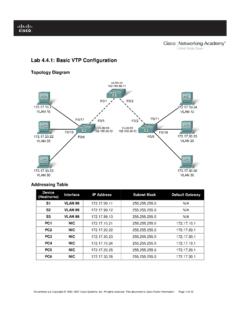
Lab 4.4.1: Basic VTP Configuration - Arvutiteaduse instituut
courses.cs.ut.eeSet the VTP domain name to Lab4 and the VTP password to cisco on all three switches . Configure S1 in server mode, S2 in client mode, and S3 in transparent mode.

Packet Tracer Configuring VPNs (Optional) - ut
courses.cs.ut.eePacket Tracer – Configuring VPNs (Optional) © 2013 Cisco and/or its affiliates. All rights reserved. This document is Cisco Public. Page 2 of 6 ISAKMP Phase 1 ...

Lab: Basic OSPF Configuration Lab
courses.cs.ut.eeThe OSPF router ID is used to uniquely identify the router in the OSPF routing domain. A router ID is an IP address. Cisco routers derive the Router ID in one of three ways and with the following precedence: 1. IP address configured with the OSPF router-id command. 2. Highest IP address of any of the router’s loopback addresses. 3.

Rui Jiang Xuegong Zhang Michael Q. Zhang Editors Basics of ...
courses.cs.ut.eeinclude useful introductions to concepts such as gene or Bayesian methods. This is a valuable aspect of the volume allowing a student various angles of approach to a new topic. Chapter 1, “Basics for Bioinformatics,” defines bioinformatics as “the storage, manipulation and interpretation of biological data especially data of nucleic acids

Lab 2.5.1: Basic Switch Configuration
courses.cs.ut.eeSet the login password to cisco . Also configure the vty lines 0 to 15 with the password cisco . S1#configure terminal Enter the configuration commands, one for each line. When you are finished, return to global configuration mode by entering the exit command or pressing Ctrl-Z. S1(config)# line console 0 S1(config-line)# password cisco

Lab: Basic Router Configuration
courses.cs.ut.eeR1(config-if)#interface serial 0/0/0 R1(config-if)#ip address 192.168.2.1 255.255.255.0 R1(config-if)#clock rate 64000 R1(config-if)#no shutdown R1(config-if)# Note: The interface will be activated until the serial interface on R2 is configured and activated Step 12: Return to privileged EXEC mode. Use the end command to return to privileged ...

Lab 5.5.1: Basic Spanning Tree Protocol - ut
courses.cs.ut.eeCCNA Exploration LAN Switching and Wireless: STP Lab 5.5.1: Basic Spanning Tree Protocol ... • Configure a password of cisco for console connections. • Configure a password of cisco for vty connections. (Output for S1 shown) Switch> enable Switch# configure terminal
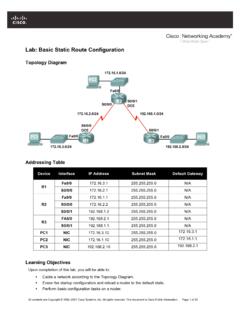
Lab: Basic Static Route Configuration
courses.cs.ut.eeIf you can answer yes to all the proceeding questions, the interface should come up. CCNA Exploration Routing Protocols and Concepts: Static Routing Lab …
Related documents
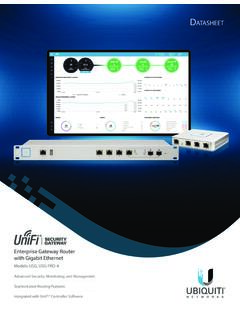
UniFi Security Gateway Datasheet - Ubiquiti
dl.ubnt.comVLAN 10 Accounting VLAN 20 Marketing VLAN 30 Training UniFi Security Gateway Pro UniFi Switch Network Segmentation with VLAN D atasheet 2. ... and delivers basic information about each network segment. Maps Upload a map of your location(s) or use Google Maps to represent
CLI Manual - D-Link
eu.dlink.comVLAN COMMANDS .....119 ISM VLAN COMMANDS ... (Basic Settings) window on the Configuration menu. The IP address for the Switch must be set before it can be managed with the Web–based manager. The Switch IP address can be
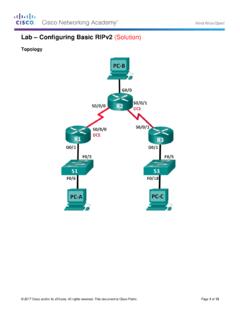
Lab – Configuring Basic RIPv2 (Solution)
sites.radford.eduIn Part 1, you will set up the network topology and configure basic settings. Step 1: Cable the network as shown in the topology. Step 2: Initialize and reload the router and switch.

DGS-1100 Series EasySmart Switch User Manual B1 v1 - D-Link
support.dlink.comAbout This Guide This guide provides by-stepstep -instructions on how install theD-Link DGS-1100 -05/05PD/08/08P Smart Managed Switches, how to use the Web Utility, and how to perform web-based management functions.

Virtual LANs (VLANs) - Allied Telesis
www.alliedtelesis.comVLAN Introduction This guide describes Virtual LANs (VLANs), VLAN features and configuration on the switch. It begins with a description of what a VLAN is, its evolution and purpose, and also provides the meaning of some common VLAN terminology. This is followed with a detailed look at VLAN implementation. Port-based VLAN

Using the Command-Line Interface - Cisco
www.cisco.comVLAN database. Enter the vlan vlan-id global configuration command to access config-vlan mode: Switch(config)# vlan 2000 Switch(config-vlan)# The supported keywords can vary but are similar to the commands available in VLAN configuration mode. To display a comprehensive list of commands, enter a question mark (?) at the prompt. Switch(config ...

Basic Router Configuration - Cisco
www.cisco.comChapter 1 Basic Router Configuration Configuring Basic Parameters Configure Fast Ethernet LAN Interfaces The Fast Ethernet LAN interfaces on your router are automatically configured as part of the default VLAN and as such, they are not configured with individual addresses. Access is afforded through the VLAN.
GS716Tv3, GS724Tv4, and GS748Tv5 Smart Switches - …
www.downloads.netgear.com350 East Plumeria Drive San Jose, CA 95134 USA September 2013 202-11263-01 GS716Tv3, GS724Tv4, and GS748Tv5 Smart Switches Software Administration Manual