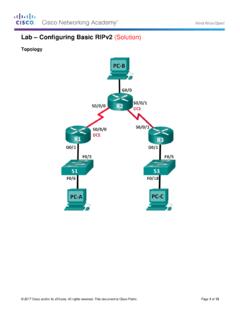
Lab – Configuring Basic RIPv2 (Solution)
In Part 1, you will set up the network topology and configure basic settings. Step 1: Cable the network as shown in the topology. Step 2: Initialize and reload the router and switch.
Download Lab – Configuring Basic RIPv2 (Solution)

Information
Domain:
Source:
Link to this page:
Documents from same domain

Section 7.4: Exponential Growth and Decay
sites.radford.edurays converts nitrogen to a radioactive isotope of carbon, 14C, with a half life of about 5730 years. Vegetation absorbs carbon dioxide through the atmosphere and animal life assimilates 14C through food chains. When a plant or animal dies, it stops replacing its carbon and the amount of 14C begins to decrease through radioactive decay ...

Exercise 3 - Biology 105 Estimating the Size of Cells ...
sites.radford.eduClean your microscope slides with lens paper before examining. • 9. When you are finished using the microscope: a. Make sure that the stage manipulator bar is not extended out to the left. b. Unplug the microscope and coil the cord beside the microscope. c. Put the dust cover back on the microscope. d. Carefully slide the microscope back into ...
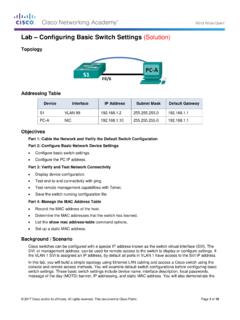
Lab Configuring Basic Switch Settings (Solution)
sites.radford.eduNotice that the VLAN 99 interface is in the down state even though you entered the no shutdown command. The interface is currently down because no switch ports are assigned to VLAN 99. c. Assign all user ports to VLAN 99. S1(config)# interface range f0/1 – 24,g0/1 - 2 S1(config-if-range)# switchport access vlan 99 S1(config-if-range)# exit

Performance Based Learning and Assessment Task Distance ...
sites.radford.eduo If the midpoint of a line is (2, 3), and one endpoint of the line is the origin find the other endpoint. Show the computations to justify your solution. o What are the endpoints of a line that has a midpoint of (-1, -3) and a distance of 8. Show the computations to justify your solution.

Fundamentals of Information Systems, Fifth Edition
sites.radford.eduFundamentals of Information Systems, Fifth Edition 19 Computer-Based Information Systems (continued) • CBIS components – Hardware: Computer equipment used to perform input, processing, and output activities – Software: Computer programs that govern the operation of the computer – Database: Organized collection of facts and

Parallel Lines Cut by a Transversal - Radford
sites.radford.eduMPE 32.a The student will use the relationships between angles formed by two lines cut by a transversal to determine whether two lines are parallel. VIRGINIA SOL: G.2a, G.4 c, f, g The student will use the relationships between angles formed by two lines cut by a transversal to determine whether two lines are parallel.

A Method of Population Estimation: Mark & Recapture
sites.radford.eduThe Mark and Recapture Technique By far the most popular way to measure the size of a population is called the Mark and Recapture Technique. This technique is commonly used by fish and wildlife managers to estimate population sizes before fishing or hunting seasons. The mark and recapture method involves marking a number of individuals in a

Area & Volume 1. Surface Area to Volume Ratio - Radford
sites.radford.eduArea & Volume 1. Surface Area to Volume Ratio For most cells, passage of all materials –gases, food molecules, water, waste products, etc. – in and out of the cell must occur through the plasma membrane. As a cell grows bigger, the internal volume increases and thereby expands the cell membrane. In turn, the volume increases more

Reaction Times and Hypothesis Testing - Radford
sites.radford.eduword cue is given, as well, after other words are spoken that should be ignored. 1 and 2. Exactly the same as in Method 1. 3. Determine a particular word as a signal to catch the dropped ruler. 4. Use a variety of words before dropping the ruler; disregard ruler catches on wrong word. 5.

Lab – Configuring IPv4 Static and Default Routes (Solution ...
sites.radford.eduStep 1: Cable the network as shown in the topology. Step 2: Initialize and reload the router and switch. Part 2: Configure Basic Device Settings and Verify Connectivity In Part 2, you will configure basic settings, such as the interface IP addresses, device access, and passwords. You will verify LAN connectivity and identify routes listed in ...
Related documents

Lab 3.5.1: Basic VLAN Configuration - ut
courses.cs.ut.eeNote: The show vlan id vlan-name displays the same output. You can also view VLAN assignment information using the show interfaces interface switchport command. Step 5: Assign the management VLAN. A management VLAN is any VLAN that you configure to access the management capabilities of a switch.
UniFi Security Gateway Datasheet - Ubiquiti
dl.ubnt.comVLAN 10 Accounting VLAN 20 Marketing VLAN 30 Training UniFi Security Gateway Pro UniFi Switch Network Segmentation with VLAN D atasheet 2. ... and delivers basic information about each network segment. Maps Upload a map of your location(s) or use Google Maps to represent
CLI Manual - D-Link
eu.dlink.comVLAN COMMANDS .....119 ISM VLAN COMMANDS ... (Basic Settings) window on the Configuration menu. The IP address for the Switch must be set before it can be managed with the Web–based manager. The Switch IP address can be

DGS-1100 Series EasySmart Switch User Manual B1 v1 - D-Link
support.dlink.comAbout This Guide This guide provides by-stepstep -instructions on how install theD-Link DGS-1100 -05/05PD/08/08P Smart Managed Switches, how to use the Web Utility, and how to perform web-based management functions.

Virtual LANs (VLANs) - Allied Telesis
www.alliedtelesis.comVLAN Introduction This guide describes Virtual LANs (VLANs), VLAN features and configuration on the switch. It begins with a description of what a VLAN is, its evolution and purpose, and also provides the meaning of some common VLAN terminology. This is followed with a detailed look at VLAN implementation. Port-based VLAN

Using the Command-Line Interface - Cisco
www.cisco.comVLAN database. Enter the vlan vlan-id global configuration command to access config-vlan mode: Switch(config)# vlan 2000 Switch(config-vlan)# The supported keywords can vary but are similar to the commands available in VLAN configuration mode. To display a comprehensive list of commands, enter a question mark (?) at the prompt. Switch(config ...

Basic Router Configuration - Cisco
www.cisco.comChapter 1 Basic Router Configuration Configuring Basic Parameters Configure Fast Ethernet LAN Interfaces The Fast Ethernet LAN interfaces on your router are automatically configured as part of the default VLAN and as such, they are not configured with individual addresses. Access is afforded through the VLAN.
GS716Tv3, GS724Tv4, and GS748Tv5 Smart Switches - …
www.downloads.netgear.com350 East Plumeria Drive San Jose, CA 95134 USA September 2013 202-11263-01 GS716Tv3, GS724Tv4, and GS748Tv5 Smart Switches Software Administration Manual