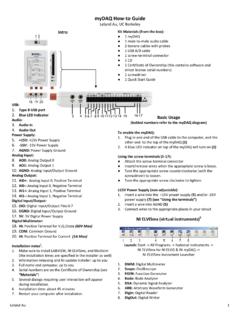
myDAQ How-to Guide
1 Quick Start Guide Basic Usage (bolded numbers refer to the myDAQ diagram) To enable the myDAQ: 1. Plug in one end of the USB cable to the computer, and the other end to the top of the myDAQ (1) 2. A blue LED indicator on top of the myDAQ will turn on (2) Using the screw terminals (5-17): Attach the screw-terminal connector
Download myDAQ How-to Guide

Information
Domain:
Source:
Link to this page:
Documents from same domain
Lecture 9: Intercept Point, Gain Compression and …
rfic.eecs.berkeley.edu1dB Compression Point ¯ ¯ ¯ ¯ Vo Vi Vi P o,−1dB Pi,−1dB Gain compression occurs because eventually the output signal (voltage, current, power) limits, due to the
EECS 242
rfic.eecs.berkeley.eduEECS 242 Scattering Parameters Prof. Niknejad University of California, Berkeley University of California, Berkeley EECS 242 – p. 1/43
Class E/F Amplifiers - University of California, Berkeley
rfic.eecs.berkeley.eduClass A/B/C Properties Keep voltage waveform sinusoidal amplitude is limited to V dd /2 Only way to improve efficiency is to control current Require very large “on” current to deliver power EECS 242 Prof. Ali M. Niknejad (C) 2009

Power Amplifiers for Communications
rfic.eecs.berkeley.eduPeak E ciency Power Added E ciency (PAE) is a popular metric. P out is the output power, P in is the input power, and P dc is the DC power consumption of the PA For high power gain systems (G p), the e ciency approaches the drain drain e ciency ( d), or for a BJT, the \collector" e ciency, or simply the e ciency of the last stage

EECS 242: Mixer Noise and Design
rfic.eecs.berkeley.eduThe mixer voltage gain is the ratio of the output voltage signal at the IF frequency to the RF input voltage signal. If the LO is at either peak, one
Lecture 12: Noise in Communication Systems
rfic.eecs.berkeley.eduThe noise of the first stage is the most important. Thus, every communication system employs a low noise amplifier (LNA) at the front to relax the noise requirements A typical LNA might have a G = 20dB of gain and a noise figure NF < 1.5dB. …

Phase Locked Loops (PLL) and Frequency Synthesis
rfic.eecs.berkeley.edudivider between N and N + 1 using a sigma-delta modulator. In practice, the programmable divider is made of up ... is an important fact to consider when designing a PLL. Niknejad PLLs and Frequency Synthesis. Divider Linear Model From …

Lecture 15: Introduction to Mixers
rfic.eecs.berkeley.eduImage Reject Filter In our example, RF = 1000MHz, and IF = 1MHz.The Imagine is on 2IF = 2MHz away. Let’s design a filter with f0 = 1000MHz and f1 = 1001MHz. A fifth-order Chebyshev filter with 0.2dB ripple is down about 80dB at the IF frequency. But the Q for such a filter is Q = 103MHz 1MHz = 103 Such a filter requires components with Q > 103! A. M. Niknejad …
Nonlinear System Theory
rfic.eecs.berkeley.eduphase-plane analysis describes nonlinear phenomena such as limit cycles and multiple equilibria of second-order systems in an efficient manner. The theory of differential equations has led to a highly developed stability theory for some classes of nonlinear systems. (Though, of course, an engineer cannot live by stability alone.) Functional
Crystal Oscillators (XTAL) - University of California ...
rfic.eecs.berkeley.eduSeries and Parallel Mode C 0 L 1 C 1 R 1 C 0 L 1 R 1 low resistance high resistance Due to the external physical capacitor, there are two resonant modes between a series branch and the capacitor. In the series mode ωs, the LCR is a low impedance (“short”). But beyond this frequency, the LCR is an equivalent inductor that resonates
Related documents

NI myRIO Project Essentials Guide
download.ni.comproject-guide-vis.zip if you have not done so previously and unpack the contents to a convenientlocation, Open the project Discrete LED demo.lvproj contained in the subfolder Discrete LED demo, Expand the hierarchy button (a plus sign) for the myRIO item and then open Main.vi by double-clicking, Confirm that NI myRIO is connected to your ...