
Parcel Returns made easy - Australia Post
2. It has been delivered to you The feature provides enhanced visibility of the return parcel for your customers and an electronic receipt, helping reduce the anxiety felt by many customers when they need to return purchases.
Download Parcel Returns made easy - Australia Post

Information
Domain:
Source:
Link to this page:
Documents from same domain

2009–10 gETTing AnnuAl REPoRT 2009–10 fuTuRE REAdY
auspost.com.au2 australia post annual report 2009–10 | report of operations australia post has always been in the business of communication and delivery, but we have continually adapted our services to changes in technology and customer demands.

Delivering eCommerce - Australia Post
auspost.com.auContents Delivering eCommerce IFC Delivering a better future 1 Leadership Chairman’s message 4 Managing Director & Group CEO’s message 5 Board and leadership team 6

Everyone Matters Annual Report 2018 - auspost.com.au
auspost.com.auIn 2008, Australian letter volumes reached an all-time peak. Since then, the number of addressed letters has declined by over 50 per cent – with more and more Australians choosing

Dangerous goods guide - Australia Post
auspost.com.auInstrument on the Transport of Dangerous Goods by Road & Rail and Chapter 1, clause 1.1.1.2 of the Australian Code for the Transport of Dangerous Goods by Road & Rail (Current Edition). Exempted quantities regulations are not recognised by the IMDG code for movement via sea to Tasmania for example.

Mail Redirection Application - Australia Post
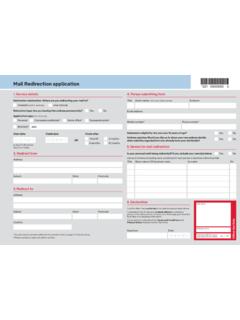
auspost.com.auOperator’s name. Entered in webPOS & receipt copy stapled to back of form. Yes / No *You will need to provide additional documents listed on page 2 of this brochure. ^Please provide at least one phone number. 2. Redirect from. Suburb State. Postcode Address. Suburb State. Postcode Address. Country. 3. Redirect to. Mail Redirection application ...
Mail Redirection application - Australia Post
auspost.com.auOperator’s name Entered in webPOS & receipt copy stapled to back of form Yes / No *You will need to provide additional documents listed on page 2 of this brochure. ^Please provide at least one phone number. 2. Redirect from Suburb State Postcode Address Suburb State Postcode Address Country 3. Redirect to Mail Redirection application 1 ...

Product Disclosure Statement Australia Post Everyday ...
auspost.com.auMastercard Prepaid can be contacted by calling 1800 549 718 (+44 207 649 9404 outside of Australia, call charges apply). Mastercard Prepaid is part of the Mastercard® Group. The Everyday Card is offered for sale online and may from time to time be made available for sale through . participating Australia Post Outlets under an arrangement with ...
Address Presentation Standards - Australia Post
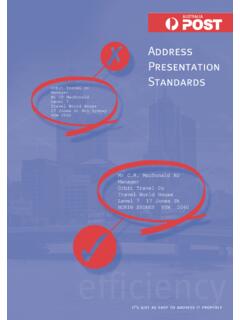
auspost.com.auBachelor of Arts BA Member of Parliament MP Member of the Institution of Engineers, Australia MIEAust Officer of the Order of Australia AO Usage: 1234567890 1234567890 MR C.R. MACDONALD AO Mr C.R. MacDonald AO 10 5. Orders, decorations and distinctions. it’s just as easy to address it properly

Australia Post 2020 Annual Report
auspost.com.au2. AUSTRALIA POST ANNUAL REPORT 2020. Today, more than ever, Australia Post is at the heart of Australian communities, connecting them to each other and the world.

Australia Post MS11 Post Charges Booklet as at 8 November …
auspost.com.auCredit facilities are available to mail users. Ask at your local participating Post Office for applications, terms and conditions. ... 250 5 1.35 13.15 12.15 60.75 C5 (162 x 229) 500 20 2.80 27.30 25.20 126.00 C4 (229 x 324) ... Postage meters are franking machines that are eligible for a reset rebate. Ask at your participating local Post
Related documents

LabelWriter Printer User Guide.en-US
download.dymo.comYour LabelWriter printer is a direct thermal printer and does not use ink or toner. Instead, the printer uses heat from a thermal print head to print on specially treated, heat-sensitive labels. Labels are the only supplies you will ever need to buy. Become familiar with the major components of the printer. S/N 00000-0000000 Top cover Label spool

80mm Series Thermal Receipt Printer -Instruction Manual
www.zjiang.comConnect the printer with the standard usb cable(usb device types are automatically) , once printer is connected with the PC, install the driver , then choose the corresponding port accordingly. 2.2 RJ45 Ethernet Port (10M/100M) (suitable for 80-III type)

Printer Tool - Argox
doc.argox.com1 Printer Tool Work with Printer Tool 4 1.2 Work with Printer Tool Start Printer Tool. Its interface looks like this: ■ Menu bar It includes Printer Tool menus. ■ Toolbar It provides ports, port settings, emulation languages, printer dpi and printer status.
TM-T88V User's Manual
files.support.epson.comFor a USB interface, do not turn on the printer before installing the printer driver. 1. Make sure the printer is turned off. 2. Connect the power cord and each interface cable to the connectors on the printer back. For the shape of each connector, see the illustration below. (Mounted interfaces vary by the printer model.) 3.

Troubleshooting the LabelWriter 4XL Printer
s7d9.scene7.com2 Confirm that the printer is feeding labels properly by pushing the form feed button while the printer is on. If the labels are jammed, the status light will blink. 3 Make sure that your USB cable has not come loose from the back of your printer or from your computer. 4 (Windows) Check that your LabelWriter printer driver is installed correctly.

Zebra GK420t User Guide - COBISS
www.cobiss.netVIF - Maintenance of computer systems infrastructure Zebra GK420t User Guide VIF-NA-BG-136, V3.0

How To Install Epson Thermal Printers (TM-T88IV USB)
www.cuanswers.comThermal Printers(TM - T88IV USB) INTRODUCTION This booklet was created to assist CU*Answers clients with the installation of Epson TM-T88IV thermal printers. CONTENTS WHAT EPSON PRINTER DO I HAVE? 2 WHAT TYPES OF PRINTERS ARE THERE? 2 SO WHICH PRINTER DO I HAVE? 2 GETTING READY 3 WORKSTATION/PRINTER REQUIREMENTS 3 …
ZD410 Direct Thermal Printer - Zebra Technologies
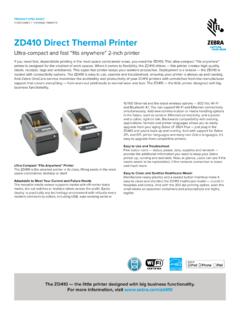
www.zebra.comZD410 Direct Thermal Printer Ultra-compact and fast “fits anywhere” 2-inch printer If you need fast, dependable printing in the most space constrained areas, you need the ZD410. This ultra-compact “fits anywhere” printer is designed for the smallest of work spaces.
ZT421 Industrial Printer - Zebra Technologies
www.zebra.comFont Matrix Type† Character Size Inches Millimeters H × W Inter-Character Gap H × W Characters Per H × W Characters Per A 9 × 5 1 U-L-D 0.030 × 0.020 50.00 0.76 × 0.51 1.97 B 11 × 7 2 U 0.037 × 0.030 33.33 0.93 × 0.76 1.31 C, D 18 × 10 2 U-L-D 0.060 × 0.040 25.00 1.53 × 1.02 0.98 E 41 × 20 6 OCR-B 0.137 × 0.087 11.54 3.47 × 2.20 0.45 F 26 × 13 3 U-L-D 0.087 × …