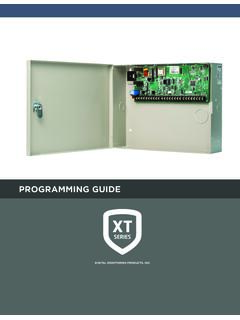
PROGRAMMING GUIDE
PROGRAMMING GUIDE When using the XT30/XT50 Series control for any listing organization’s approved methods, refer to this manual and the XT30/XT50 Installation Guide. These documents outline the installation and programming requirements of all applications for which the XT30/XT50 is approved. FCC Notice
Download PROGRAMMING GUIDE

Information
Domain:
Source:
Link to this page:
Documents from same domain
PROGRAMMING GUIDE - DMP
buy.dmp.comMODEL XR500 SERIES CONTROL PANEL PROGRAMMING GUIDE Contains programming Instructions for use with the Model XR500, XR500N, XR500E Series Control Panels
PROGRAMMING GUIDE - DMP
buy.dmp.comXR150/XR550 Series Programming Guide Digital Monitoring Products 1 INTRODUCTION XR PROGRAMMING INFORMATION This guide provides programming information for the DMP XR150/XR550 Series panel. Before starting to program, we recommend that you read through the contents of this guide.
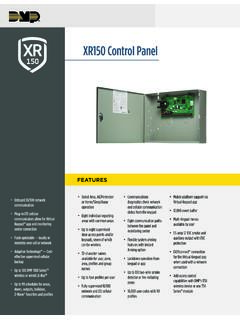
XR150 Control Panel - DMP.com
buy.dmp.comOne Built-In LX Bus (100 zones) SIMPLE ZONE EXPANSION WITH THE 1154/1158 WIRELESS INPUT MODULES When a DMP panel is installed in the same location as a non-DMP panel, the ... advantage of access control capabilities in hard …

SYSTEM USER GUIDE
buy.dmp.comChime Press Chime to turn the chime feature on and off. If chime is on, the keypad will sound an alert and display a notification when external doors and windows (with sensors installed) are opened. Reset Press Reset to reset fire and panic sensors after they have triggered an alarm. Favorites Favorites displays a list of your Z-Wave favorites.

INSTALLATION GUIDE
buy.dmp.comoutputs provide ground connection for a positive voltage source. A Model 300 Output Harness is required to use these outputs. Enclosure Specifications The XR150/XR550 Series panels are shipped in an enclosure with a transformer, end-of-line resistors, battery leads, user’s guide, and programming sheets. Enclosure Model

Training Institute Troubleshooting Guide
buy.dmp.comThe first Diagnostic function displayed is: [TEST LX-BUS]. This Diagnostics function allows you to test the ability of the Interface Cards (Models 481, 462N, 462P, 462FM, and 472) to communicate with zone and output expanders connected to the LX-Bus™. TECH NOTE: The XR500 Command Processor™ series has one built-in LX-Bus™. An

XR550 Control Panel - DMP
buy.dmp.comNo to confirm alarm status and send it to the monitoring center. DMP WIRELESS DMP 1100 Series wireless communication employs 900 MHz frequency-hopping spread-spectrum to ensure clear and accurate signal transmissions without interference in practically any environment. Receivers are alerted of transmitters that go missing with two-way ...
SYSTEM USER GUIDE - DMP.com
buy.dmp.comSecureComTM Video SecureCom Video allows you to add wired or wireless cameras inside or outside the building. You can easily record clips or view live video feed at any time using the Virtual Keypad App or VirtualKeypad.com. Virtual Keypad App and VirtualKeypad.com The Virtual Keypad App and VirtualKeypad.com allow you to control and monitor

XT30 and XT50 Panels - DMP
buy.dmp.comfour-digit user codes with authority levels 100-event (XT30) or ... Four onboard and eight wireless outputs for annunciation and control applications Supports up to eight ... a customer may be preparing to cancel their monitoring contract. With this …

PROGRAMMING AND INSTALLATION GUIDE
buy.dmp.comDualCom Programming and Installation Guide Digital Monitoring Products 3 Backlit Logo The backlit logo indicates the power and armed status of the communicator.
Related documents

OBJECT ORIENTED PROGRAMMING
atomicobject.comprogramming world have learned to think in terms of algorithmic decomposition. This was hard to learn and is even harder to unlearn. Computing as simulation The primary difference between OT and structured HLLs is the fidelity of the abstraction to the real world. Fortran forces you into working with abstractions that are computer-language oriented
PROGRAMMING GUIDE
buy.dmp.com• XR150/XR550 Series Programming Sheet (LT-1234) • XR150/XR550 Series Users Guide (LT-1278) Internal Programmer The panel contains all of its programming information in an on-board processor and does not require an external programmer. You can perform all programming tasks through a 32-character DMP alphanumeric keypad set to address

I. Notes on Structured Programming
www.iicseonline.orgI. Notes on Structured Programming EDSGER W. DIJKSTRA 1. To MY READER These notes have the status of "Letters written to myself": I wrote them down because, without doing so, I found myself repeating the same arguments over and over again. When reading what I had written, I was not always too satisfied.

Introduction to programming - unibz
www.inf.unibz.it2. selection of the telephone registry of the requested city, done by the operator 3. search of the telephone number corresponding to the requested person name on the telephone registry The program has to represent all objects that come into play and realize all operations. °c Diego Calvanese Lecture Notes for Introduction to Programming A.A ...
VPT24 Programming Guide - Leviton.com
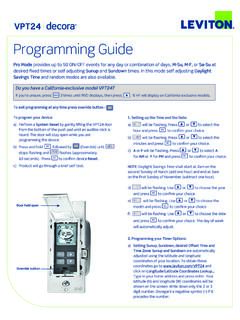
www.leviton.comProgramming Guide SET SET SET SET SET SET A A Override button Door held open To exit programming at any time press override button - To program your device: a) Perform a System Reset by gently lifting the VPT24 door from the bottom of the push pad until an audible click is heard. The door will stay open while you are programming the device:

Mitel 8568 Telephone User Guide
www.mitelservice.comPage ii Mitel® 8568 Telephone User Guide – Issue 2, June 2010 Important Safety Instructions and Precautions Remember the following safety guidelines when using the telephone. Programming Emergency Numbers Make sure to do the following when programming emergency numbers and/or making test calls to emergency numbers: