
Quick Start - download.msi.com
y CPU/ System/ Chipset temperature detection y CPU/ System/ Chipset fan speed detection y CPU/ System/ Chipset fan speed control Form Factor y ATX Form Factor y 12 in. x 9.6 in. (30.4 cm x 24.3 cm) BIOS Features y 1x 256 Mb flash y UEFI AMI BIOS y ACPI 6.1, SM BIOS 2.8 y Multi-language Software y Drivers y DRAGON CENTER y Nahimic Audio y CPU-Z ...
Download Quick Start - download.msi.com

Information
Domain:
Source:
Link to this page:
Documents from same domain
Optix Series - download.msi.com
download.msi.com3 Stand Base with Screw 4 Wall Mount Screws x 4 5 Stand Screws x 4 6 VESA Cover 7 Power Cord ... 15 Camera Cradle with Rotatable Ball Head * Contact your place of purchase or local distributor if any of the items is damaged or ... It doesn’t support data transmition function. 5 USB3.1 Gen1 Type B Upstream Port For USB Upstream Cable.
Optix Series - download.msi.com
download.msi.com(2014/35/EU), ErP Directive (2009/125/EC) and RoHS directive (2011/65/ EU) This product has been tested and found to comply with the harmonized standards for Information Technology Equipment published under Directives of Official Journal of
Optix Series - download.msi.com
download.msi.comto Electromagnetic Compatibility (2014/30/EU), Low-voltage Directive (2014/35/EU), ErP Directive (2009/125/EC) and RoHS directive (2011/65/ EU) This product has been tested and found to comply with the harmonized standards for Information Technology Equipment published under Directives of Official Journal of the European Union

Quick Start - download.msi.com
download.msi.comAudio y Realtek® ALC892 Codec 7.1-Channel High Definition Audio Back Panel Connectors y 1x PS/2 keyboard/ mouse combo port y 2x USB 2.0 Type-A ports y 1x VGA port y 1x DVI-D port y 1x DisplayPort y 1x USB 3.1 Gen2 Type-A port y 1x USB 3.1 Gen2 Type-C port y 1x LAN (RJ45) port y 2x USB 3.1 Gen1 Type-A ports y 6x audio jacks Continued on next page
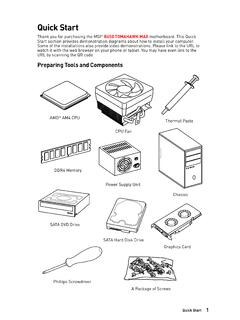
Quick Start - download.msi.com
download.msi.comInternal Connectors y 1x 24-pin ATX main power connector y 1x 8-pin ATX 12V power connector y 6x SATA 6Gb/s connectors y 2x USB 2.0 connectors (support additional 4 USB 2.0 ports) y 1x USB 3.2 Gen1 connectors (support additional 2 USB 3.2 Gen1 ports) y 1x 4-pin CPU fan connector y 1x 4-pin water-pump-fan connector y 4x 4-pin system fan connectors

Contents
download.msi.com4x USB 3.2 Gen 1 5Gbps Type-A ports on the back panel Internal Connectors ∙ 1x 24-pin ATX main power connector ∙ 1x 4-pin ATX 12V power connector ∙ 4x SATA 6Gb/s connectors ∙ 1x M.2 slots (M-Key) ∙ 1x USB 3.2 Gen 1 5Gbps connector (supports additional 2 …

Inleiding - download.msi.com
download.msi.comInleiding 4 5 1. Webcam/ Webcam-LED/ interne microfoon • Deze ingebouwde webcam kan worden gebruikt voor beeld, video-opname, conferencing, enz. • De webcam-LED indicator die zich naast de webcam bevindt, licht op wanneer de webcamfunctie wordt geactiveerd en de LED gaat uit als deze functie wordt uitgeschakeld.

Quick Start - download.msi.com
download.msi.comBIOS Features ∙ 1x 256 Mb flash ∙ UEFI AMI BIOS ∙ ACPI 6.0, SMBIOS 2.8 ∙ Multi-language Software ∙ Drivers ∙ DRAGON CENTER ∙ MSI APP Player (BlueStacks) ∙ Open Broadcaster Software (OBS) ∙ CPU-Z MSI GAMING ∙ Google Chrome™, Google Toolbar, Google Drive ∙ Norton™ Internet Security Solution Dragon Center Features ∙ ...

User's Manual
download.msi.comEuropean Union: Batteries, battery packs, and accumulators should not be disposed of as unsorted household waste. Please use the . public collection system to return, recycle, or treat …

CREATOR CENTER User Guide - download.msi.com
download.msi.comThe screenshots for the UI in this user guide are for reference only and the actual UI design may vary. Operation Panel Information Bar Display System ... Base Clock frequency (BCLK). You can also fill out the value in the input box. ... Please refer to the instructions on page 28.
Related documents

UEFI BIOS Recovery 1.0a - Supermicro
www.supermicro.comMay 26, 2011 · This user's guide provides an overview on the Uni fi ed Extensible Firmware Interface (UEFI) BIOS, and lists detailed instructions on how to rescue and recover the UEFI BIOS used in a Supermicro motherboard or system. Conventions Used in the Manual Special attention should be given to the following symbols for proper system setup and

UEFI System Utilities User Guide for HPE ProLiant Gen10 ...
itdoc.hitachi.co.jpUEFI System Utilities User Guide for HPE ProLiant Gen10 Servers and HPE Synergy Part Number: 881334-004 Published: February 2018 Edition: 1 Abstract This guide details how to access and use the Unified Extensible Firmware Interface (UEFI) that is embedded in the system ROM of all ProLiant Gen10 servers and HPE Synergy compute modules.
HPE ProLiant DL380 Gen10 Server User Guide
content.etilize.comHPE ProLiant DL380 Gen10 Server User Guide Part Number: 868990-001 Published: July 2017 Edition: 1 Abstract This document is for the person who installs, administers, and troubleshoots servers and storage

BIOS User Guide
s.eet.euBIOS User Guide B250GT3. 2 | BIOS Update BIOS Update The BIOS can be updated using either of the following utilities: • BIOSTAR BIOS-FLASHER: Using this utility, the BIOS can be updated from a file on a hard disk, ... It shows system information including UEFI BIOS version, Project Code, Model Name, Build Date and etc.

Trusted Platform Module (TPM) TCG 1.2 / 2
www.supermicro.comAbout This User Guide This user guide is written for system integrators, IT professionals, and knowledgeable end ... drivers/utilities and any pertinent user manuals/guides: ... F. Enabling TXT Support in the UEFI Shell .....49 Preface. 6 TPM User Guide Chapter 1 Introduction Congratulations on purchasing your TPM from an industry leader. ...