
QUICK START GUIDE - TradeStation
QUICK START GUIDE. To get started trading crypto, you must apply and be approved for both a TradeStation Crypto account and a TradeStation Securities equities account, which ... Launch the Auth0 Guardian app, and Allow Guardian to take pictures and record video.
Download QUICK START GUIDE - TradeStation

Information
Domain:
Source:
Link to this page:
Documents from same domain

Installation and TradeStation 10 Installation and …
uploads.tradestation.comInstallation and Upgrade Guide ... The installation status displays as TradeStation installs. ... you’ll find links to the installation and upgrade video, ...

I. Complete for Individual/Joint Accounts: II. Complete ...
uploads.tradestation.comOptions Information Form and Agreement. Complete if you would like the ability to trade options on your account. With respect to any transaction effected by you on my behalf, I hereby agree and
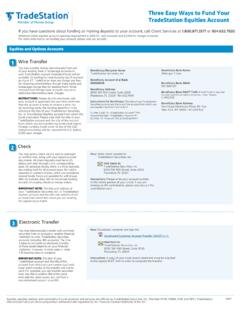
Three Easy Ways to Fund Your TradeStation Equities Account
uploads.tradestation.comAccount number 0040813901 Instructions for Beneficiary: The title of your TradeStation Securities account and the title of the account from which you are transferring funds must match. Further Credit To: <TradeStation Account Title> Account Number: <TradeStation Account #> By Order of: <Account Title at Sending Bank> IBAN#: GB36CHAS60924240813901

Essentials - TradeStation
uploads.tradestation.comEasyLanguage Essentials Programmer s Guide is a programmers introductio n to TradeStation’s EasyLanguage programming tools. This book is based on the current release of TradeStation 8.3. It is assumed that the reader has access to the TradeStation platform.

Important Information and Disclaimer
uploads.tradestation.comImportant Information and Disclaimer: All support, education and training services and materials provided by TradeStation are for informational affiliate. This material may also discuss in detail how TradeStation is designed to help you develop, test and implement trading strate gies.

Cookies are small text files that are placed on your ...
uploads.tradestation.compersonalization_id These cookies are used for Facebook and Instagram paid ads retargeting. User Info / Preferences tslpcached This cookie is used by LiveEngage chat to remember contact details the second time a user accesses the chat feature. Double Click B IDE MR MUID NID OGPC TDCPM TDID anj fr These are advertising cookies for Google. Some ...

Strategy Testing, Optimization and Automation
uploads.tradestation.comStrategy Testing, Optimization and Automation TradeStation In a historical back-test, a strategy will always assume a perfect fill; market orders are filled immediately at the next available tick and limit orders are filled at the specified limit price. Under real …
Related documents
EpicCare Link Community User Quick Start Guide
info.kaiserpermanente.orgAffiliate Link Community User Quick Start Guide ... Revenue Guardian, Rover, SmartForms, Sonnet, Stork, Tapestry, Trove, Trusted Partners, Welcome, Willow, Wisdom, With the Patient at Heart and World Connect are registered trademarks, trademarks or service marks …
XtraMath Teacher Quick Start Guide
cdn0.xtramath.orgeacher uick Start Guide Coriht 22221 traMath v 221b 5 of 22 SIGNING UP WITH CLEVER Signing up through Clever means that your rosters will sync with Clever,

Quick Set-up and User Guide
www.bt.com12 Quick set-up guide 22. Select Yes if you want to enter more contacts or No if you don’t want to for now. Follow steps 19, 20 and 21 on page 11 for instructions on how to add a contact. 23. Select OK to complete the set up wizard. You can now start using your phone. Please read the rest of this User Guide for instructions on how to use the ...

Quick Set-up and User Guide
www.ligo.co.ukQuick set up guide 13 Set up Yes Turn on call Guardian No Call Guardian on Set up OK You need Caller Display BT Call Guardian 16. Continue to read and follow the prompts. 17. Press OK. 18. Press OK. You need to have a Caller Display service from your network provider to use all the features available e.g. Call Guardian, Visual Voicemail, Calls ...
Parchment Guide to High School Transcripts
www.parchment.comParchment Guide to High School Transcripts 2 Contents OVERVIEW 4 REGISTER FOR A PARCHMENT.COM ACCOUNT 5 I have a registration code 5 I do not have a registration code 5 Opt-in to share your information with colleges 6 ORDER YOUR TRANSCRIPT 7 Select your destination 9 Academic Destinations (colleges and universities) 9 The NCAA 10
Guardian NetSecure - Quick Heal
www.quickheal.co.inInstalling Guardian NetSecure To install Guardian NetSecure, follow these steps: Place the Guardian NetSecure CD/DVD in the DVD drive. The autorun feature of the CD/DVD is enabled and it will automatically open a screen with a list of options. If the DVD drive does not start the CD/DVD automatically, follow these steps:
User Guide - Quick Heal
www.quickheal.co.inInstalling Guardian Total Security To install Guardian Total Security, follow these steps: Place the Guardian Total Security CD/DVD in the DVD drive. The autorun feature of the CD/DVD is enabled and it will automatically open a screen with a list of options. If the DVD drive does not start the CD/DVD automatically, follow these steps:

Harvard Referencing quick guide
www.yorksj.ac.ukThe Guardian, 20 June, p. 5. Note: add . Available at: URL (Accessed: date) at the end for newspaper articles accessed online. If the article has no named author, move the newspaper name in italics to the start of the reference.