
ScanSnap セットアッププログラムインストール手順
1. ScanSnapを添付のUSB ケーブルで接続し [次へ] をクリックします。 2. 給紙カバーを開けて、電源をONにして [次へ] をクリックします。 ※SV600はStop ボタンを押して電源をONにします。
Download ScanSnap セットアッププログラムインストール手順

Information
Domain:
Source:
Link to this page:
Documents from same domain

CardMinder for ScanSnap!TM User’s Guide
scansnap.fujitsu.comCardMinder for ScanSnap! User’s Guide ii Use in High-safety Applications This product has been designed and manufactured on the assumption that it will be used in

ScanSnap Organizer User's Guide - Fujitsu
scansnap.fujitsu.comUse in High-safety Applications This product has been designed and manufactured on the assumption that it will be used in office, personal, domestic, regular industrial, and general-purpose applications.

プログラムのインストール先 ... - FUJITSU
scansnap.fujitsu.comプログラムのインストール先フォルダ一覧 ※ ScanSnap Manager 「C:¥Program Files¥PFU¥ScanSnap¥Driver」 64bitOS は、以下の場所になります。

Carrier Sheet Option - Fujitsu
scansnap.fujitsu.com1 1. Introduction Thank you for purchasing “ScanSnap Carrier Sheet Option. This optional product is specifically designed for fi-5110EOX Color Image Scanner. The Carrier Sheet allows you to scan documents that cannot be physically scanned such as a document
Features not supported by ScanSnap Home Differences from ...
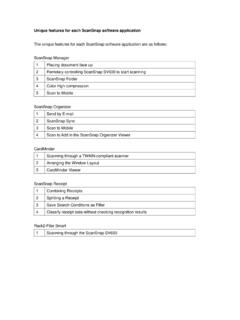
scansnap.fujitsu.com3 CardMinder Viewer Differences from ScanSnap Receipt 1 Combining Receipts 2 Splitting a Receipt 3 Save Search Conditions as Filter 4 Classify receipt data without checking recognition results Differences from Rack2-Filer Smart 1 Scanning through the ScanSnap SV600 1. Title

Installation Instructions - scansnap.fujitsu.com
scansnap.fujitsu.comInstallation Instructions 1. Be sure you log into Windows® as a user with administrator privileges. 2. Download "WinManagerVxxLxxWW.exe" onto your hard drive.

ScanSnap Organizer のインストール手順
scansnap.fujitsu.comScanSnap Organizer のインストール手順 ※インストールにおいては、Administrator(管理者)権限を持つユーザーでログオンしてください。 1. 実行している全てのアプリケーションを終了してください。 2.
ScanSnap Organizer User's Guide - Fujitsu
scansnap.fujitsu.com2.2.1. Menu Bar File Open Starts the associated application and opens the selected file. (Example: For a PDF file, [Adobe Acrobat] is started.) New Cabinet: Creates a new Cabinet directly under [My ScanSnap] folder.