Sharing and Presenting Tools - Cisco Webex
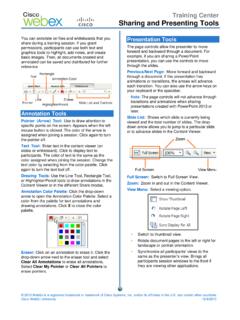
annotated can be saved and distributed for further reference. Annotation Tools Pointer (Arrow) Tool: Use to draw attention to specific points on the screen. Appears when the left mouse button is clicked. The color of the arrow is assigned when joining a session. Click again to turn the pointer off. Text Tool: Enter text in the content viewer (on
Download Sharing and Presenting Tools - Cisco Webex

Information
Domain:
Source:
Link to this page:
Documents from same domain

Getting started with Webex Meetings.
www.webex.comRemember to take chargers for laptops or other equipment you need from your office. Make sure your computer and apps are up to date. Double check your home internet connection and update your VPN. Dedicate a workspace in your home that’s ergonomic, comfortable, and productive.
Getting Started - Cisco Webex
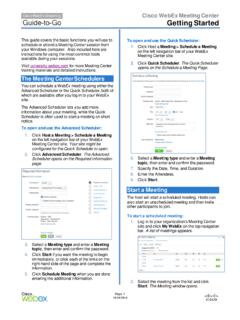
www.webex.comRecorder panel opens and recording begins. 4. Click the . Pause. button ( ) when you want to stop recording briefly, and click it again to re- start. 5. Click the . Stop. button ( ) to end the recording completely. You are prompted to confirm that you want to stop recording. Note: A new recording is created each time you stop recording and ...

Datsheet Webex Desk Hub
www.webex.comexperiences to deliver a modernized, clutter-free safe environment for the hybrid worker. experiences designed for Hot Desking, Hoteling, and advanced Collaboration. The Desk Hub will sit within the single portfolio for Webex Collaboration devices and be a bridge between video phones and our integrated video endpoints like the Webex Desk or

Cisco Webex Training Solution Overview
www.webex.comCisco Webex Assist producers will make sure your training session starts and runs smoothly. Take advantage of robust, media-rich Webex technology, session features like polling, chat, and surveys, work with a producer to prepare a session, and plan and practice a dry run.
AccessRestrictionstoCiscoWebexToll-FreeNumbers
www.webex.comAccessRestrictionstoCiscoWebexToll-FreeNumbers FirstPublished:2017-06-08 LastModified:2018-06-19 AmericasHeadquarters CiscoSystems,Inc. …
CISCO WEBEX VS. MICROSOFT TEAMS
www.webex.comAfter carefully reviewing Cisco Webex and Microsoft Teams, ZK Research found that Teams pales in comparison to Webex with regard to the breadth and depth of capabilities, particularly in the areas noted earlier—even though Teams is a viable product and …

Collaboration device x i r m t ucadro pt
www.webex.comCisco Webex: HTTP, REST APIs VCS: H.323 and SIP CUCM: SIP Cisco Webex: HTTP, REST APIs VCS: H.323 and SIP CUCM: SIP Cisco Webex: HTTP, REST APIs Peripherals Supported Cisco Webex Pen G2 Cisco Touch 10 Cisco Touch 10 Cisco Touch 10 Bandwidth Consumption H.264: from 768 kbps to 6000 kbps Minimum bandwidth: • 720p30 from 768 kbps • 1080p30 ...
Related documents

German Immigrant Arrivals: Resources in the Library of ...
www.loc.govThe ABCs of German-American migration : annotated guide to German-American migration records / by Charles R. Haller. Asheville, N.C. : Money Tree Imprints, c2000. v, 100 p. ; 23 cm. Includes index. ISBN 0-9703748-0-1 Z1361.G37H35 2000 LH&G 2001335108 A useful guide to sources for German-American immigration. 2

MC-013-INFO Information Sheet for Calculating Interst and ...
www.courts.ca.govthe court after the judgment. (For information on recovering costs and a detailed list of costs that can be recovered see Code of Civil Procedure sections 685.040, 685.050 et seq., 685.070(b), and 685.090; see also “Requesting Costs and Interest” below). Crediting Payments Received MC-013-INFO l Form Approved for Optional Use
State Board of Medical Examiners Laws
www.njconsumeraffairs.govNew Jersey Statutes Annotated (N.J.S.A.), published by Thomson West, provides the official annotated statutes for New Jersey. The statutes in PDF form provided on this website by the Division of Consumer Affairs are unofficial courtesy copies, which may differ from the official text. Although every effort is made

System Design Document Template
its.dot.govAtlanta Regional Commission – MSAA System Design Document 09/30/2017 Document Number: 10.0 Federal Award ID Number: GA-26-0008-01

The linguistic review process of product information in ...
www.ema.europa.euFurther guidance on the presentation of product information text is available in the QRD Annotated EN template. Translations of the agreed product information in all EU languages (including Icelandic and Norwegian) are to be provided for linguistic review after adoption of the CHMP EN opinion (see section 2.2 “post-opinion”).

APA Citation Style
www.library.cornell.eduReference List References cited in the text of a research paper must appear in a Reference List or bibliography. This list provides the information necessary to identify and retrieve each source. • Order: Entries should be arranged in alphabetical order …

“The Problem of Evil ” by Fyodor Dostoevsky
philosophy.lander.edu4. List five or six possible explanations which are sometimes taken to account for the death of an innocent child in a universe created by God. 5. What does Alyosha mean when he says to Ivan, “That is rebellion”? Siberian Convict Colony, Russia, Library of Congress 2 Reading For Philosophical Inquiry: A Brief Introduction

QRD Human PI Annotated Template v10.2 rev1
www.ema.europa.eureaction and on each relevant special population, e.g.: “Summary of the safety profile”, “Tabulated list of adverse reactions”, “Description of selected adverse reactions” (alternatively the subsection could be named with the name of the relevant adverse reaction), “Other special populations”.]

Basic First Aid Written Exam - EMS SAFETY
www.emssafetyservices.com©2014 EMS Safety Annotated Basic First Aid Key Exam Version C 5. To treat a nosebleed, hold pressure on the bridge of the nose and have the person: A. Lean slightly back B. Lean slightly forward C. Apply a heat pack to the nose D. Lie flat on the floor Workbook Topic: leeding Shock and Trauma; Nosebleeds, “Treatment: 1.