Speed Dome Camera Installation Guide
VIA HD CCTV DVR / NVR NOTE: The panel below is available only when the camera is used with our brand’s HD CCTV DVR or NVR, and not all functions in the pa nel are supported for this camera. Right-click to return to the live view, and click the channel with this speed dome camera connected. Then,
Download Speed Dome Camera Installation Guide

Information
Domain:
Source:
Link to this page:
Documents from same domain

One Cable solution (PON) HD Video Recording
www.surveillance-download.comAVH0401 One Cable solution (PON) HD Video Recording 4CH HD Video Recorder Features One Ethernet Cable Solution (PON, Power-over-Network) Camera power supply & video transmission over

AVN80X network V1.1 - surveillance-download.com
www.surveillance-download.com5 1. CAMERA NETWORK CONFIGURATIONS Please follow the instructions below to finish camera installation and network configurations. You may configure the network connection of this network camera with your laptop / computer, or with your iPhone®

16CH 2MP NVR - surveillance-download.com
www.surveillance-download.comSpecifications* Hardware Video Input One LAN port (up to 16 IP cameras) Video Output HDMI Video Output Resolution 1920 x 1080 Audio Output YES

FULL D1 DVR User Manual - surveillance …
www.surveillance-download.comIMPORTANT SAFEGUARD CAUTION RISK OF ELECTRIC SHOCK CAUTION: To reduce the risk of electric shock, do not expose this apparatus to rain or moisture.

4CH MPEG4 DVR - surveillance-download.com
www.surveillance-download.com273Z 760A_760AS_761AS_761ASV_560A_560AS_561AS_561ASV_Quick_V1.2 4CH MPEG4 DVR Quick Guide Please read instructions thoroughly before operation and retain it for future reference.
MPEG4 4CH DVR MANUAL L - surveillance …
www.surveillance-download.com260Z DR040ASV_DR040_Manual_V1.05 MPEG4 4CH DVR MANUAL L Please read instructions thoroughly before operation and retain it for future reference.

Compatible with TVI, AHD and IP systems
www.surveillance-download.comz592_593_system_V1.0 TRIBRID SPEED DOME CAMERA System Configuration Guide Compatible with TVI, AHD and IP systems The product image shown above may differ from the actual product.
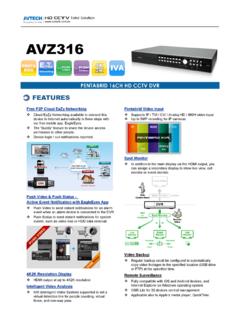
AVZ316 spec - surveillance-download.com
www.surveillance-download.comVideo Video System NTSC / PAL (auto detection) Video Compression Format H.264 Video Signal IP / TVI / CVI / Analog HD / 960H Video Input 16 quadbrid channels (IP / TVI / Analog HD / 960H),

HD CCTV 1080P IR Dome Camera - surveillance …
www.surveillance-download.comDGC1304 HD CCTV 1080P IR Dome Camera FEATURES (1) 1/2.7” CMOS sensor with 1080P video output (2) Low light sensitivity of 0.1 Lux / …
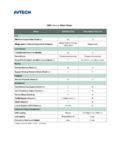
CMS Lite v.s. Video Viewer - surveillance …
www.surveillance-download.comCMS Lite v.s. Video Viewer Model CMS Lite (V3.0) Video Viewer (V0.2.1.4) Live Maximum Layout Cuts (Check a.) 32 16 Merge mode & Remote Independent (Check b.)
Related documents

High Performance Stereo Audio ADC - Everest Semi
www.everest-semi.com• DVR • NVR : ORDERING INFORMATION: ES7243 -40°C ~ +85°C QFN-20 : BLOCK DIAGRAM : ES7243 : AINLP/AINLN AINRP/AINRN : Multi-bit SDOUT. Delta-sigma . Modulator . Audio . Data . Interface . DSP SCLK. Clock Manager Sample Rate Detector . I. 2: C Interface : LRCK MCLK CCLK CDATA AD0 AD1 TDMIN .

Enterprise Management Suite 2 - interluck.co.jp
www.interluck.co.jpデバイス(dvr, nvr, ipカメラ)への接続を行わない状態であることを示しま す。デバイスの登録や削除はこの状態で行ないます。 オンライン デバイス(dvr, nvr, ipカメラ)への接続を行う状態であることを示します。
CameraFTP VSS Software
www.cameraftp.comComparison with a regular DVR / NVR: Features VSS Regular DVR/NVR DVR cost $200 or $0 (if use an old PC/laptop) $200 DVR + camera cost + hard drive cost HDD cost Included Usually not included System Setup Easy Easy CCTV Monitor Included Yes (with laptop) No (must be connected to a TV or monitor!) Wi-Fi support Yes No (mostly)
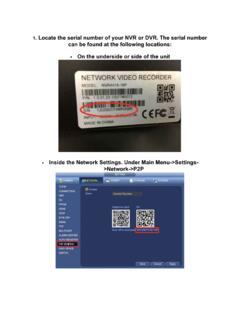
1. Locate the serial number of your NVR or DVR. The serial ...
www.cctvsecuritypros.comPassword: admin (Your DVR/NVR Password) Once all of your information is entered. Click “Get Info”. Once the device details have been automatically entered, click “Add”. After a few moments, SmartPSS will connect to the NVR and display

iPOLiS mobile - hanwhasecurity.com
www.hanwhasecurity.comSelecting a DVR/NVR will display 4-split video screen in quad mode. M 4/9 channel modes can be selected for NVR. Since the connection may be unstable due to the network environment, please use a recommended profile for multi-channel mode. If you don't register a DDNS ID for the device connected to the router,