
USER GUIDE - download.msi.com
The screenshots for the UI in this user guide are for reference only and the actual UI design may vary. Operation Panel Information Bar ... and enables overclocking (You can click the gear icon ... Click to free up memory Click to clean up the disk Select Monitor in the sub menu to enter Monitor page. Setting
Download USER GUIDE - download.msi.com

Information
Domain:
Source:
Link to this page:
Documents from same domain
Optix Series - download.msi.com
download.msi.com3 Stand Base with Screw 4 Wall Mount Screws x 4 5 Stand Screws x 4 6 VESA Cover 7 Power Cord ... 15 Camera Cradle with Rotatable Ball Head * Contact your place of purchase or local distributor if any of the items is damaged or ... It doesn’t support data transmition function. 5 USB3.1 Gen1 Type B Upstream Port For USB Upstream Cable.
Optix Series - download.msi.com
download.msi.com(2014/35/EU), ErP Directive (2009/125/EC) and RoHS directive (2011/65/ EU) This product has been tested and found to comply with the harmonized standards for Information Technology Equipment published under Directives of Official Journal of
Optix Series - download.msi.com
download.msi.comto Electromagnetic Compatibility (2014/30/EU), Low-voltage Directive (2014/35/EU), ErP Directive (2009/125/EC) and RoHS directive (2011/65/ EU) This product has been tested and found to comply with the harmonized standards for Information Technology Equipment published under Directives of Official Journal of the European Union

Quick Start - download.msi.com
download.msi.comAudio y Realtek® ALC892 Codec 7.1-Channel High Definition Audio Back Panel Connectors y 1x PS/2 keyboard/ mouse combo port y 2x USB 2.0 Type-A ports y 1x VGA port y 1x DVI-D port y 1x DisplayPort y 1x USB 3.1 Gen2 Type-A port y 1x USB 3.1 Gen2 Type-C port y 1x LAN (RJ45) port y 2x USB 3.1 Gen1 Type-A ports y 6x audio jacks Continued on next page
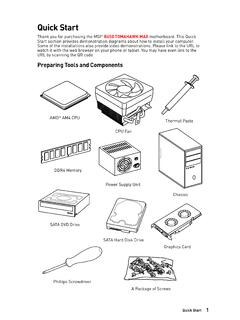
Quick Start - download.msi.com
download.msi.comInternal Connectors y 1x 24-pin ATX main power connector y 1x 8-pin ATX 12V power connector y 6x SATA 6Gb/s connectors y 2x USB 2.0 connectors (support additional 4 USB 2.0 ports) y 1x USB 3.2 Gen1 connectors (support additional 2 USB 3.2 Gen1 ports) y 1x 4-pin CPU fan connector y 1x 4-pin water-pump-fan connector y 4x 4-pin system fan connectors

Contents
download.msi.com4x USB 3.2 Gen 1 5Gbps Type-A ports on the back panel Internal Connectors ∙ 1x 24-pin ATX main power connector ∙ 1x 4-pin ATX 12V power connector ∙ 4x SATA 6Gb/s connectors ∙ 1x M.2 slots (M-Key) ∙ 1x USB 3.2 Gen 1 5Gbps connector (supports additional 2 …

Inleiding - download.msi.com
download.msi.comInleiding 4 5 1. Webcam/ Webcam-LED/ interne microfoon • Deze ingebouwde webcam kan worden gebruikt voor beeld, video-opname, conferencing, enz. • De webcam-LED indicator die zich naast de webcam bevindt, licht op wanneer de webcamfunctie wordt geactiveerd en de LED gaat uit als deze functie wordt uitgeschakeld.

Quick Start - download.msi.com
download.msi.comBIOS Features ∙ 1x 256 Mb flash ∙ UEFI AMI BIOS ∙ ACPI 6.0, SMBIOS 2.8 ∙ Multi-language Software ∙ Drivers ∙ DRAGON CENTER ∙ MSI APP Player (BlueStacks) ∙ Open Broadcaster Software (OBS) ∙ CPU-Z MSI GAMING ∙ Google Chrome™, Google Toolbar, Google Drive ∙ Norton™ Internet Security Solution Dragon Center Features ∙ ...

User's Manual
download.msi.comEuropean Union: Batteries, battery packs, and accumulators should not be disposed of as unsorted household waste. Please use the . public collection system to return, recycle, or treat …

CREATOR CENTER User Guide - download.msi.com
download.msi.comThe screenshots for the UI in this user guide are for reference only and the actual UI design may vary. Operation Panel Information Bar Display System ... Base Clock frequency (BCLK). You can also fill out the value in the input box. ... Please refer to the instructions on page 28.
Related documents

AMD Ryzen Master Overclocking User’s Guide
download.amd.comOverclocking User’s Guide ... memory clocks and related parameters above or below the stock values. When run on boards enabled for overclocking, AMD Ryzen Master will automatically enable the Overclocking Mode at the user’s initiation of a change to a stock parameter. The CPU overclocking parameters will be
ROG STRIX Z370-E GAMING - Asus
dlcdnets.asus.comDual channel memory architecture Supports Intel® Extreme Memory Profile (XMP)* * Hyper DIMM support is subject to the physical characteristics of individual CPUs. Please refer to Memory QVL(Qualified Vendors List) for details. Expansion slots 2 x PCIe 3.0/2.0 x16 slots (supports x16, x8/x8, x8/x4+x4*, x8+x4+x4/x0**)

ROG STRIX X570-I GAMING - Asus
dlcdnets.asus.comnon-ECC, un-buffered memory* 2nd and 1st Gen AMD Ryzen™ with Radeon™ Vega Graphics Processors 2 x DIMM, max. 64GB, DDR4 3200(O.C.) / 3000(O.C.) / 2933 / 2800 / 2666 / 2400 / 2133 MHz, non-ECC, un-buffered memory* Dual channel memory architecture * Please refer to Memory QVL (Qualified Vendors List) for details. Expansion slots
Version 1 - download.asrock.com
download.asrock.comPlease realize that there is a certain risk involved with overclocking, including adjusting the setting in the BIOS, applying Untied Overclocking Technology, or using third-party overclocking tools. Overclocking may affect your system’s stability, or even cause damage to the components and devices of your system. It should be done