
User Manual - Thrustmaster
• On PC, my game’s menus scroll by themselves: - Exit the game and switch the pedals to “combined” (2 axes) mode Then return to your game to . reconfigure the wheel with the new axes. • My wheel’s steering is not responsive enough: - Switch your wheel to high sensitivity mode.
Download User Manual - Thrustmaster

Information
Domain:
Source:
Link to this page:
Documents from same domain
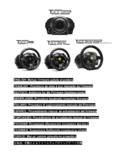
ITALI ANO - Thrustmaster
ts.thrustmaster.comENGLISH: Manual firmware update procedure (Windows 7 / 8 / 8.1 / 10) On PC, the USB sliding switch on the T300 racing wheel’s base must always be set to the PS3 position!
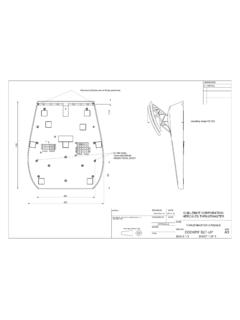
A3
ts.thrustmaster.com310 99 204 267 11,5 operating range125-220 drawn by date guillemot corporation hercules thrustmaster thrustmaster 2013-11-20 checked by date name approvals thrustmaster 2 …
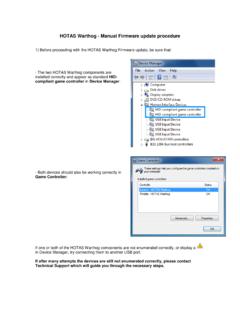
HOTAS Warthog - Manual Firmware update …
ts.thrustmaster.comHOTAS Warthog - Manual Firmware update procedure 1) Before proceeding with the HOTAS Warthog Firmware update, be sure that: - …

MANUEL DE L’UTILISATEUR - ts.thrustmaster.com
ts.thrustmaster.com2/44 – Manuel de l’utilisateur T.A.R.G.E.T v3.0 Avant-propos Bienvenue dans ce manuel et félicitations pour votre achat. Nous espérons que ce contrôleur de …
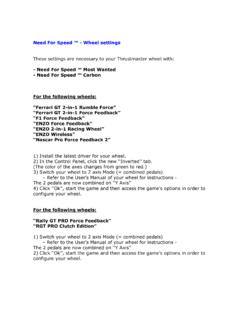
Need For Speed ™ - Wheel settings - Thrustmaster
ts.thrustmaster.comNeed For Speed ™ - Wheel settings These settings are necessary to your Thrustmaster wheel with: - Need For Speed ™ Most Wanted - …
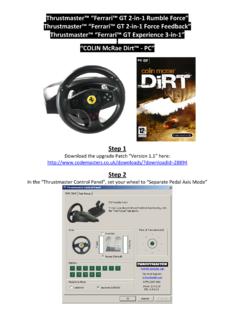
ColinMcRae Dirt Ferrari GT WHEEL - Thrustmaster
ts.thrustmaster.comThrustmaster™ “Ferrari™ GT 2‐in‐1 Rumble Force” Thrustmaster™ “Ferrari™ GT 2‐in‐1 Force Feedback” Thrustmaster™ “Ferrari™ GT Experience 3‐in‐1” “COLIN McRae Dirt™ ‐ PC” Step 1
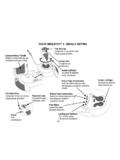
FLIGHT SIMULATOR™ X - DEFAULT MAPPING
ts.thrustmaster.com2/4 FLIGHT SIMULATOR™ X - DEFAULT MAPPING Throttle (meer/minder) Alza flap (passo Subir alerones (paso a paso) Visuale panoramica Vista panorámica Roer links/rechts

ENGLISH - “RACING WHEEL MODE” AND “GAMEPAD MODE” …
ts.thrustmaster.comincrease the T80 Racing Wheel's sensitivity (for more information on this subject, please refer to the section below, “Adjusting the r acing wheel's sensitivity in “Gamepad Mode”). ADJUSTING THE RACING WHEEL'S SENSITIVITY IN “GAMEPAD MODE”

ENGLISH - RACING WHEEL SENSITIVITY ADJUSTMENT: In …
ts.thrustmaster.comThe racing wheel automatically reverts to Sensitivity level 1 (i.e. default mode) when the system restarts or the wheel is disconnected from the system. Manually adjusting the sensitivity level slightly alters the intensity of the racing wheel's
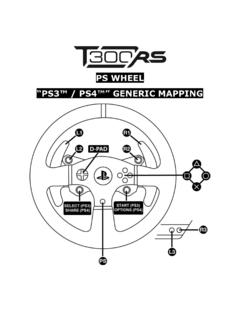
PS WHEEL - Thrustmaster
ts.thrustmaster.com1.2 a d-pad select (ps3) share (ps4) start (ps3) options (ps4) 1.3 aoo
Related documents

Razer Basilisk
dl.razerzone.comleft, right and scroll wheel mouse button for 5 seconds. CUSTOMIZE DEFAU T PERFORMANCE MOUSE MAT SURFACE CALIBRATION Your Razer gaming mouse de ivers immensely accurate tracking straight out of the box. To experience an even higher leve of precision, add a pre-configured Razer surface profile or ca ibrate your own. Dismiss ADD A …

Dell KM714 Wireless Keyboard and Mouse User's Guide
downloads.dell.comScroll and pan 4-way scroll (Windows 7 , 8 and 10) Zoom in/out Press and hold side button, and scroll wheel up or down. (Windows 7 , 8 and 10) Back Press and hold side button, and tilt wheel towards left. (Windows 7 , 8 and 10) Forward Press and hold side button, and tilt …

INSTRUCTION MANUAL WIRELESS MOUSE JBBTMSLIM
s3-ap-southeast-2.amazonaws.com3. Turn the mouse on, the blue light on the right of scroll wheel will flash slowly. Press and hold the “Connect”button until the blue light flashes quickly. The mouse is now in pairing mode. 4.Pair with your Bluetooth device. Your device will display “JBBTMSLIM” select pair, your device will connect to the mouse. Model JBBTMSLIM

Keyboard Shortcuts - Bluebeam Technical Support
support.bluebeam.comScroll Click + Drag Double-Click = = = Mouse for 3D Navigation Left Button Right Button Middle Button (wheel) = = = = = Cloud Cloud+ Ellipse Eraser Snapshot Highlight Hyperlink Image Line Arc Arrow Dimension Note Polyline Lasso Pen Polygon Callout Rectangle Text Box Typewriter File Attachment Flag Format Painter

Wireless Gaming Mouse Souris gaming sans fil
www.logitech.com4 Scroll left (Wheel tilt left) 5 Scroll right (Wheel tilt right) 6 DPI down (Button G7) 7 Middle click (Button G3) 8 DPI shift/Sniper button (Button G6) 9 Wheel mode toggle button (not programmable) 10 Forward (Button G5) 11 Battery status (Button G9) 12 Back (Button G4) 13 Upper weight door (bottom of mouse)

Direct-Drive Plenum Fans and Fan Arrays
www.trane.comA housed fan contains a scroll, or housing, that directs the air leaving the fan in one direction (Figure 1). A plenum fan consists of a centrifugal fan wheel without the surrounding housing. The fan wheel pressurizes the surrounding plenum, allowing air to discharge in multiple directions. Historically, most large fans used in
FORERUNNER Owner’s Manual 55
www8.garmin.comSelect to scroll through the widgets, data screens, options, and settings. Hold to open the music controls (Controlling Music Playback on a Connected Smartphone, page 27). UP Select to scroll through the widgets, data screens, options, and settings. Hold to view the menu. Introduction 1