Using SharePoint as a data source for Modern Reporting
SharePoint is a great organizational data store. SharePoint lists offer a quick and easy way for users to store and share millions of items, while document libraries have become the industry standard for document management, supplying secure, reliable storage. SharePoint libraries supply the backbone for document storage in all of Office 365.
Download Using SharePoint as a data source for Modern Reporting

Information
Domain:
Source:
Link to this page:
Documents from same domain

Yammer Success Guide
resources.techcommunity.microsoft.cominnovation, and engagement across every department of your organization. ... Work with leadership to develop a usage policy and guidelines for governance. This will be important to ensure that activity on ... Champions are your community of people who have bought into
Using SharePoint and Teams as a Modern Dashboarding …
resources.techcommunity.microsoft.comSharePoint Server 2019 supports modern pages, as a result, the process for embedding reports is identical to the process outlined above using the Embed web part. In classic SharePoint, the process is slightly different. When the embed code is obtained, the HTML string is …

Track information. Organize work. Get things done.
resources.techcommunity.microsoft.comTrack issues— a flexible view Create lists for anything—from issues, inventory, and contacts, to processes, and more. You can personalize the ready-made template through intuitive clicks or by using Power Apps to extend your forms. Lists allows you to continuously add and modify the template and structure to meet your needs.

Get started with Microsoft OneDrive
resources.techcommunity.microsoft.comGet started with Microsoft OneDrive. 1. Access files anywhere Store and access your files from any device via a web browser, mobile app, or PC and Mac with robust sync options. This includes your personal files and files shared with you in Office 365 from Microsoft Teams and SharePoint. 4. Find files faster

SharePoint Online - resources.techcommunity.microsoft.com
resources.techcommunity.microsoft.comand Suggested sites on your ... Select a site from the SharePoint homepage or enter its URL into your browser. Then select Documents in the left navigation pane. Open Open and edit a file online ... Based on admin settings, the three levels of sharing are: Anyone –people inside and outside your org

Microsoft Office 365 GxP Guidelines
resources.techcommunity.microsoft.comThe purpose of this document is to demonstrate that as a cloud solution provider, Microsoft has the ... customers can help usher in a new era in which cloud-based GxP systems are no longer seen as a compliance risk, but rather as a safer, more efficient model for …
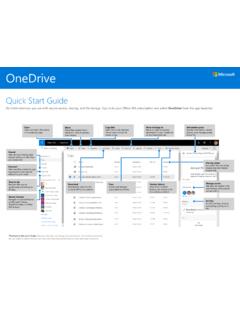
Quick Start Guide
resources.techcommunity.microsoft.comOneDrive Quick Start Guide Do more wherever you are with secure access, sharing, and file storage. Sign in to your Office 365 subscription and select OneDrive from the app launcher. *Powered by Microsoft Graph.Discover view does not …
Related documents

Introduction to Microsoft Teams in Preview
cp-mlxprod-static.microsoft.comConnectors allow your Microsoft Teams users to receive updates right from popular services such as Twitter, Trello, Wunderlist, GitHub, and VSTS. Updates show up as rich cards in channels.
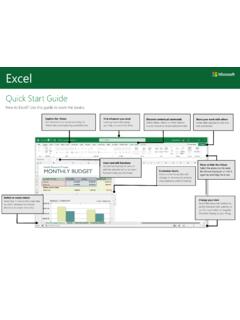
Quick Start Guide - download.microsoft.com
download.microsoft.comseamless integration between Office, OneDrive, and SharePoint. Find recent files Whether you only work with files stored on your PC’s local hard drive or you roam

SharePoint Lookbook - lookbook.microsoft.com
lookbook.microsoft.comgroup in Microsoft Teams, is backed by a SharePoint team site to empower your employees to work together with shared files, news, and data. You can customize your team site with the content, information, and apps you rely on every day. You can share it with people inside or outside your organization. And, you can collaborate in a web

An End User’s Guide to SharePoint Online - CFP
www.cloudfastpath.comAs you become more comfortable with SharePoint Online, you can explore the powerful integrations it has with other aspects of your Office 365 suite--such as Microsoft Flow. A dynamic automation and workflow tool, Flow allows you to create processes that react to your behavior in SPO, or update your SharePoint Online based on your behavior in other

File Management in Microsoft Teams - James Cook University
www.jcu.edu.aucollaboratively. Some options will require assistance from ICT Desktop Support (eg: linking the SharePoint document Library directly to your computer), but once set-up Teams allows more flexibility when working with files than ever before. Uploading Files . 1. From O365 online, open Teams from the App Launcher or start the . Microsoft Teams
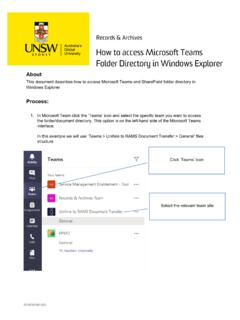
2019 35195-003 Process Document - How to access …
www.recordkeeping.unsw.edu.auThis document describes how to access Microsoft Teams and SharePoint folder directory in Windows Explorer Process: 1. In Microsoft Team click the ‘Teams’ icon and select the specific team you want to access the folder/document directory. This option is on the left-hand side of the Microsoft Teams interface.

SHAREPOINT DEPLOYMENT GUIDE AND CHECKLISTS
www.thorprojects.comSHAREPOINT DEPLOYMENT TEAM ROLES MICROSOFT OFFICE SHAREPOINT SERVER 2007 DEPLOYMENT GUIDE AND CHECKLISTS INDEX checklist-front.indd 2 10/23/2007 5:09:33 PM. MICROSOFTOFFICE SHAREPOINTSERVER 2007 FEATURE AREAS Business Intelligence Collaboration Business Forms Portal Content Management Search Platform