
Zoom Quick Reference Guide - CustomGuide
Quick Reference Guide The Zoom Meeting Screen Getting Started Download the Zoom app: Visit the Zoom website at zoom.us, click the Resources link at the top of the Zoom page, select Download Zoom Client, then click the Download button next to the version of the app you want. who is in the meeting and who is in
Download Zoom Quick Reference Guide - CustomGuide

Information
Domain:
Source:
Link to this page:
Documents from same domain

Microsoft PowerPoint 2013 - CustomGuide
www.customguide.comMicrosoft® PowerPoint 2013 Quick Reference Card The PowerPoint 2013 Screen Keyboard Shortcuts The Fundamentals To Create a New Presentation: Click the File tab, click New.

Word 2013 Quick Reference - SharePoint Training
www.customguide.comMicrosoftWord 2013 ® Quick Reference Card The Word 2013 Screen Keyboard Shortcuts General Open a Document Ctrl + O Create New Ctrl + N …

Quick Reference Card Visit: qr.customguide
www.customguide.comMicrosoftWord 2016 ® Quick Reference Card The Word 2016 Screen Keyboard Shortcuts General Open a Document Ctrl + O Create New Ctrl + N …

Windows 10 Quick Reference - CustomGuide
www.customguide.comMicrosoft® Windows 10 Quick Reference Card Start Menu Keyboard shortcuts Basic Commands Start Menu Copy a Folder/File Ctrl + C Cut a Folder/File Ctrl + X

Your Organization’s Name Here - SharePoint Training
www.customguide.com©CustomGuide 2015 3 Table of Contents Table of Contents ..... 3

Project 2013 Quick Reference - CustomGuide
www.customguide.comMicrosoft® Project 2013 Quick Reference Card Project 2013 Screen Common Views To Display a View: Select the View tab and choose from the Task Views available.

Windows 8 Quick Reference - CustomGuide
www.customguide.comicrosof inos uic eference Car For Personal Use Only ustomuide Contact Us at info@customguide.com for organizational use. Free Quick References! Visit: qr.customguide.com The Start Screen

Word 2007 Quick Reference - SharePoint Training
www.customguide.comMicrosoft® Word 2007 Quick Reference Card Word 2007 Screen [Grab your reader’s attention with a great quote from the Shortcuts The Fundamentals Open a Document …

uic eference Car Free Quick References! - …
www.customguide.comicrosof nc uic eference Car For Personal Use Only ustomuide Contact Us at info@customguide.com for organizational use. Free Quick References! Visit: qr.customguide.com The Lync 2013 Window

Excel 2013 Quick Reference - CustomGuide
www.customguide.comMicrosoftExcel 2013 ® Quick Reference Card The Excel 2013 Screen Keyboard Shortcuts Close button General Open a Workbook Ctrl + O Create New Ctrl + N
Related documents

Symbol LS4278 Quick Reference Guide, p/n 72-69835-01 Rev B
pdfs.metrolinedirect.comQuick Reference Guide 13 Radio Communications Host Types Scan a bar code below to choose how the scanner connects to a remote device. Scan Cradle Host if connecting to the Symbol STB4278 cradle. Pairing When the scanner is configured as an SPP or HID Master, a 'pairing bar code' must be created for the remote Bluetooth device to which the ...

Hi! Let’s get started. - Roku, Inc.
wwwimg.roku.comPower port – Connects your Roku player to a 120V AC power source with the included power adapter. Reset button – Resets your Roku player to its original factory settings when pressed and held for 10 seconds (a feature you’ll rarely, if ever, use). HDMI port – Connects your Roku player to an HDTV with an HDMI cable (not included). D
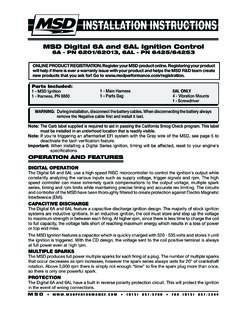
MSD Digital 6A and 6AL Ignition Control 6A - PN ... - Holley
documents.holley.comspeed controller can make extremely quick compensations to the output voltage, multiple spark series, timing and rpm limits while maintaining precise timing and accurate rev limiting. The circuits ... This wire connects to the coil negative (-) terminal. This is the ONLY

CS6080 Quick Start Guide - zebra.com
www.zebra.comQuick Start Guide 3 Introduction Introducing the CS6080 Companion Scanner, featuring a groundbreaking design that easily ... connects to the PC/host via Bluetooth and performs like there is a serial connection. Classic Bluetooth only. 16 CS6080 Scanner Cradle Bluetooth Classic
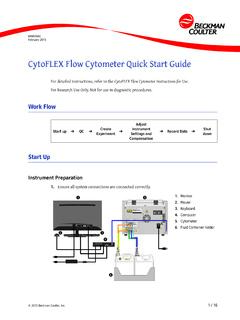
CytoFLEX Flow Cytometer Quick Start Guide
med.nyu.eduCytoFLEX Flow Cytometer Quick Start Guide Instrument QC 2. Log on to the computer and double-click to start CytExpert. a. Ensure that the Connected icon on the Status Bar near the bottom-left side of the display is green. b. If the icon is not green, ensure that the instrument USB is securely connected to the computer and restart the computer. 3.
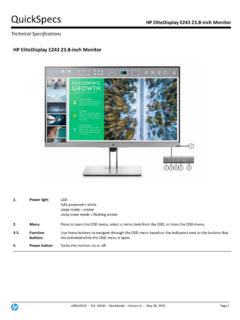
HP EliteDisplay E243 23.8-inch Monitor
www8.hp.comconnects through USB. HP HDMI Standard Cable Kit — T6F94AA Use the cable to connect your desktop to your standard HDMI devices and displays. HP Quick Release Bracket — EM870AA6 An easy-to-use, VESA-compliant, LCD monitor mounting solution that allows you to quickly and securely attach an LCD monitor to a variety of

Quick Install Guide - D-Link
support.dlink.comQuick Install Guide If any of the above items are missing, please contact your reseller. • Make sure the area that you want to plug the extender into has a solid connection to your router. Use a wireless laptop, tablet, or mobile phone in that area to test the connection to verify. • If your wireless router or access point does not support WPS,