Transcription of Activate a FirstNet SIM card and install it in an Android ...
1 December 11, 2019 2019 AT&T Intellectual Property. FirstNet and the FirstNet logo are registered trademarks of the First Responder Netw ork Authority. All other marks are the property of their respective ow ners. Activate a FirstNet SIM card and install it in an Android device To access all the benefits of FirstNet , you need a FirstNet SIM card and a FirstNet Ready device. Your FirstNet SIM card is pre-activated when you order a new line of service. If you port (transfer) your phone number to a new line of service or upgrade your device, you need to manually Activate your FirstNet SIM card . For help with activation, you can call FirstNet Customer Service at After you install an activated FirstNet SIM card , your device will work only on FirstNet a high-speed, highly secure wireless communications platform built exclusively for first responders. For orders placed online, through FirstNet Customer Service, or through your FirstNet Account Team, the FirstNet S IM card will be delivered pre-inserted in the device.
2 Before you begin Activate a new Android device Activate your current Android device on the FirstNet network Before you begin Make sure you don t lose saved voicemail or contacts when you Activate your device on FirstNet . Before you Activate it, do the following: Transfer your important data and contacts from your old SIM card to your new device. Check whether you re upgrading to a device that has Visual Voicemail. If your current device doesn t have that feature, review all new and saved voice messages in your current voicemail box. Those voice messages won't be available after you Activate a device that has Visual Voicemail. Activate a new Android device If you have a new FirstNet Ready Android device, follow these steps: 1. Get a FirstNet SIM card , if you don t already have one. 2. Verify your device is FirstNet Ready. 3. Activate your FirstNet SIM card . 4. Insert the activated FirstNet SIM card in to your device Power the device on and proceed through the initial setup.
3 Note : For orders placed online, through FirstNet Customer Service, or through your FirstNet Account Team, the FirstNet SIM card will be delivered pre-inserted in the device. Dece mber 1 1, 20 19 Page 2 2019 AT&T Intellectual Property. FirstNet and the FirstNet logo are registered trademarks of the First Responder Netw ork Authority. All other marks are the property of their respective ow ners. Activate a FirstNet SIM card and install it in an Android device 5. Verify the device operating system. 6. Power the device off and on. The device automatically connects to FirstNet . 7. Verify your device has been properly activated on the FirstNet network. 8. Configure custom wireless access options, if necessary. Activate your current Android device on the FirstNet network If you have an existing FirstNet Ready Android device (with an active AT&T SIM card ), or if you re migrating from another wireless service, follow these steps: 1.
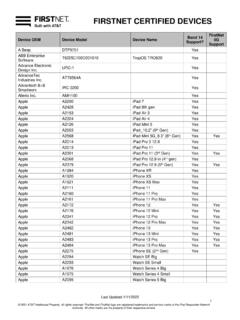
4 Get a FirstNet SIM card , if you don t already have one. 2. Verify your device is FirstNet Ready. 3. Activate your FirstNet SIM card . 4. Verify the device operating system. 5. Power your device off. 6. Remove the current SIM card from your device. 7. Insert the activated FirstNet SIM card , and then power the device on. It automatically connects to FirstNet . 8. Verify your device has been properly activated on the FirstNet network. 9. Configure custom wireless access options, if necessary. Get a FirstNet SIM card To use your device on FirstNet , you need a FirstNet SIM card . You can get one in any of these ways: Go to your local AT&T store and pick one up. Call FirstNet Customer Service at Order one online with your purchase of a FirstNet Ready device. FirstNet SIM cards aren t available separately online. Verify your device is FirstNet Ready 1. Tap Se ttings, tap S yste m, and then tap About Device.
5 Note the model number that appears. 2. Go to , select your device name, and compare the model number listed there to the model number on your device. If the model numbers match, your device is FirstNet Ready. If the model numbers don t match, your device isn t FirstNet Ready. Dece mber 1 1, 20 19 Page 3 2019 AT&T Intellectual Property. FirstNet and the FirstNet logo are registered trademarks of the First Responder Netw ork Authority. All other marks are the property of their respective ow ners. Activate a FirstNet SIM card and install it in an Android device Activate your FirstNet SIM card You need to Activate a FirstNet SIM card before you install it in a device. Make sure you have the device IMEI number and the SIM card number, then do 1 of these things: Activate it yourself at Call FirstNet Customer Service at You ll need to provide your device IMEI number.
6 Bring your device to an AT&T retail store and ask for assistance. Note : If you order a new device with a new line of service, you ll receive a FirstNet SIM card that s already activated. If you need help, contact your FirstNet Specialist or your administrator. Verify your device is active on the FirstNet network 1. Tap Se ttings, tap S yste m, and then tap About device. 2. View Carrier. If the value shows FirstNet , your device has been provisioned correctly. If you see any other value, call FirstNet Customer S e r vi c e at When your device is activated on the FirstNet network, you ll see F i r stNe t next to the signal strength bars on the device. Configure wireless access options You can configure custom wireless network access options on Android devices. If your device is FirstNet Ready and you have a FirstNet SIM card , these options are automatically configured. If you need to manually configure wireless access options, make sure your organization uses them, and that they re supported by FirstNet .
7 You can then set them up from your device. Note : If you need a custom wireless access option, ask your administrator for information. These options are sometimes referred to as access point names (APNs). Set up access options on an Android device These are the typical steps for changing access option settings on an Android device. Steps for your device may vary. 1. From the home screen, tap Se ttings. 2. Tap More. 3. Tap Mobile networks. 4. Tap Access Point Names. 5. To add a new APN, tap the plus (+) icon. 6. In the Na me field, enter the APN information, and then tap OK.