Transcription of 4.2.2 Error code and message - מדפסות SAMSUNG
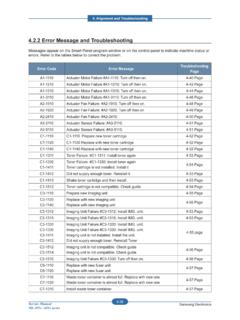
1 Alignment & TroubleshootingService Manual4-29 SAMSUNG Error code and messageMessages appear on the Smart Panel program window or on the control panel display to indicate machine status or errors . Refer to the tables below to better understand the meanings of each message , then follow the suggested solution provided on the page that you are referred code Error message Troubleshooting01-000 Door is open or Check Transfer belt4-31 page01-004 Paper jam in MP tray 4-32 page01-005 Paper jam in tray 1 4-33 page01-00601-018 Paper jam in tray 24-34 page01-009 Paper jam inside of machine 4-35 page01-010 Paper jam in exit area 4-36 page01-015 Paper jam at the top of duplex path4-37 page01-016 Paper jam inside of duplex path-01-017 Output bin full.
2 Remove printed page02-000 System Error : #02-000. Please turn off then on4-39 page02-00102-006 Fuser Error : #02-001/006. Please turn off then on4-40 page02-002 System Error : #02-002. Please turn off then on4-41 page02-005 System Error : #02-005. Please turn off then on4-41 page03-000 Motor Error . Error : #03-000. Turn off then on4-42 page03-00703-00803-009 Motor Error . Error : #03-007/008/009. Turn off then on4-43 page03-015 Motor Error . Error : #03-015. Turn off then on4-44 page04-00104-00204-008 LSU Error : #04-001/002/008. Please turn off then page08-00008-001 Original paper JamOriginal paper jam inside of scanner. Remove Jam4-46 page08-00208-006 Original paper jam inside of scanner4-47 page08-00308-010 Original paper JamOriginal paper jam inside of scanner.
3 Remove Jam4-48 page08-00408-006 Original paper JamOriginal paper jam inside of scanner. Remove Jam4-49 page08-008 Scanner door OpenDoor of scanner is open. Close it4-50 page11-003 Scanner lockedScanner locking switch is locked. Release it4-51 pageAlignment & TroubleshootingService Manual4-30 SAMSUNG ElectronicsError code Error message Troubleshooting12-00012-001 Paper mismatch Tray1/2 Load [A4] [Plain]Continue Cancel X4-52 page12-004 Paper mismatch [A4] [Plain]Continue Cancel X4-53 page18-000 Fax memory is almost page18-001 Fax memory is full. Print or remove received fax job 4-54 page18-002 Too many faxes are in the print queue waiting to be printed. Wait, reprioritize, and/or remove unwanted jobs from the print page18-003 Too many faxes are received.
4 Reprioritize, and/or remove unwanted jobs from the print page21-002 Paper Empty in tray1 Paper is empty in tray1. Load paper4-55 page21-003 Tray 1 cassette is pulled out. Insert it properly4-56 page21-010 Paper is empty in MP tray. Load paper4-57 page21-018 Paper Empty in tray2 Paper is empty in tray2. Load paper4-58 page21-019 Tray2 cassette is pulled out. Insert it properly4-59 page28-00128-00228-003 Transfer belt is not installed. Install belt is not compatible for this machine. Check user s pageAlignment & TroubleshootingService Manual4-31 SAMSUNG Electronics Code01-000 Error message Door is open orCheck Transfer belt SymptomFront cover or top cover is opened. Possible Cause 1.
5 Harness is defective, Connector is not connected properly. 2. Sensor is defective. Troubleshooting method :1. Ensure the Front and Top Covers are closed If the PTB [paper transfer belt] is not installed, install Check the cover switch harness between Main PBA and HVPS. 4. Check the 24V enable signal on Main PBA. If the voltage is high(5V), replace the Main Check the 24V1 on SMPS. If there is no output, replace the SMPS board. CN29 Connector24V1 No. 2,3,4 Pin24V enable No. 28 Pin Cover Switch ConnectorAlignment & TroubleshootingService Manual4-32 SAMSUNG Electronics Code01-004 Error messagePaper Jam in MP tray SymptomThe paper from the MP tray has not reached to the feed sensor within a predetermined period of time after pick up.
6 Possible Cause 1. Pickup roller rubber is worn Pickup Clutch does not Feed Sensor is defective. Troubleshooting method1. Ensure the Front and Top Covers are closed If the PTB [paper transfer belt] is not installed, install Check the cover switch harness between Main PBA and HVPS. 4. Check the 24V enable signal on Main PBA. If the voltage is high(5V), replace the Main Check the 24V1 on SMPS. If there is no output, replace the SMPS board. Flat6p Feed/Trayempty7p MP empty/MPsolenoidPickupSolenoidAlignment & TroubleshootingService Manual4-33 SAMSUNG Electronics Code01-005 Error messagePaper jam in tray 1 SymptomThe paper from the tray1 has not reached to a feed sensor within a predetermined period of time after pick up.
7 Possible Cause 1. Pickup roller rubber is worn Pickup Clutch does not Feed Sensor is defective. Troubleshooting method1. Take out the cassette and remove the jammed Check the separator pad of the cassette. If it become loose or has reached its PM interval, replace it. * MEA Holder Pad (JC97-02892A)3. If the pick up roller does not rotate, check the Gear Pick up(JC97-02895A) and solenoid. If it is defective, replace it. 4. If the pick up roller rotates but the paper is not feeding, replace the Feed motor (JC31-00112A). 5. Check the connectors are plugged in properly on CN4,5,9 on Check the connectors are plugged in properly on CN1,2 on HVPS and check the flat Check that the PM interval for Pick-up Roller has expired.
8 If so, replace Check the actuator on the Feed Sn. If it does not work correctly, replace the Check for proper positioning of the Knockup-Plate(JC97-02888A)10. Check if the Guide-adjust is adjusted for paper entry & TroubleshootingService Manual4-34 SAMSUNG Electronics Code01-00601-018 Error messagePaper jam in tray 2 SymptomThe paper from the tray2 has not reached to a feed sensor within a predetermined period of time after pick up. Possible Cause1. Pickup roller rubber is worn Pickup Clutch does not Feed Sensor is defective. Troubleshooting method :1. Take out the 2nd cassette and remove the jammed If the pick up roller does not rotate, check the Gear Pick up(JC97-03228A).
9 If it is defective, replace it. 3. If the pick up roller rotates but the paper is not feeding, replace the Clutch-Feed(JC97-03270A). 4. Check the connector is plugged in properly on CN9 connector on Main PBA5. Check the sensor and connector in SCF. Alignment & TroubleshootingService Manual4-35 SAMSUNG Electronics code 01-009 Error message Paper jam inside of machine SymptomPaper jam inside of machine1. At Power On, the paper is jamming at Regi sensor or Feed sensor. 2. At printing, the paper is detecting at Regi sensor or Feed sensor continuously. 3. At printing, the paper is not detected at exit sensor within a predetermined time. Possible Cause 1. Feed sensor or Regi Sensor is defective.
10 2. Exit sensor is defective. 3. Feed Clutch is Regi Clutch is defective. Troubleshooting method1. Check the Spring tension of the Regi. roller and Regi shaft. If the spring is defective, replace it. 2. Check and replace the exit Check the connectors are plugged in properly on the flat cable / exit sensor harness / Feed sensor Check the OPC motor is working. / OPC Check PTB [paper transfer belt] working condition, if PTB-Belt is torn replace Feed/Tray emptyFlat Cable3p Exit sensor6p Feed/Tray emptyFlat Cable3p Exit sensorAlignment & TroubleshootingService Manual4-36 SAMSUNG Electronics code 01-010 Error messagePaper jam in exit area SymptomPaper jam in exit area Possible CauseThere is paper jammed under the Exit Sensor at Power ON, or the Fuser Actuator Arm, or Exit Sensor is defective.