Transcription of 4.2.2 Error Message and Troubleshooting - מדפסות …
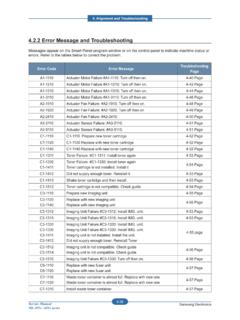
1 4. Alignment and Troubleshooting4-25 Samsung ElectronicsService ManualML-331x/371x Error Message and TroubleshootingMessages appear on the Smart Panel program window or on the control panel to indicate machine status or errors . Refer to the tables below to correct the problem. Error CodeError MessageTroubleshooting PageA1-1110 Error #A1-1110: Turn off then pageC1-1110 C1-1120 C1-1140 Prepare new cartridge Replace new cartridge Replace new cartridge27 pageC1-1411 Install toner28 pageC1-1512 Not Compatible Toner pageH1-1210 Paper jam in pageH1-1252 Paper is empty in Tray2. 29 pageM1-1110 Paper Jam in pageM1-1610 Paper Jam in MP pageM1-5112 Paper is empty in tray 1. 31 pageM1-5612 Paper Empty in MP pageM2-1110 Paper Jam inside pageM2-2110 Paper Jam inside pageM2-2310 Paper Jam bottom of pageM3-1110 Paper Jam in exit pageM3-2130 Output bin full. Remove pageS2-4110 Door open. Close pageS6-3123 Network Problem: IP Con Network pageU1-2320 Error #U1-2320 Turn off then pageU1-2330 Error #U1-2330 Turn off then pageU1-2340 Error #U1-2340 Turn off then pageU2-1111 U2-1113 Error #U2-1111 Turn off then on.
2 Error #U2-1113 Turn off then page4. Alignment and TroubleshootingService ManualML-331x/371x series4-26 Samsung Electronics CodeA1-1110 Error messageError #A1-1110: Turn off then on. Symptom / Cause After working the main BLDC motor, the Ready signal has not occurred within 1 Harness is defective. Connector is not connected OPC coupler in the toner cartridge has Main BLDC motor is Engine board is defective. Troubleshooting method : First, turn the machine off then on. If the Error persists, refer to the Check if the motor connector is connected properly. Reconnect OPC coupler has overloaded. After removing the toner cartridge, rotate the OPC coupler. (Spec : 6 ) If there is any damage, the OPC coupler can t rotate well. Replace the toner The main BLDC motor is defective. - Unplug the connector from the motor carefully. - Replace the main BLDC motor with new one. 4. If the problem persists, replace the main Alignment and Troubleshooting4-27 Samsung ElectronicsService ManualML-331x/371x series CodeC1-1110 / C1-1120 / C1-1140 Error messagePrepare new cartridge / Replace new cartridge / Replace new cartridge Symptom / Cause The remaining toner cartridge is less than 10% The toner cartridge is at the end of its life.
3 Troubleshooting method1. Print the supply information report. Check the life remaining of the toner cartridge. If its life is at the end, turn the machine off and replace the toner cartridge with new Alignment and TroubleshootingService ManualML-331x/371x series4-28 Samsung Electronics CodeC1-1411 Error messageInstall toner. Symptom / Cause The toner cartridge is not installed. Troubleshooting method1. Turn the machine off then on. 2. Remove the toner cartridge. Thoroughly roll the cartridge ve or six times to distribute the toner evenly inside the cartridge. And reinstall the toner cartridge. CodeC1-1512 Error messageNot Compatible Toner cartridge. Symptom / Cause Toner cartridge is not compatible. Troubleshooting method1. Print the supply information report. Check information of the toner If the toner cartridge is not a Samsung genuine toner cartridge, replace with new Alignment and Troubleshooting4-29 Samsung ElectronicsService ManualML-331x/371x series CodeH1-1210 Error messagePaper jam in Tray2.
4 Symptom / Cause A paper jam was detected in the feed area of the Paper was inserted abnormally or was not loaded in the cassette properly. 2. Pick Up unit has a problem. Troubleshooting method1. Open the Tray2 and remove the jammed paper. 2. If there is any defective part in the pick up unit, replace it. CodeH1-1252 Error messagePaper is empty in Tray2. Symptom / Cause Paper is empty in Tray2. The status LED is There is no paper in the Actuator-Paper Empty is Photo Sensor is defective or connection is Main Board is defective. Troubleshooting method1. Load the paper in the If the Actuator-Paper Empty is defective, replace If the Photo Sensor is defective, replace it. Check if the connector is connected properly. 4. If the problem persists, replace the Main Alignment and TroubleshootingService ManualML-331x/371x series4-30 Samsung Electronics CodeM1-1110 Error messagePaper Jam in Tray1. Symptom / Cause The jammed paper has occurred in the Pick-Up or Torque Limiter Roller is contaminated or worn There is some obstacles in the paper path.
5 Troubleshooting method1. Clear the jammed paper. If the problem persists, check the While pushing the Paper Empty Sensor, send the printing data. Check if the pick up roller is rotating normally. 3. Check if there is any obstacles in the paper path (from Pick-Up to Feed Sensor). The feed roller should be especially Print out the Supplies Information. Check the Tray 1 Roller Life and Tray1 Torque Limiter Life. If the life came to the end, replace the relative roller. CodeM1-1610 Error messagePaper Jam in MP tray. Symptom / Cause The jammed paper has occurred in the MP MP Pick-Up or MP Torque Limiter Roller is contaminated or worn There is some obstacles in the paper path. Troubleshooting method1. Clear the jammed paper. If the problem persists, check the While pushing the Paper Empty Sensor, send the printing data. Check if the pick up roller is rotating normally. 3. Check if there is any obstacles in the paper path (from Pick-Up to Feed Sensor).
6 The feed roller should be especially Print out the Supplies Information. Check the Tray Roller Life and Tray Torque Limiter Life. If the life came to the end, replace the relative Alignment and Troubleshooting4-31 Samsung ElectronicsService ManualML-331x/371x series CodeM1-5112 Error Message Paper is empty in tray 1. Symptom / Cause Paper is empty in Tray1. The status LED is There is no paper in the Actuator-Paper Empty is Photo Sensor is defective or connection is Main Board is defective. Troubleshooting method1. Load the paper in the If the Actuator-Paper Empty is defective, replace If the Photo Sensor is defective, replace it. Check if the connector is connected properly. Empty sensorEmpty actuatorEmpty sensorEmpty actuator4. If the problem persists, replace the Main Alignment and TroubleshootingService ManualML-331x/371x series4-32 Samsung Electronics CodeM1-5612 Error Message Paper Empty in MP Tray.
7 Symptom / Cause Paper is empty in MP Tray. The status LED is There is no paper in the MP Actuator-Paper Empty is Photo Sensor is defective or connection is Main Board is defective. Troubleshooting method1. Load the paper in the MP If the Actuator-Paper Empty is defective, replace If the Photo Sensor is defective, replace it. Check if the connector is connected properly. Empty sensorEmpty actuatorEmpty sensorEmpty actuator4. If the problem persists, replace the Main Alignment and Troubleshooting4-33 Samsung ElectronicsService ManualML-331x/371x series CodeM2-1110 Error messagePaper Jam inside machine. Symptom / Cause A paper jam was detected at the feed sensor. 1. The feed sensor is defective. 2. The Regi Roller was contaminated or worn There is some obstacles in the paper path. 4. The driving for the toner cartridge has some The driving for the fuser unit has some problem. Troubleshooting method1. Remove the jammed paper.
8 If the Error persists, check the followings. 2. Check if the feed sensor connector is connected properly. Feed sensorRegi. sensorFeed sensorRegi. sensor3. Check if the Regi roller is contaminated or worn out. If yes, replace it. 4. Check if there is any obstacles or contamination in the paper path. If yes, clean or remove Alignment and TroubleshootingService ManualML-331x/371x series4-34 Samsung Electronics CodeM2-2110 Error messagePaper Jam inside machine. Symptom / Cause A paper jam was detected in the duplex area. 1. The printed image is skewed. 2. The duplex unit is not installed or the installation is There is some obstacles in the paper path. Troubleshooting method1. Remove the jammed paper. 2. Remove the contamination or obstacles in the paper path. 3. Check if the duplex unit is installed properly. CodeM2-2310 Error messagePaper Jam bottom of duplex. Symptom / Cause A paper jam was detected in the bottom of duplex.
9 1. There is some obstacles in the paper path. 2. The paper guide in the tray was not adjusted properly. 3. The exit sensor was not assembled properly. Troubleshooting method1. Remove the jammed Remove the contamination or obstacles in the paper path. 3. Adjust the paper guide properly. 4. Check if the exit sensor is assembled properly. Reassemble it. 4. Alignment and Troubleshooting4-35 Samsung ElectronicsService ManualML-331x/371x series CodeM3-1110 Error messagePaper Jam in exit area. Symptom / Cause A paper jam was detected in the exit area. 1. There is some obstacles in the paper path. Troubleshooting method1. Remove the jammed Check if there is any obstacles or contamination in the paper path. If yes, clean or remove it. CodeM3-2130 Error messageOutput bin full. Remove paper. Symptom / Cause The machine detected that the output tray has got full or the bin-full sensor is defective. 1. Output tray is Outbin full sensor connection is wrong.
10 Troubleshooting method1. Remove the paper on the output tray. (The maximum loading capacity is 150 sheets based on standard paper(80g/m2).)2. Check if the Bin-full Sensor connector is connected properly. Reconnect it or replace the Bin-full Alignment and TroubleshootingService ManualML-331x/371x series4-36 Samsung Electronics CodeS2-4110 Error messageDoor open. Close it. Symptom / Cause Door is open or the cover open switch is defective. The status LED is red. Troubleshooting method1. Check if the front door is closed Check if the rear door is closed Check if the connection between the main board and HVPS board is Check if the cover open switch on HVPS board is operated properly. If it is defective, replace the HVPS board. Cover Open SwitchCover Open Switch4. Alignment and Troubleshooting4-37 Samsung ElectronicsService ManualML-331x/371x series CodeS6-3128 Error Network Error . Symptom / Cause Network Error - The con rmation was requested for wired port, the server has rejected.