Transcription of Advice on Exporting Registration to SIMS - …
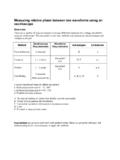
1 Export to SIMS Page 1 of 4 Exporting Registration periods Advice on Exporting Registration to > Overview: the two possible ways What is the right way to export Registration periods to ? It would be nice if there was a definitive answer to this, but in practice Capita have given you a choice of two possible ways to export Registration to .. and your choice can affect Attendance and Cover within SIMS. This makes it one of the most complicated parts of The two possible methods are: Method Represented in TimeTabler by: (1) As lessons (in teaching periods ) A standard activity, with a class (eg: 7A) and a subject of Reg (say), eg: 7A SSSSS JW (7A for 5 singles with teacher JW) (2) As duties (in non-teaching periods ) (sometimes called non-class codes in SIMS) A "special location" or "staff label" in TimeTabler. Notes: 1) Either of these methods is allowed, depending on the effect you wish to have in Capita s own timetabling software (Nova-T) allows either.
2 In practice it seems that most Nova-T schools export Registration as a duty (method 2) .. however, Capita s standard Advice to TimeTabler users is to use Method 1. 2) School Census: In order for the School Census to work in SIMS, you need to set the "levels" for all Registration groups as "Gen" or "Other". How to do this: At Step 6 of the export, after you click on "Create export", a screen pops-up that invites you to say what the "level" is for each teaching-group ("class" in SIMS). The defaults give, for example, "KStg3" to all the groups in Year 7, "GCEAS" to the groups in Year 12, etc. But for the groups that just represent Registration , Capita's recommend that you choose a neutral level such as "Gen" or "Other". You would need to do this for all the Registration groups, in all years. If you do this once, then these levels will be remembered for future (re)exports. > The effect on Attendance & Cover in SIMS The methods affect Attendance and Cover within SIMS as follows: Method How handled by SIMS Attendance ?
3 * How handled by SIMS Cover ? (1) As lessons (in teaching periods ) Attendance can be recorded Teacher can be covered (2) As duties (in non-teaching periods ) Attendance cannot be recorded, as duties have no members (students) Teacher can be covered * Attendance: Note that SIMS also has a separate pastoral structure which runs in parallel with the timetable, and can also be set-up to record Registration /attendance. Export to SIMS Page 2 of 4 Exporting Registration periods > Teaching or Non-teaching periods ? In addition, SIMS has the concept of each period being either a teaching or a non-teaching period. You can therefore, as you export from TimeTabler, choose to export each period of your timetable as either a teaching period or as a non-teaching period . This is quite a complicated area of SIMS. The main differences between teaching and non-teaching periods in are as follows: (Normal) Teaching Period Non-teaching period Visible in Lesson Monitor and Lesson Register.
4 Ignored by Lesson Monitor and Lesson Register. Both classes and non-class codes (duties) can be scheduled here Only non-class codes (duties) can exist here; classes cannot be scheduled here. (If you try to do this, the first page of the SIMS Transfer Wizard will say Error: Lessons scheduled at non-teaching periods ). Notes: 1) SIMS does not allow a different pattern of teaching/non-teaching on different days. So if you are going to use non-teaching periods , you must place them in the same period(s) of each day. 2) If you need to change your Lesson Monitor settings in , go to: tools setups lesson monitor options 3) Capita s standard Advice to TimeTabler users is to use teaching periods . > Further information about the Export to SIMS The export from TimeTabler finishes by calling the SIMS program " " which then performs the rest of the import into SIMS. This is explained in the document " " .. you can find a copy here.
5 See page 13 for the bit about " " being called. You can also learn more about what happens in SIMS once " " has been called here: Important: before importing a timetable from TimeTabler into , always make a backup of your SIMS Database(s), so you can go back if you need to. > Testing: a trial run To see the effects of Exporting Registration to SIMS, you may wish to do a trial export to SIMS, with just a few registrations included in your schedule, to see how it appears in SIMS. If it appears the way you would like, then you can go on to enter the rest of your registrations. Always remember to take a complete Backup of your SIMS database before importing, so you can go back if you need to. Export to SIMS Page 3 of 4 Exporting Registration periods > Appendix 1: Advice from a school (Sept 2011) Further to the above, we received some further feedback from a school that imported its timetable from TimeTabler into SIMS in Sept 2011, explaining how they handled Registration see below: It looks as if they entered the registrations in TimeTabler as lessons for the teachers, but with special locations, rather than classes.
6 And at step 3 of the export, on the "Prepare your Basic Data --> Shape" page, they said those periods are non-teaching periods . They did this so they appear in SIMS Cover Module. As far as marking attendance in SIMS Lesson Monitor, they set this up via the "pastoral set up in SIMS" .. rather than by having " Registration lessons" against those classes in TimeTabler. Email from school: Hello Chris, The issue we had was registrations not appearing in Cover on SIMS. We used the pastoral set up in SIMS to allocate tutors to tutorgroups and rooms and these appeared on Lesson Monitor in SIMS, but not in Cover. My process for getting registrations imported into SIMS so that they appeared on Cover was to put them as Special Locations. I produced new Special Locations (7 Alb, 7 Beck etc), then made a new batch of activities with these locations in. We have 20 tutor periods over a fortnight (2 a day) and so had to make 2 activities for each tutor group as it would only accept a maximum of 10 S's for each activity.
7 I then called up the schedule and loaded the batches with the tutor periods in them. However, I found that, as I had put in the two Registration periods a day before we imported I had ticked the "Make all classes unavailable this period" and found I couldn't schedule them. I went to the class screen and tick the "Make Available all cycle" for the class and then allocated the tutor activities on these new periods . When we reimported them into SIMS we found that they would appear as needing cover if a teacher was absent, so it worked. It did take a while however and it would be beneficial if there was a quicker way to sort out inputting Registration periods into a cycle. Now that we are at the end of my first ever timetabling marathon I'd like to add that the software has been great and I have enjoyed using it. It was well worth the investment of both time and money. Export to SIMS Page 4 of 4 Exporting Registration periods > Appendix 2: Advice from LA Support (2014) (The Advice here refers to Nova-T, but the same Advice should apply to TimeTabler, as during the export, TimeTabler effectively replaces Nova-T): There is no need to create academic classes to match Registration groups for Lesson Registration purposes because Lesson Monitor will offer Registration groups for selection in Take Register if it is set up to do so.
8 The only reason for creating academic classes to match Registration groups for a Registration period is so that they appear on the student timetables and so that Cover slips for Reg periods can be printed with student names. The normal way to represent Registration periods is in Nova and is designed specifically for Cover purposes. Reg periods are created as Non teaching periods and Non Class codes entered for Teachers for Registration . These periods do not appear on the student timetables. periods must not be excluded or made non-teaching if the user wishes them to appear on student timetables as follows: Registration in Teaching periods : Where Registration periods are teaching periods in Nova, they are treated like any other teaching period. A block is created and scheduled which represents the Registration groups (one block of Registration group classes for each year). Teachers are assigned to these classes (not given NCCs) and they are scheduled in the normal way.
9 Cover sees this as no different from any of the other classes. Where this type of Registration setup is used, the students will need to be assigned to these Registration group classes in Academic Management in SIMS .net. When Registration is set up in this way, it means that 2 Reg columns will appear in Lesson Monitor and that the user will need to set up Lesson Monitor so that both columns are populated when the Reg attendance is done. (Some schools prefer not to have these 2 columns displayed in Lesson Monitor and therefore opt for the other method -not teaching periods .) Changing from one method to the other means sending the cycle to SIMS .net from Nova. It is not advisable to do this in the middle of the academic year.