Example: quiz answers
Amazfit Bip U User Guide
DND Tap the DND icon to configure Do-Not-Disturb settings. After DND is enabled, the watch does not vibrate when it receives incoming call alerts, SMS alerts, app alerts, email alerts, and nudge alerts. After you select Enable in smart mode, DND is automatically enabled when you fall asleep while wearing the watch.
Tags:
Information
Domain:
Source:
Link to this page:
Documents from same domain

Amazfit T-Rex User Manual
amazfit-support.cdn.bcebos.comAmazfit T-Rex features one AMOLED touch screen and four physical buttons. Basic Operations Touch screen You can swipe left/right or up/down on the watch face to switch between different function pages. Tapping and exiting: You can tap to enter a specific function page and also display the tap tips on

Manual de usuario de Amazfit GTR 2 (edición en español ...
amazfit-support.cdn.bcebos.comfluorado o una correa de silicona cuando no pueda evitar dicho contacto, por ejemplo, al nadar. Conectar y emparejar Utilice el teléfono para escanear el código QR siguiente y descargar e instalar la aplicación Zepp. Para una mejor experiencia de usuario, actualice la aplicación a la última versión siguiendo las instrucciones.
Amazfit Band 5 User Manual
amazfit-support.cdn.bcebos.comTake o˚ the band, hold both ends of the strap firmly, and pull the strap so that a small gap appears between the band body and the slot on each end of the strap. Use your finger to push the band body from the front of the strap. Log in to Zepp App, select the option to pair the band, and follow the prompts in the connection wizard.
Amazfit Bip U Pro User Guide
amazfit-support.cdn.bcebos.comfaces. The watch faces in gray are available to choose. Tap to select one. The watch provides several watch faces by default. You can also go to the store in the Zepp app to synchronize online watch faces to the watch, or set a picture on the …
Manuel d'utilisation de la montre Amazfit GTS 2 (version ...
amazfit-support.cdn.bcebos.comSubtilités des cadrans de montre Certains cadrans de montre comprennent certaines subtilités. Grâce à ces subtilités, vous pouvez afficher des informations telles que les pas, la consommation et la météo, ou appuyer sur une subtilité pour lancer l'application correspondante. Vous pouvez également modifier les informations selon vos ...

Manuale utente di Amazfit GTS 2 Mini
amazfit-support.cdn.bcebos.comNavigazione delle funzioni sul quadrante dell'orologio e uso del pulsante Amazfit GTS 2 Mini è dotato di schermo tattile TFT e di un pulsante fisico. Navigazione delle funzioni Scorri verso l'alto, il basso, sinistra e destra per muoverti tra le funzioni sullo schermo dell'orologio.
Manual de usuario de Amazfit GTS 2 (edición en español ...
amazfit-support.cdn.bcebos.comAparte de las esferas de reloj incorporadas de serie, puede elegir las esferas de reloj en línea que desee en la tienda de esferas de reloj de la aplicación Zepp y sincronizarlas con el reloj. También puede configurar imágenes del teléfono como esferas de reloj personalizadas con la aplicación. Para agregar esferas de reloj en línea: 1.

User Manual for Amazfit GTS 2 (English Edition) Contents
amazfit-support.cdn.bcebos.comUser Manual for Amazfit GTS 2 (English Edition) Contents ... Swipe right on the watch face to go to the smart assistant page, which supports the easy use and view of various functions and information: 1. View real-time app information, such as progress information such as workouts and count down, which
Related documents
LG Ericsson User Guide 80128024 phones - CTS
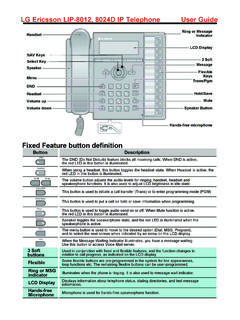
www.cts.co.nzUsing Do-Not-Disturb (DND) to Block Incoming Calls To toggle DND ON and OFF: 1. Press the DND button. Forwarding calls to another Station or Voice Mail To activate Call Forward from your phone to another phone or internal system resource: 1. Lift the handset (or press Speaker ) 2. Press the Fwd Soft button, 3. Dial the type of forward code 1-5 4.

Yealink T41P, T42G, T46G, T48G manual
www.rhmtelecom.com1.9. Do not Disturb (DND) The Do Not Disturb (DND) function rejects incoming calls automatically.(Incoming calls will be shows as "missed calls"). To activate the DND-mode on your telephone: - Push the DND soft key will enable the DND mode. Your telephone is in DND mode as soon as the display shows either or . If the DND mode is

MiVoice 5320e IP Phone User Guide
www.una.eduDND - Indicates DND (Do not disturb) mode. • 5320e IP Phone – User Guide ...

Polycom VVX 411 Full User Guide
newoag.iitk.ac.inDND—Select DND to toggle DND (Do Not Disturb) on or off. When DND is enabled, your phone won’t ring and incoming calls will go to voice mail. Settings—Select Settings to access phone features and settings to customize your phone. Lines View Lines view (shown next) is your phone’s default display.
POLYCOM VVX 450 TELEPHONE GUIDE - Nextera
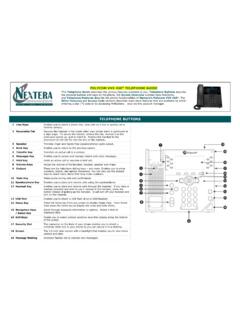
nextera.netDND. to toggle DND (Do Not Disturb) on or off. When DND is enabled, your phone won’t ring and incoming calls will go to voice mail. Select . Settings. to access phone features and settings to customize the phone. Lines Views . Lines View is the default display. Lines view displays phone lines, favorites, and soft keys.

Poly UC Software 6.4
support.polycom.comDisabling Notifications for Intercom Calls in DND Mode When the phone is set to Do Not Disturb (DND) mode, users can disable visual call notifications for incoming intercom calls. Use the call.shared.displayAlertWhenDnd parameter to configure this feature. 0 – Disable call notifications. 1 (default) – Enable call notifications.