Transcription of BASILISK ULTIMATE - Razer Inc.
1 .
.
The numbe of dots-per-inch (DPI) of mouse nu»ement. Stages Enable Number of Stages . PERFORMANCE LIGHTING CALIBRATION POWER PROFILE Quick synced with auslLlSH ULTIMATE ADVANCLD bled is be to a profile and CUSTOMIZE BRIGHTNESS SWITCH LIGHTING when whe disylay Off . CHROMA STUDIO . PERFORMANCE LIGHTING
Domain:
Source:
Link to this page:
1 .

Engineered specifically for gaming, the Razer Cynosa Pro is the perfect keyboard for you to take your gaming experience to the next level. Featuring gaming grade ... Scroll Up - Performs a “Scroll Up” command using the assigned button. Scroll Down - Performs a “Scroll Down” command using the assigned button.

keyboard worldwide, making its mark as the primary choice for esports athletes. Four years later, the Razer™ Mechanical Switch was introduced, ... You can create a new profile by clicking the button or delete the current profile by clicking ... Key Assignment Menu Initially, each key is set to DEFAULT. However, you may change the function of ...

precision users who require greater accuracy. The „acceleration off‟ option (default) turns off internal acceleration only and does not affect Windows XP acceleration, which can be turned off via the Control Panel, Mouse, Pointer Options, and unselecting „Enhance Pointer Precision‟. Windows Pointer Speed [Windows Only]

iPhone, iPad, Kindle Fire, Android phones, Razer Blade, Macbook Pro, or today’s newer Ultrabooks.) Audio / Mic Splitter Adapter Usage Devices with separate 3.5mm audio and microphone jacks (Works with most laptop and desktop computers) 2. REGISTRATION / TECHNICAL SUPPORT REGISTRATION

0 | For gamers by gamers™ The Razer Leviathan 5.1 Channel Surround Sound Bar easily fits under any desktop monitor or living room console setup. …

FOR GAMERS. BY GAMERS. 1 The Razer BlackWidow Ultimate is the keyboard that offers extreme durability. Equipped with Razer Mechanical Switches designed for gaming, individually backlit keys with dynamic lighting effects and as well as

FOR GAMERS. BY GAMERS. 1 The Razer BlackWidow Elite is a gaming keyboard designed for prime performance and a durable 80 million keystroke lifespan. A multi-function digital dial provides media controls, and the USB 2.0 and audio pass through allows

KEYBOARD PROFILES PROFILE POWER GAMING MODE is Windows CUSTOMIZE All guttong Backspace LIGHTING Backsp Standard o PROPERTIES Oven Windows Keyboard Properties HYPERSPEED MULTI-DEVICE PAIRING Open Pairing Utility RAZER MINI

keyboard properties razer huntsman mini . synapse keyboard profile gaming mode sta razer huntsman customize buttons c a rx kspace lighting default key default function function profile launch program shortcuts text 01 sable . keyboard profile adw\nced effects 'pectrum cycling

your favorite games, and enable other RGB devices to sync with Razer Chroma for a truly immersive gaming experience. CHROMA VISUALIZER The Chroma Visualizer syncs all your Chroma enabled devices and smart lights with the media you're playing for a fun and immersive listening experience. Set the mood of your room whenever you're
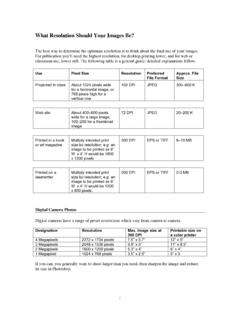
data) in an inch. Thus he resolution of digital images is often given in “Dots per Inch”(DPI) or, more precisely, “Pixels per Inch” (PPI). [The terminology gets confusing as laserwriters are also measured in terms of Dots per Inch, referring to the spacing of individual dots of toner in making up solid forms, such as letters, or ...

The 57 mm wide thermal print head uses 672 individually addressable dots to form individual raster lines of data at 300 dots per inch across the print head and either 300 or 600 dots per inch in the travel direction as directed by the print control data. …

version number, X and Y pixel density (dots per inch or dots per cm), pixel aspect ratio (derived from X and Y pixel density), thumbnail. APP0 marker used to specify JFIF extensions Additional APP0 marker segment(s) can optionally be used to specify JFIF extensions. If used, these segment(s) must immediately follow the JFIF APP0 marker ...

Optical resolution of a scanner is normally expressed in “dots per inch” (DPI). The optical resolution of any scanning device should exceed the maximum resolution needed to accurately capture the finest detail of the materials to be scanned. For standard text documents, 200 DPI should be adequate and will capture most

An A-4 size page document Colour scanned at 100 DPI (Dots per inch resolution) will generate of file of between 200-250 kb. Applicant’s Name Passport no.
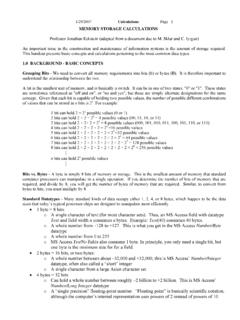
For picture files, the concepts of "dots" and "pixels" are identical. In normal usage, "dots" is associated with dots-per-inch (dpi), a standard measure of resolution for scanners and printers, while "pixels" is associated with the working resolution of a computer monitor. The memory requirement for a single dot or pixel depends upon the level

Jan 06, 2005 · Plan for Today CAD Lecture (ca. 50 min) CAD History, Background Some theory of geometrical representation SolidWorks Introduction (ca. 40 min) Led by TA Follow along step-by-step Start creating your own CAD model of your part (ca. 30 min) Work in teams of two Use hand sketch as starting point 16.810 2