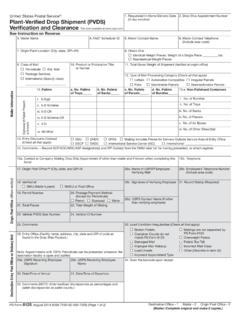
Transcription of CASS Summary Report
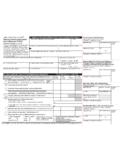
1 CASS Summary ReportCASS A11. CASS Certified Company Name2. CASS Certified Software Name & Version3. ConfigurationThis form may be generated as the output of address matching processing using CASS Certified software in conjunction with current USPS address database files. Any facsimile must contain the same information in the same format as the printed DMM Section 602 for more Software4. Z4 Change Certified Company Name5. Z4 Change Certified Software Name & Version6. Configuration7. eLOT Certified Company Name8. eLOT Certified Software Name & Version9.
2 Configuration1. MASS Certified Company Name2. MASS Certified Software Name, Version & Model ConfigurationB. List MASS A21. List Processor s Name2. Date List Processed3. Date of Database Product Useda. Master Filea. ZIP + 4 Fileb. Z4 Changeb. Z4 Changed. CRISd. CRIS5. Number of Lists6. Total Records Submitted for ProcessingC. Output 2. Validation PeriodFroma. ZIP + 4/DPV Confirmedb. Z4 Change ProcessedOutput Rating1. Total Coded4. List Name or ID No. (If using ID No., number must start with ID #)To2. Validation PeriodFromc.
3 5-Digit Codedd. CRRT Codede eLOT Assigned1. Total CodedToFromToD. Mailer I certify that the mailing submitted with this form has been coded (as indicated above) using CASS Certified software meeting all of the requirements listed in the DMM Section Mailer s Signature2. Date SignedE. Qualitative Statistical Summary (QSS) For informational Purposes Only: QSS is solely made available for the list processor s review and analysis. This information is not to be considered by the Postal Service personnel in determining rate eligibility under any circumstances.
4 See reverse for a detailed Rise DefaultHigh Rise ExactRR DefaultRR ExactLACSLink EWSS uiteLink PS Form 3553, September 2017 (Page 1 of 2) This form available on the web at Rating4. MLOCR Serial Name and Address of MailerPrivacy Notice: For information regarding our Privacy Policy, visit .c. eLOTc. eLOTThis information allows mailers and list processors to evaluate the quality of their address list processed through CASS software before its contents enter the mailstream. A significant number of Highrise default/rural route default matches, although these addresses remain eligible for postal automation rate discounts at this time, increase the costs and reduce the efficient delivery of this mail.
5 Mailer s should research to obtain secondary unit designator address information or highrise addresses and specific box number information for rural route addresses which are coded to default records on the National ZIP + 4 File. Highrise Default/RR Default Entries in this box show the number of addresses that were default matched. Defaults are matches made to addresses that contain invalid/missing secondary address or box information. A highrise default contains the building street address in the primary range field and spaces in the secondary range field.
6 A rural route default contains the route number in the primary name but also has spaces in the primary address range. LACSLink System Entries in this box show the number of addresses which have been converted through the LACSLink process. LACSLink is a data product provided by the Postal Service to allow addresses that have been converted due to addresses that have been renamed or renumbered, or for 911 emergency systems to be linked with their new address. Early Warning System (EWS)Entries in this box show the number of addresses on the processed address list that are new addresses not in the current Postal Service ZIP + 4 File.
7 These addresses are, however, valid addresses as formatted and should not be changed in any way since the Postal Service will assign ZIP + 4 s to these addresses on the next monthly ZIP + 4 SystemEntries in this box show the number of ZIP+4/DPV confirmed addresses that matched to a highrise default, and the SuiteLink process returned the appropriate suite number. Only SuiteLink enabled software will return a value in this box (Check with your software vendor for obtaining this option). These address records are valid delivery points by the Postal Service.
8 Addresses that are not confirmed by DPV are either new addresses not available on the current Delivery Sequence File, or are not valid and the list holder should further investigate to determine the accuracy of these addresses. Mailers should make every effort to ensure the quality of their address list(s). 1. List Processor s Name: Enter the company name that coded the address list(s) and/or performed ZIP + 4 /DPV confirmation using CASS Certified software. Attach a list if additional space is Date List Processed: Enter the processing date for each list.
9 If multiple lists, enter the oldest date from the Date of Database Product Used: Enter the version date of each database package used for processing. If multiple lists, enter the oldest version date from the List Name or ID No.: Print the name or identification number of the address list. If more than one list is used, leave blank. If the identification number is used, the number MUST be preceded by ID# .5. Number of Lists: Enter the number of lists used to produce the Total Records Submitted for Processing: Enter the total number of address records (from all lists in item B5) submitted at the time the list(s) was NameZIP + 4/DPV ConfirmedFive-Digit CodedTotal Carrier Route CodedeLOT Sequence No.
10 Assigned30 days before (the 15th of each month or bi- monthly) or no later than 105 days after the file days before (the 15th of each month or bimonthly) or no later than 105 days after the ZIP + 4, Five-digit ZIP, or the Carrier Route product days before or up to 105 days after the ZIP + 4, Five-Digit ZIP , or the Carrier Route product date (the 15th of each month or bimonthly) or up to 105 days after the file days before or up to 105 days after the eLOT file product date (the 15th of each month or bimonthly).180 days after the ZIP + 4 valid From days after the Five-Digit Valid From days after the Carrier Route Valid From days after the eLOT valid From DateTo , , , & Company Name: Enter the name for each kind of software as it appears on the CASS /MASS , , , & Software Name and Version: Enter name and version for each kind of software as it appears on the CASS/MASS , , , & Configuration: Enter the specific software configuration parameter settings as it appears on the CASS/MASS MLOCR.