Transcription of Clicker Remote Programming Instructions
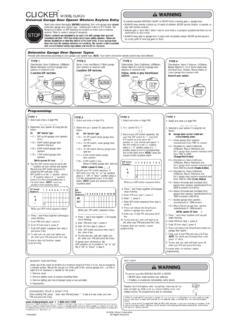
1 Clicker MODEL KLIK1 UUniversal Garage Door Opener Remote ControlTo prevent possible SERIOUS INJURY or DEATH from a moving gate or garage door: ALWAYS keep Remote controls out of reach of children. NEVER permit children to operate, or play with Remote control transmitters. Activate gate or door ONLY when it can be seen clearly, is properly adjusted and there are no obstructions to door travel. ALWAYS keep gate or garage door in sight until completely closed. NEVER permit anyone to cross path of moving gate or door.
2 2008, Clicker Corporation114A3485C All Rights ReservedRead Instructions thoroughly BEFORE with garage door closed. Identify garage door opener type -Smart/Learn button or DIP Switch. Smart/Learn button or DIP Switches are located on motor unit or external receiver. Refer to owner s manual if products are intended to be used only with garage door openers manufactured after 1993 that utilize photo-eyes safety sensors. These are always located on or near the bottom of the door track. If your garage door does not have the sensors attached and working, the opener is not compliant with current federal safety regulations and should be with Instructions according to your type of garage door : 2 Position DIP Switch:If Programming fails reverse DIP switches (OFF to ON and ON to OFF).
3 **3 Position DIP Switch:For Chamberlain remotes DO NOT use the 0 position, use + or - . If you already have a 3-button Remote , DIP switch #1 must be set to - if the large button is to open the door. It may be necessary to reprogram original Remote RemoteExisting Remote34 Press program button until LED DIP switches. Turn extra switches OFF.**ORDIP SWITCH SMART/LEARN BUTTON231 KGKG4 Motor UnitSelect a button to program. Press button times ensuring LED stops flashing after each press. Code is accepted when door CONTROL BATTERYNOTICE: To comply with FCC and or Industry Canada (IC) rules, adjustment or modifications of this receiver and/or transmitter are prohibited, except for changing the code setting or replacing the battery.
4 THERE ARE NO OTHER USER SERVICEABLE to Comply with FCC Standards FOR HOME OR OFFICE USE. Operation is subject to the following two conditions: (1) this device may not cause harmful interference, and (2) this device must accept any interference received, including interference that may cause undesired of batteries properly. Replace ONLY with 3V2032coin prevent possible SERIOUS INJURY or DEATH: NEVER allow small children near batteries. If battery is swallowed, immediately notify reduce risk of fire, explosion or chemical burn: Replace ONLY with 3V2032 coin batteries.
5 Do NOT recharge, disassemble, heat above 100 C (212 F) or B# of Brand Description Yeartimes to pressbutton11 Chamberlain * 9 Position 90- 9212 Chamberlain * 9 Position Canada 83- 8913 Genie 12 Position 8514 Linear Multicode 10 Position 7615 Chamberlain 8
6 Position 83- 8916 Stanley/Multicode 10 Position 7617 Genie 9 Position 8518 Linear Moore-O-Matic 8 Position 7619 Chamberlain * 7 Position 83- 89 CHART A# of Brand Type/Color of Yeartimes to Smart/Learn pressbutton 1 Linear Mega-Code 97-Current2 Chamberlain * Orange/Red 97- 033 Chamberlain * Purple 95- Current4 Chamberlain * Green 93- 965 Genie Overhead Door Intellicode 95- 056 Genie Overhead Door Intellicode 05 Current7 Stanley Secure
7 Code 989 Wayne Dalton Rolling Code 9911 Chamberlain * 9 Position 90- 921-800-442-1255 Chamberlain, LiftMaster and Moore-O-Matic are Trademarks of Chamberlain Group. Genie is a Trademark of Overhead Door Corporation. Overhead Door is a Trademark of Overhead Door Corporation. Linear is a Trademark of Linear Corporation. Master Mechanic is a Trademark of TruServ. Sears is a Trademark of Sears & Roebuck.
8 Stanley is a Trademark of The Stanley Works. Wayne Dalton is a trademark of Wayne Dalton Corporation. Do It is a trademark of Do It Best program complete. Press selected button to test. If unit does not work, return to Step and release the smart/learn 1 See Chart B to determine # of times to press button and write in blank on step SWITCH SMART/LEARN BUTTONP ress program program button until LED Chart A to determine # of times to press button and write in blank on step : Your opener may appear different and you may have to remove the light lens to access the learn button.
9 *NOTE: LiftMaster, Do-It, Master Mechanic, Raynor, True Value and Sears Craftsman are compatible with Chamberlain 121110985376412 LED IndicatorButton 1 Button 2 Program ButtonBatteryDIP SwitchesBattery CoverMotor UnitONSTOPNOTE: If there are problems Programming to button 1, program tobutton a button to program. Press button times ensuring LED stops flashing after each press. Code is accepted when one of the following occurs: Programming complete. Press selected button to test. If unit does not work, return to Step Modelo KLIK1U de CLICKERC ontrol remoto universal para abridores de puertas de garajesPara impedir posibles LESIONES GRAVES o MORTALES debido al movimiento de una compuerta o puerta de garaje: Mantenga SIEMPRE los controles remotos fuera del alcance de los ni os.
10 No permita NUNCA a ni os que las operen ni que jueguen con los transmisores de control remoto Active la compuerta o la puerta S LO cuando la pueda ver claramente, est bien ajustada y no haya obstrucciones en el recorrido de la puerta. Mantenga SIEMPRE la compuerta o la puerta del garaje a la vista hasta que est completamente cerrada. No deje NUNCA que nadie cruce la trayectoria de la compuerta o puerta en NADVERTENCIAADVERTENCIAADVERTENCIAADVERT ENCIA 2008, Clicker Corporation114A3485C Todos los derechos reservadosLea completamente ls instrucciones ANTES de con la puerta del garaje cerrada.