Example: stock market
Getting Started with Adobe After Effects
The first time you open Adobe After Effects CC 2015, you will see the Welcome Window. This window is described below: Figure 1 - Welcome Window 1. On the left-hand side, you will see a list of Recent Projects. These serve as links to your projects on your hard drive. If this is the first time opening AE, you will see a blank area like in the image
Tags:
Information
Domain:
Source:
Link to this page:
Documents from same domain

Microsoft Office Access 2013 - Kennesaw State …
apps.kennesaw.eduThe Backstage view is more prominent in Access 2013. When first opening the program, the user will be presented with options to open recent documents, start a new blank database, or select from a number of

Microsoft Office Access 2013 - Kennesaw State …
apps.kennesaw.eduMicrosoft Office Access 2013. Before reading this booklet, it is recommended that you read the following Access 2013 documents on the UITS Documentation Center at

Microsoft Office Word 2013 - Kennesaw State …
apps.kennesaw.eduMicrosoft Office Word 2013 An Introduction to Word 2013 Training, Outreach & Learning Technologies ... It includes an introduction to the Microsoft Office 2013 interface, and covers the various aspects of creating, formatting, editing, saving, and printing a document in Word 2013.

Microsoft Office Excel 2016 for Windows - Application Gateway
apps.kennesaw.eduMicrosoft Office: Excel 2016 for Windows Advanced Excel Tools ... Advanced Excel Tools workshop. The booklet will explain how to create a simple macro, how to use nested formulas, how to create templates, hide/unhide rows and columns, and protect/unprotect your …
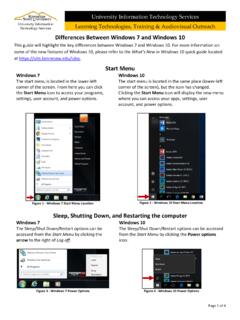
Differences between Windows 10 and Windows 7
apps.kennesaw.eduDifferences Between Windows 7 and Windows 10 This guide will highlight the key differences between Windows 7 and Windows 10. For more information on some of the new features of Windows 10, please refer to the What’s New in Windows 10 quick guide located at https://uits.kennesaw.edu/cdoc.
Microsoft Windows 10 - Kennesaw State University
apps.kennesaw.eduRevised: 10/12/2018 Page 6 of 57 Introduction This booklet is designed to give you a foundation and framework when using the Microsoft Windows

Microsoft Office PowerPoint 2016 for Windows
apps.kennesaw.eduIntroduction Microsoft Office PowerPoint 2016 is a presentation software application that aids users in the creation of professional, high-impact, dynamic presentations. Slides are the building blocks of a PowerPoint presentation. By using slides, the focus is not only on the speaker, but on the visuals (slides) as well. Learning Objectives

Microsoft Office Access 2016 for Windows
apps.kennesaw.eduIntroduction Microsoft Access 2016 allows people to effectively and efficiently organize data. The various sections presented in this document will help you to build a solid knowledge foundation of the software. This booklet is the companion document to the Intro to Access 2016 workshop. It …

Microsoft Office Excel 2016 for Windows
apps.kennesaw.eduRevised: 6/2/2016 Page 5 of 32 Introduction This booklet is the companion document to the Excel 2016: Intro to Excel workshop. It includes an introduction to the Microsoft Office 2016 interface and covers the various aspects of creating, formatting, editing, saving, and printing a document in Excel 2016. Learning Objectives

Microsoft Office Word 2016 for Windows
apps.kennesaw.eduCustomizing the Ribbon You can hide/unhide tabs that you do not use, or create your own tab of favorite tools. The following explains how to customize the Ribbon to build your own tabs and groups. 1. Click the File tab. Figure 6 - File Tab (Backstage View) 2. …
Related documents

การใช้โปรแกรม Photoshop
www.bangkudee.ac.thเริ่มต้นใช้งาน Photoshop CC 2015 1. วิธีการเข้าสู่โปรแกรม Photoshop CC 2015 ดับเบิ้ลคลิก ที่ไอคอนดังรูปเพื่อเข้า โปรแกรมPhotoshop 2. หน้าตาของโปรแกรม Photoshop ...