Example: biology
GNS 430/430A - static.garmincdn.com
GNS 430 Quick Reference FREQUENCY SELECTION 190-00140-01 Rev. G 5 fReQUeNCy SeLeCtioN 1) If the tuning cursor is not currently in the desired window (COM or VLOC), press the
Tags:
Information
Domain:
Source:
Link to this page:
Documents from same domain
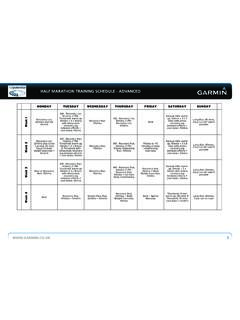
HALF MARATHON TRAINING SCHEDULE -‐ …
static.garmincdn.comhalf marathon training schedule - advanced www.garmin.co.uk 1 half marathon training schedule -‐ advanced monday tuesday wednesday thursday friday …

owner’s manual - Garmin International
static.garmincdn.comnüvi 30/40/50 Owner’s Manual 1 Getting Started ‹ WARNING See the Important Safety and Product Information guide in the product box for product warnings and

Owner’s Manual - Garmin International
static.garmincdn.comGetting the Owner's Manual You can get the latest owner's manual from the web. 1 Go to www.garmin.com /support. 2 Select Manuals . 3 Follow the on-screen instructions to select your product.

Garmin Navigation Map Update - …
static.garmincdn.com6 Garmin Navigation Map Update Garmin Express 4. If the customer’s email address is known, then this can be added to register the unit. Map Update Notifications can be

Approach S3 - Garmin International
static.garmincdn.comTable of Contents Getting Started ..... 1 Charging the Device ..... 1

GPS-ENABLED CYCLING COMPUTER - Garmin …
static.garmincdn.comEdge 500 Owner’s Manual 1 Getting Started Getting Started wArNING Always consult your physician before you begin or modify any exercise program.

nüvi 1100/1200/1300/1400 series owner’s manual
static.garmincdn.comnüvi 1100/1200/1300/1400 Series Owner’s Manual i Table of Contents Table of Contents nüvi 1100/1200/1300/1400 Series Models .....iv

INFORMATION NOTICE CONCERNING THE …
static.garmincdn.com2 Transfer of Personal Data to Other Garmin Companies Garmin will take appropriate technical and organizational actions to protect the processing of the
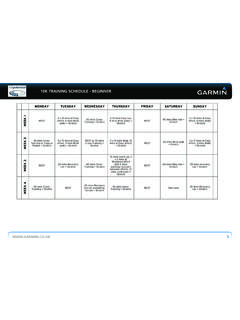
10K TRAINING SCHEDULE - BEGINNER ... - Garmin …
static.garmincdn.com10k training schedule - beginner www.garmin.co.uk 3 monday tuesday wednesday thursday friday saturday sunday week 9 at rest 60 mins cross-training + stretch

maps + more
static.garmincdn.comUser’s manual maps + more User’s manual Table of contents III Table of contents 1 Introduction ..... 9
Related documents
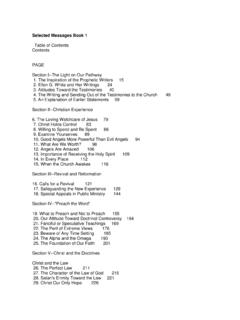
Selected Messages Book 1 - EllenWhiteDefend
ellenwhitedefend.comSelected Messages Book 1 Table of Contents Contents PAGE Section I--The Light on Our Pathway 1. The Inspiration of the Prophetic Writers 15
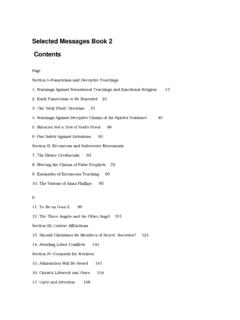
Selected Messages Book 2 Contents - EllenWhiteDefend
ellenwhitedefend.comSelected Messages Book 2 Contents Page Section I--Fanaticism and Deceptive Teachings 1. Warnings Against Sensational Teachings and Emotional Religion 13
Is there an effect of subliminal messages in music on ...
www.jasnh.com32 Journal of Articles in Support of the Null Hypothesis. JASNH, 2006, Vol. 4, No. 2 Subliminal messages in music? 33 These messages were presented so quickly (between 1/2000 and 1/3000 of a

The 1999 and 2003 messages explained - plover.com
www.plover.com1/1 The 1999 and 2003 messages explained by S.Dumas for more information visit our web site: http://www.activeseti.qc.tc

Wireless Networks - ece.rutgers.edu
www.ece.rutgers.eduIvan Marsic • Rutgers University 4 the messages to the base station in the cell of the intended recipient. In turn, this remote base station broadcasts the message within its cell for …

SD1+ Speech Dialler - Farnell element14 | Electronic ...
www.farnell.comProgramming SD1+ 32 NOTES: SD1+ 1 Introduction This manual describes how to install and program all SD1+ units manufactured after June 2008. Note that the programming menu for units

TELSTRA EASYCALL® 4 - ZTE Australia
www.ztemobiles.com.au• Press Down (5 times) > OK to enter the Settings Menu • Press Down (6 times) to get to Switch Setup • Press OK to select Switch, Move the cursor to On then press OK to enable the switch. • Press Back then Down to get to Switch Number: 1. The first location will define the voice call number. 2. Locations 2-5 define the SMS numbers.