Example: air traffic controller

How to Remove the ActivClient message stating …

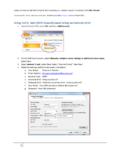
How to Remove the ActivClient message stating you do not have a CAC reader plugged in (when you don t have your CAC reader plugged in) ONLY for ActivClient Last reviewed on 12 March 2017 by Michael J. Danberry, 1. Right click the ActivClient icon (by your clock) and select: Advanced Configuration Manager. If you do not see the ActivClient icon (by your clock) it could mean you either don t have ActivClient installed, or it is not running. If it is the latter, you can also get to the Advanced Configuration Manager by navigating to: Start, All Programs, ActivIdentity and then click on: Advanced Configuration Manager Click on: Notifications Management. On the right side, look for Display No Smart Card reader Alert. Change the Yes to No. (See image below). NOTE: If you don t see what is below, it may mean that when you installed ActivClient , you may not have selected Typical install. You will need to reinstall ActivClient to give you the Advanced Configuration Manager.

How to Remove the ActivClient message stating you do not have a CAC reader plugged in (when you don’t have your CAC reader plugged in) ONLY for ActivClient

Tags:

  Message, Reader, Remove, Tasting, To remove the activclient message stating, Activclient

Information

Domain:

Source:

Link to this page:

Please notify us if you found a problem with this document:

Other abuse

Advertisement

Transcription of How to Remove the ActivClient message stating …

1 How to Remove the ActivClient message stating you do not have a CAC reader plugged in (when you don t have your CAC reader plugged in) ONLY for ActivClient Last reviewed on 12 March 2017 by Michael J. Danberry, 1. Right click the ActivClient icon (by your clock) and select: Advanced Configuration Manager. If you do not see the ActivClient icon (by your clock) it could mean you either don t have ActivClient installed, or it is not running. If it is the latter, you can also get to the Advanced Configuration Manager by navigating to: Start, All Programs, ActivIdentity and then click on: Advanced Configuration Manager Click on: Notifications Management. On the right side, look for Display No Smart Card reader Alert. Change the Yes to No. (See image below). NOTE: If you don t see what is below, it may mean that when you installed ActivClient , you may not have selected Typical install. You will need to reinstall ActivClient to give you the Advanced Configuration Manager.

2

Related search queries