Transcription of INTRODUCTION http://www.kwsp.gov
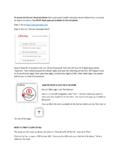
1 Employees provident fund i-Akaun activation 2 INTRODUCTION Members are required to register for i-Akaun before using this facility. Registration can be done at any nearby EPF Kiosk or Counter or contact the EPF Contact Management Centre at 03-89226000. Members can activate their i-Akaun by using the temporary the User ID and Password given after registration. activation must be made through the EPF official website at within 30 days. 1 Go to Choose Login to i-Akaun Members 1 Employees provident fund i-Akaun activation 3 Enter temporary User ID provided in the SMS and click Next 2 2 3 Enter the temporary Password provided in the SMS and click Login 3 Employees provident fund i-Akaun activation 4 4 4 Choose Agree and click Next Employees provident fund i-Akaun activation 5 5 6 5 6 7 8 The User ID textbox will be pre-filled with the Temporary User ID provided in the SMS.
2 Members can choose to change it if desired (User ID can only be change once during the activation process) The new User ID must contain letters or numbers or a combination of both, and must be 8 - 16 characters. Create a New Password (must contain between 8 - 20 aplhanumeric characters) and confirm. Choose Online Image Enter a Secret Phrase (contains letters or numbers or a combination of both, maximum of 10 characters) and click Next 7 8 Employees provident fund i-Akaun activation 6 9 9 Successful activation screen will be displayed Members can continue to log in into i-Akaun