Transcription of Invacare eForms
1 Invacare eForms For additional information, visit Customer Service: 800-333-6900 Fax: 800-678-4682 To order Literature: 800-828-6282. Invacare eForms offer new functionality! Invacare is pleased to offer you an upgraded solution to your ordering process. Our enhanced order forms allow you to fill out a form electronically, print and fax the form, save and email* it to Customer Service, or maintain the business practices that work for you today. The format has been revised to reveal a cleaner look with electronic selection and input functions. *Saving and emailing the eForms is available with Acrobat Professional software If you are using Adobe Reader If you are using Adobe Acrobat Professional View and download all forms View and download all forms Save blank versions of the forms to your desktop Save blank AND completed versions of the forms Complete forms electronically to maintain electronic records Print blank or completed forms Complete forms electronically Fax completed forms to Customer Service Print blank or completed forms Fax completed forms to Customer Service Email completed forms to Customer Service by using Please note: The 'Email' button at the end of the form will not work with Adobe Reader.
2 The 'Email' button will only work while using the 'Email' button at the end of the form. Adobe Acrobat Professional. For information on downloading Adobe Reader for free, or puchasing Adobe Acrobat Professional, please visit NOTE: All specifications and dimensions are approximate. For the most current pricing information, go to Page 1 of 4. Invacare Solara 3G SmartSelect Wheelchair Configurations Price List and Order Form Customer Service: 800-333-6900 Fax: 800-678-4682 To order literature: 800-828-6282. TRANSACTION TYPE: Order Quote Date Account # #. Company Name Phone #. Address City State 0 Zip Code Country Contact Name Comments Special Note HCPCS codes are not intended to be, nor should be considered billing or legal advice. Providers are responsible for determining the appropriate billing codes when submitting claims to the Medicare Program and should consult an attorney or other advisor to discuss specific situations in further detail.
3 SOLARA 3G SMARTSELECT STOCK WHEELCHAIR CONFIGURATIONS. Model Quantity Number Description List Price SOLARA3 GLS1 16 x 16 Frame with 12" Rear $ SOLARA3 GLS2 18" x 18" Frame with 12" Rear Wheels .. $ SOLARA3 GLS3 20" x 20" Frame with 12" Rear Wheels .. $ SOLARA3 GLS4 18" x 18" Frame with 24" Rear Wheels .. $ SOLARA3 GLS5 20" x 20" Frame with 24" Rear Wheels .. $ All Solara 3G SmartSelect configurations include Transport Brackets (TRBKTS*) Please see Chart 1 on the following page for specific configurations. For seating needs please refer to the following form: *Transport Tie Down TRRO includes four factory-installed transport brackets and wheelchair Invacare Matrx Seating Series Price List Form 11-036. anchored pelvic belt. TRRO has been crash-tested in accordance with To order any of the following products, ANSI/RESNA WC Vol 1. Section 19 Frontal Impact Test please contact Invacare Customer Service. requirements for wheelchairs with a 168 lbs.
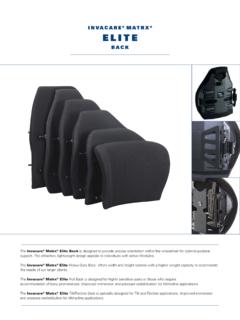
4 Crash dummy, which corresponds to a person with a weight of 114 lbs. to 209 lbs. CUSHIONS. TRBKTS includes four factory-installed wheelchair transport brackets. Model Number Product Name TRBKTS has not been crashtested in accordance with WC19. Use these MA-VI Matrx Vi transport brackets only to secure an unoccupied wheelchair during transport. PS-V Matrx PS. FT Matrx Flotech As of this date, the Department of Transportation has not approved any tie- down systems for transportation of a user while in a wheelchair, in a BACKS. moving vehicle of any type. It is Invacare 's position that users of Model Number Product Name wheelchairs should be transferred into appropriate seating in vehicles for transportation and use be made of the restraints made available by the auto MPB-V Matrx PB. industry. Invacare cannot and does not recommend any wheelchair MPBD Matrx PB Deep transportation systems. PBE Matrx Elite EDB Matrx Elite Deep NOTE: All specifications and dimensions are approximate.
5 For the most current pricing information, go to Revised May 28, 2012 Form Invacare Solara 3G SmartSelect Wheelchair Configurations CHART 1: CONFIGURATION OPTIONS. MODEL NUMBER SOLARA3 GLS1 SOLARA3 GLS2 SOLARA3 GLS3 SOLARA3 GLS4 SOLARA3 GLS5. Frame Style Tilt in Space Tilt in Space Tilt in Space Tilt in Space Tilt in Space Transport Selection TRBKTS TRBKTS TRBKTS TRBKTS TRBKTS. Cable Free Foot Release Cable Free Foot Release Cable Free Foot Release Traditional Traditional Tilting Option Right Mount Right Mount Right Mount Hand Release Hand Release Seat Width Range 14-18" 16-20" 18-22" 16-20" 18-22". Seat Width 16" 18" 20" 18" 20". Seat Depth Range 15-19" 15-19" 18-22" 15-19" 18-22". Seat Depth 16" 16" 19" 18" 19". Seat to Floor Height 17" 17" 17" 18" 18". Frame Color Wet Black Wet Black Wet Black Electric Red Electric Blue Caster 6 x 2" Semi Pneumatic 6 x 2" Semi Pneumatic 6 x 2" Semi Pneumatic 8 x 1" Urethane 8 x 1" Urethane 24" Composite 24" Composite Rear Wheel 12" Composite 12" Composite 12" Composite Aluminum Handrims Aluminum Handrims Axle Type Quick Release Quick Release Quick Release Quick Release Quick Release Rear Tire Flat Free Inserts Flat Free Inserts Flat Free Inserts Flat Free Inserts Flat Free Inserts Foot Operated Wheel Locks Push to Lock Push to Lock Push to Lock Push to Lock Push to Lock Seat Pan Flush Flush Flush Flush Flush Arm Height High High Low High High Conventional T-Arms Flip Back Two Point Conventional Full Length Adjustable Height Full Length Fixed Height Desk Length Two Point Full Length Two Point Adjustable Desk Length Two Point Arm Style Adjustable Height Arms Arms Arms Adjustable Height Arms Standard Aluminum Standard Aluminum
6 Standard Aluminum Standard Aluminum Standard Aluminum Back Cane Back Cane Back Cane Back Cane Back Cane Back Type Fold Down Fold Down Fold Down Fold Down Fold Down Back Height 20" (Straight Cane) 24" (Straight Cane) 24" (Straight Cane) 24" (Straight Cane) 24" (Straight Cane). Adj. Angle Stroller Adjustable Angle Adjustable Angle Stroller Handle None None Stroller Handle Handle Back Accessories Inside Mount Inside Mount Outside Mount 70 Non Tapered 70 Non Tapered 70 Non Tapered 70 Swingaway 90 Non Tapered Front Riggings Swingaway Swingaway Swingaway MFX Swingaway Push Button Buckle Push Button Buckle Push Button Buckle Push Button Buckle Push Button Buckle Seat Strap Seat Strap Seat Strap Seat Strap Seat Strap Positioning Accessories Heel Loops Heel Loops Heel Loops Heel Loops Heel Loops Misc. Accessories Rear Anti-tippers Rear Anti-tippers Rear Anti-tippers Rear Anti-tippers Rear Anti-tippers Specifications Frame Style Tilt-in-Space Seat width + 8 1/4" (12" wheels).
7 Overall Width Seat width + 9 1/4" (18-24" wheels). Seat Widths 16", 18", 20". Seat Depths 16", 18", 20". Back Height 20", 24". Adjustable Angle Back 0 , 5 , 10 , 15 , 20 , 25 , 30 . Tilt Range -5 to 50 . Weight Limit 300 lbs. Weight 34 1/2 lbs*. Warranty Lifetime on frame and crossbraces *Base chair without Accessories NOTE: All specifications and dimensions are approximate. For the most current pricing information, go to Revised May 28, 2012 Page 3 of 4 Form Invacare Solara 3G SmartSelect Wheelchair Configurations Tilt Assist Explained The Solara 3G wheelchair is shipped from the factory pre-configured with When adjusting the Tilt Assist there are 4 bolts to change (2 on one of three Tilt Assist settings: Front, Mid or Rear, based solely on the each side.) See the illustration to the left and chart above. seat depth range and seat depth ordered. This setting describes how the user's weight is distributed on the frame itself, , does one front load the chair, The Rear setting has the rocker tube telescoped entirely into the rear load or is the weight evenly distributed.
8 As compared to the 2G, the 3G seat frame support tube where the adjustment bolt is in the bottom requires up to 30% less force needed to tilt because of these settings. If hole. Along the base frame the bolt is in the top hole. ( factors other than seat depth or seat depth range come into play that affect the accommodates a seat depth that is in the highest end of the seat weight distribution of the chair, the provider has the ability to change the Tilt depth range). Assist setting in the field by simply adjusting 2 screws on each side of the frame. For the Mid setting the adjustment bolt is simply in the middle hole along the rocker tube which telescopes out and the middle hole along the base frame. ( optimal for a seat depth in the middle of Tilt Assist Factory Setting the seat depth range). Seat Depth Range 15" - 19" Seat Depth Range 18" - 22". The Front setting has the bolt in the top hole of the rocker tube D15 Front Setting which is fully telescoped out of the seat frame support tube and in D16 Front Setting the bottom hole along the base frame.
9 ( accommodates a seat D17 Mid Setting depth in the lowest end of the seat depth range). D18 Rear Setting Front Setting D19 Rear Setting Front Setting D20 Mid Setting D21 Rear Setting D22 Rear Setting The factory setting may need to be adjusted if a seating system is added. The factory setting does not account for conditions outside of the seat depth and seat depth range which may cause more weight to be distributed to the front or back of the chair. Comments Print Form Email Form Clear Form NOTE: All specifications and dimensions are approximate. For the most current pricing information, go to Invacare Corporation USA 2010 Invacare Corporation Form One Invacare Way Invacare , the Blue Medallion Design, Yes, you can, Smartleg and Tracer are registered Elyria, OH USA trademarks and IVC is a trademark of Invacare Corporation. Specifications and prices are 44035-4190 subject to change without notification. 800-333-6900. Page 4 of 5.
10 Revised May 28, 2012 Form