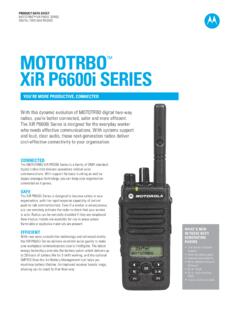
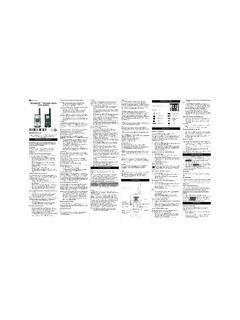
Transcription of MENU Push to Talk Accessory Port MON (Low) Control …
1 MT SeriesKEM-ML34301 ASafety and General InformationImportant Information on Safe and Efficient OperationRead This Information Before Using Your information provided in this document supersedes the general safetyinformation in user guides published prior to December 1, and Receive ProcedureYour two-way radio contains a transmitter and a receiver. To Control yourexposure and ensure compliance with the general population/uncontrolled environment exposure limits, always adhere to the followingprocedure: Transmit no more than 50% of the time. To receive calls, release the PTT button. To transmit (talk), press the Push to Talk (PTT) 50% of the time, or less, is important because the radiogenerates measurable RF energy exposure only when transmitting (interms of measuring standards compliance).Exposure to Radio Frequency EnergyYour Motorola two-way radio complies with the following RF energyexposure standards and guidelines: United States Federal Communications Commission, Code of FederalRegulations; 47 CFR part 2 sub-part J.
2 American National Standards Institute (ANSI)/Institute of Electricaland Electronic Engineers (IEEE) C95. 1-1992. Institute of Electrical and Electronics Engineers (IEEE) Edition. International Commission on Non-Ionizing Radiation Protection(ICNIRP) 1998. Ministry of Health (Canada) Safety Code 6. Limits of Human Exposureto Radiofrequency Electromagnetic Fields in the Frequency Rangefrom 3 KHz to 300 GHz, 1999. Australian Communications Authority Radiocommunications(Electromagnetic Radiation Human Exposure) Standard, 2003. ANATEL ANNEX to Resolution No. 303 of July 2, 2002. ANATEL ANNEX to Resolution No. 533 of September 10, 2009. To ensure optimal radio performance and make sure human exposure toradio frequency electromagnetic energy is within the guidelines set forthin the above standards, always adhere to the following Radio Operation and EME ExposureAntenna CareUse only the supplied or an approved replacement antennas, modifications, or attachments could damage theradio and may violate FCC NOT hold the antenna when the radio is IN USE.
3 Holding theantenna affects its effective OperationTo maintain compliances with FCC/Health Canada RF exposureguidelines if you wear a radio on your body when transmitting alwaysplace the radio in a Motorola-supplied or approved clip holder, holster,case or body harness for this product . Use of non-Motorola-approvedaccessories may exceed FCC/Health Canada RF exposure you do not use one of the Motorola-supplied or approved body-wornaccessories and are not using the radio held in the normal use position,ensure the radio and its antenna are at least 1 inch ( cm) from yourbody when OperationIf applicable, when using any data feature of the radio with or without anaccessory cable, position the radio and its antenna at least one inch( cm) from the Audio Accessories 53724: Remote Speaker with Push-to-Talk Microphone 53725: Headset with Swivel Boom Microphone 53727: Earbud with Push-to-Talk Microphone 53728: Flexible Ear Receiver 56320: Earpiece with Boom MicrophoneElectromagnetic Interference/CompatibilityNote: Nearly every electronic device is susceptible to electromagneticinterference (EMI) if inadequately shielded, designed or otherwiseconfigured for electromagnetic compatibility.
4 This device complies withPart 15 of the FCC Rules. Operation is subject to the following twoconditions:1. This device may not cause harmful interference; and2. This device must accept any interference received, includinginterference that may cause undesired CanadaThe term "IC:" before the equipment certification number only signifiesthat the Industry Canada technical specifications were avoid electromagnetic interference and/or compatibility conflicts, turnoff your radio in any facility where posted notices instruct you to do or health care facilities may be using equipment that issensitive to external RF instructed to do so, turn off your radio when onboard an use of a radio must be in accordance with applicable regulationsper airline crew Devices PacemakersThe Advanced Medical Technology Association recommends that aminimum separation of 6 inches (15 cm) be maintained between ahandheld wireless radio and a pacemaker. These recommendations areconsistent with the independent research by and recommendations ofthe Food and Drug with pacemakers should: ALWAYS keep the radio more than 6 inches (15 cm) from theirpacemaker when the radio is turned ON.
5 Not carry the radio in the breast pocket. Use the ear opposite the pacemaker to minimize the potential forinterference. Turn the radio OFF immediately if there is any reason to suspect thatinterference is taking Devices Hearing AidsSome digital wireless radios may interfere with some hearing aids. In theevent of such interference, you may want to consult your hearing aidmanufacturer to discuss Devices OtherIf you use any other personal medical device, consult the manufacturerof your device to determine if it is adequately shielded from RF physician may be able to assist you in obtaining this and General Use While DrivingCheck the laws and regulations regarding the use of radios in the areawhere you drive, and always obey them. If you do use your radio whiledriving, please: Give full attention to driving and to the road. Use hands-free operation, if available. Pull off the road and park before making or answering a call if drivingconditions so use of a two-way radio while engaged in activities requiringconcentration may cause distraction or otherwise impair your ability tosafely participate in such activities.
6 Always use technology not place a portable radio in the area over an air bag or in the air bagdeployment area. Air bags inflate with great force. If a portable radio isplaced in the air bag deployment area and the air bag inflates, the radiomay be propelled with great force and cause serious injury to occupantsof the Explosive AtmospheresTurn off your radio prior to entering any area with a potentially explosiveatmosphere. Only radio types that are especially qualified should beused in such areas as Intrinsically Safe. Do not remove, install orcharge batteries in such areas. Sparks in a potentially explosiveatmosphere can cause an explosion or fire resulting in bodily injury oreven More InformationFor further information, you may call Motorola Solutions, Inc. at 1-800-638-5119 ( and Canada), e-mail us at or visit uson the Internet at : The areas with potentially explosive atmospheres referred toabove include fueling areas such as below decks on boats, fuel orchemical transfer or storage facilities, areas where the air containschemicals or particles (such as grain, dust or metal powders) and anyother area where you would normally be advised to turn off your vehicleengine.
7 Areas with potentially explosive atmospheres are often but notalways Caps and AreasTo avoid possible interference with blasting operations, turn off yourradio when you are near electrical blasting caps, in a blasting area, or inareas posted Turn off two-way radios. Obey all signs and CautionsAntennasDo not use any portable radio that has a damaged antenna. If adamaged antenna comes into contact with your skin , a minor burn batteries can cause property damage and/or bodily injury such as burnsif a conductive material like jewelry, keys or beaded chains touchexposed terminals. The conductive material may complete an electricalcircuit (short circuit) and become quite hot. Exercise care in handling anycharged battery, particularly when placing it inside a pocket, purse or othercontainer with metal care when removing NiMH or AA batteries. Do not use sharp orconductive tools to remove either of these Charger Safety Instructions:Save these Instructions1.
8 Do not expose the charger to rain or Do not operate or disassemble the charger if it has received a sharpblow, or has been dropped or damaged in any Never alter the AC cord or plug provided with the unit. If the plug willnot fit the outlet, have the proper outlet installed by a qualifiedelectrician. An improper condition can result in a risk of To reduce the risk of damage to the cord or plug, pull the plug ratherthan the cord when disconnecting the charger from the To reduce the risk of electric shock, unplug the charger from theoutlet before attempting any maintenance or Use of an attachment not recommended or sold by Motorola mayresult in a risk of fire, electric shock or personal Make sure the cord is located so it will not be stepped on, trippedover or subjected to damage or An extension cord should not be used unless absolutely of an improper extension cord could result in a risk of a fireand/or electric shock. If an extension cord must be used, make surethat: The pins on the plug of the extension cord are the same number,size and shape as those on the plug of the charger.
9 The extension cord is properly wired and in good condition. The extension cord size is 18 AWG for lengths up to 100 feet, and16 AWG for lengths up to 150 The supply cord of the AC adaptor cannot be replaced. If the cord isdamaged, call customer service at 1-800-638-5119 ( and Canada)or e-mail us at InformationYour Motorola radio operates on FRS & GMRS frequencies in Canada &in the USA. For Canadian citizens, use of these frequencies is subject tothe rules & regulations of Industry Canada (IC). IC requires no licensewhen operated in Canada. For USA citizens, use is subject to the rulesand regulations of the Federal Communications Commission (FCC) . TheFCC requires that all operators using GMRS frequencies obtain a radiolicense before operating their equipment. To obtain the FCC forms, pleasevisit the FCC s Web site at tosource form 605 and 159, which includes all the instructions you willneed. If you wish to have the document faxed or mailed, or if you havequestions, please use the following contact information:Changes or modifications not expressly approved by Motorola may voidthe user s authority granted by the IC/FCC to operate this radio andshould not be made.
10 To comply with IC/FCC requirements, transmitteradjustments should be made only by or under the supervision of aperson certified as technically qualified to perform transmittermaintenance and repairs in the private land, mobile and fixed servicesas certified by an organization representative of the user of thoseservices. Replacement of any transmitter component (crystal,semiconductor, etc.) not authorized by the IC/FCC equipmentauthorization for this radio could violate IC/FCC :Use of this radio outside the country where it was intended to bedistributed is subject to government regulations and may be prohibited. Radio Battery MeterThe radio battery icon shows the battery charge level, from full toempty. When the radio has one segment left, the radio chirps periodically or after releasing(Low Battery Alert).Removing the NiMH Battery Pack1. Turn the radio With the back of the radio facing you, loosen the retaining screw onthe battery door and open the Remove the NiMH battery pack by pulling the ribbon attached to the Close the battery cover and tighten the retaining screw on thebattery the Three AA Alkaline Batteries ( Optional Accessory )1.