Transcription of Microsoft Teams Rooms System for Medium Room
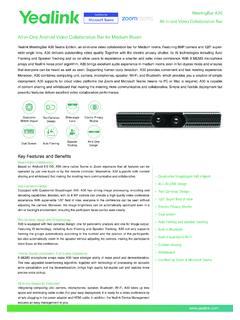
1 MVC640. Microsoft Teams Rooms System Microsoft Teams Rooms System for Medium Room Yealink MVC series are native and easy-to-use video conferencing solutions specially designed for Microsoft Teams Rooms . The MVC series provides a full-scene video conference solution to cover all of the meeting Rooms from small to large. According to the unique characteristics of the video conferencing room, a high-performance mini-PC is specially released. In the design of mini-PC, it takes into account both aesthetics and practicability, that fully integrating the cable management with itself to provide a flexible and reliable deployment solution for any meeting room.
2 The MVC series features the native Microsoft Teams -tailored user interface that is easy to be operated with close-to-zero learning curve, and you just walk into the meeting room and start your scheduled Teams or Skype for Business meeting with one-touch join. Yealink MVC640 includes a MSpeech speakerphone and a 4K UVC84 USB PTZ camera with 12x optical zoom to meet the requirements of Medium meeting room. One Cable 3-Microphone Yealink Camera Auto Framing Wireless Device Technology Array Control Plug-in Content Sharing Management Key Features and Benefits Native Microsoft Teams -tailored user interface, smooth conference experience Native Microsoft Teams -tailored user interface offers a one-touch meeting join.
3 Designed with the idea of multi-function all-in-one, the MTouch II touch panel allows you easily perform call control, camera control, content sharing and other functions. At the same time, MTouch II has a built-in Human Motion Sensor that the conference System can be automatically waken up and you can immediately start the confer- ence. Auto-framing & smart audio Yealink UVC84 camera allows for the auto-framing of all participants present at a meeting, freeing your hands and focusing on the meeting itself. Meanwhile, with the Yealink camera control plug-in and camera presets supported, the mechanical pan, tilt and zoom can be easily done quietly in one step.
4 Empowered with 12x optical zoom, UVC84 supports 4K video calls that conducts business to capture everyone in the meeting room clearly. Working with MSpeech, MVC640 can provides the voice recognition feature of Teams meeting room applica- tion, including voice transcription, real-time translation, and Cortana voice assistant. Content sharing in real time The unique wireless content sharing solution provides participants with maximum flexibility, that a one-click content sharing can be simply realized by plugging into the WPP20 only. With a high resolution of 1080P/30 frames, it provides users with a better content sharing experi- ence. Besides, the wired content sharing is also available by connecting to the USB-C port or HDMI port.
5 Simple to deploy, easy to use With the VCH port, MCore is specially designed for the video meeting Rooms that the deployment can be easily extended. At the same time, its all-in-one design with the feature of cable management ensure the stability of the wire connection, and the most appropriate deployment can be achieved according to the layout of the meeting room. One CAT5e is totally enough to connect the TV area and the conference table area and to complete the data transmission and power supply, no additional power supply or extension cable is needed, which not only simplifying the deployment but also effectively reducing deployment costs. Manage your devices remotely This solution supports Yealink Device Management Platform/Cloud Service, you can flawlessly manage, monitor, configure, update and diagnose all Yealink audio and video devices peripherals on this platform remotely.
6 Specifications Package Content MTouch II touch panel MSpeech smart USB speakerphone MCore Mini-PC 8-inch IPS screen 3 MEMS microphone array for HD voice MTouch II touch panel 1280 x 800 resolution pickup UVC84 USB PTZ camera 10-point capacitive touch screen 7 MEMS microphone array for voice MSpeech smart USB speakerphone headset jack recognition*. WPP20 wireless presentation pod (optional) Human Motion Sensor - Voice transcription Angle adjustable bracket (28 ~ 50 ) - Real-time translation Preload 1080P/30 FPS FHD for sharing - Cortana voice assistant Windows 10 IoT Enterprise X64. Support wired and wireless content sharing 4W HD Speaker Windows 10 IoT Enterprise License Built-in Wi-Fi AP for Yealink wireless presentation device 360 20ft (6-meter) voice pickup range Microsoft Teams Rooms App, support Skype for HDMI/USB-C HD video input Full-duplex technology Business on-premise/online and Teams meetings Acoustic echo cancellation (AEC).
7 Yeallink RoomConnect UVC84 USB PTZ Camera *Voice recognition should be supported by 4K camera MCore Mini-PC Microsoft Teams Rooms application 12x optical zoom 8th-gen Intel QUAD-CORE i5. Field of view (diagonal): 80 Package Features (without WPP20). Memory: 8GB (2 x 4GB). Auto Framing : Storage: 128GB SSD. Camera presets : 2 x HDMI video output with CEC supported Pan range: 200 Carton Meas: 595mm x 393mm x 258mm Bluetooth and Wi-Fi Tilt range: 130 . 1x Yealink VCH port (RJ45), connect to MTouch II. Package Features (with WPP20). 1 x Line-out ( ). 4 x Type-A. : 1 x Yealink Microphone port (RJ-45). 1 x 10/100/1000M Ethernet port : 1 x USB Type-B. 1 x Power port Carton Meas: 595mm x 393mm x 258mm 1 x Power port 1 x Security lock slot 1 x Security lock slot Integrated cable management 1 x Reset slot Scene Graph in a Conference Room UVC84 80.
8 Laptop MTouch II. YEALINK NETWORK TECHNOLOGY CO., LTD. Email: Web: Connection UVC84. VCH DC48V Video out Line out HDMI. Display DC19V. HDMI HDMI 5V 5V VCH Internet MCore Display HDMI. Ethernet cable CAT5e USB-C. (with an HDMI adapter). MSpeech MTouch . When starting up the System for the first time, you need to connect a mouse to complete the initial configuration. We recommend using the wireless mouse and keyboard kit. For more information about the installation and deleployment of accessories (for example, the installation of MCore package or the UVC84 camera), refer to the Quick Start Guide of corresponding accessory. About Yealink Yealink (Stock Code: 300628) is a global brand that specializes in video conferencing, voice communications and collaboration solutions with best-in-class quality, innovative technology and user-friendly experience.
9 As one of the best providers in more than 140. countries and regions, Yealink ranks in the global market share of SIP phone shipments (Global IP Desktop Phone Growth Excellence Leadership Award Report, Frost & Sullivan, 2019). Copyright Copyright 2021 YEALINK(XIAMEN) NETWORK TECHNOLOGY CO., LTD. All rights reserved. No parts of this publication may be reproduced or transmitted in any form or by any means, electronic or mechanical, photocopying, recording, or otherwise, for any purpose, without the express written permission of Yealink(Xiamen). Network Technology CO., LTD. Technical Support Visit Yealink WIKI ( ) for firmware downloads, product documents, FAQ, and more.
10 For better service, we sincerely recommend you to use Yealink Ticketing System ( ) to submit all your technical issues. YEALINK(XIAMEN) NETWORK TECHNOLOGY CO.,LTD. Web: Addr: Ling-Xia North Road, High Tech Park, Huli District, Xiamen, Fujian, China Copyright 2021 Yealink Inc. All right reserved. YEALINK NETWORK TECHNOLOGY CO., LTD. Email: Web.