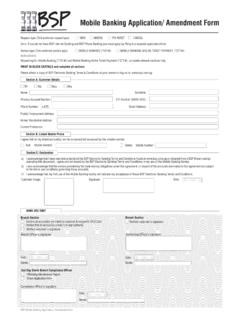
Transcription of Mobile Banking Application 030518 - BSP
1 Request type (Tick preferred request type) NEW (Applying for Mobile Banking for the first time) AMEND (Existing customer applying for changes) PIN RESET (Existing customer applying for PIN reset) CANCEL (Existing customer applying to deregister from Mobile Banking )Instructions:Please read carefully through the Application and fill in your necessary information. Applicant must be over 12 years of age.
2 PRINT IN BLOCK CAPITALS and complete all sections. Please obtain a copy of BSP Electronic Banking Terms & Conditions at your branch or log on to: Banking & Mobile App Application / Amendment Form Section A: Customer Details Mr Ms Miss Mrs Name Surname:Account Number: CIF Number (BANK USE):Phone Number.
3 +675 Postal/ Employment Address: Email Address: Section B: Linked Mobile Phone I agree that all my linked account(s) will be accessed/not accessed by this Mobile number. (Tick ONLY 1 preferred service provider) Add Mobile Number: Section C: Declarationa) I acknowledge that I have read and understood the BSP Electronic Banking Ter ms and Conditions found at or obtained from a BSP Branch and by executing this document, I agree and am bound by the BSP Electronic Banking Ter ms and Conditions in my use of the Mobile Banking )
4 I also acknowledge that the service provided by the Bank and my obligations under this agreement, in respect of the accounts nominated in this agreement are subject to the terms and conditions governing those ) I acknowledge that my first use of the Mobile Banking facility will indicate my acceptance of those BSP Electronic Banking Ter ms and : Customer Image: Date: Branch Section Confirm all account(s) are linked to customer & recipient s CIF/Z CardVerified that all account(s) a one(1) to sign authority Verified customer s that customer has activated for Mobile Banking Branch Officer s signature: Name:Name: Authorising Officer s signature.
5 Dd / mm / yyBANK USE ONLYB ranch SectionVerified customer s signature2nd Day Check Branch Compliance OfficerRBanking Maintenance ReportCheck Application Formdd / mm / yyBSP Mobile Banking & Mobile App Application / Amendment Formdd / mm / yy Delete Mobile Number:Home/ Residential Address:Current Profession:Compliance Officer s signature: Name:dd / mm / yyDate: Use your User ID to activate your Mobile Banking service ( *131*123*User ID# & press send)Your User ID: _____Date: Date: Service type (Tick preferred service) Mobile BANKINGMOBILE APPM obile Service type (Tick ONLY 1 preferred service provider) Digicel Bmobil





![Welcome [www.bsp.com.pg]](/cache/preview/d/a/9/e/f/4/c/e/thumb-da9ef4ce99bbbf088d5c3bf1d82628e4.jpg)