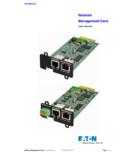
Transcription of Network Management Card (Network-MS) - …
1 Network Management card ( Network -MS) user Manual Network Management card user Manual 34003991XT_EN/EG Page 1/129 Network Management card ( Network -MS) user Manual Network Management card user Manual 34003991XT_EN/EG Page 2/129 Contents 1 EATON Network SOLUTION 6 GENERAL PRESENTATION 6 Connecting the UPS to the Ethernet Network 7 Protection of the computers/servers 7 Supervision of the UPSs over the Network 8 Connection 8 PRESENTATION OF THE Network Management card (NMC) 10 Compatibility with UPSs 10 Direct sending of E-mail 11 Sending text messages (SMS) 11 Compatibility with the Network Management Systems (NMS) Trap sending 11 Environment Sensor (option) 11 TECHNICAL DATA 12 Hardware characteristics 12 EMC Compatibility 12 Configuration 12 Administration 13 Network 13 Environment sensor 14 MIB ( Management Information Base) 14 Default parameters 15 2 INSTALLATION 17 UNPACKING AND CHECK ON CONTENTS 17 INDICATIONS 17 INSTALLATION IN THE UPS 18 SENSOR INSTALLATION (OPTION)
2 20 3 CONFIGURATION 21 CONFIGURE IP PARAMETERS 21 Your Network is equipped with a DHCPv4 server 22 Your Network is not equipped with a DHCPv4 server 23 IPv6 Parameters 23 TEST AFTER CONFIGURATION 23 4 SUPERVISION AND ADMINISTRATION BY BROWSER 24 OPTIMISING THE PERFORMANCE OF YOUR BROWSER 24 UPS 25 UPS properties page 25 Network Management card ( Network -MS) user Manual Network Management card user Manual 34003991XT_EN/EG Page 3/129 On-line help 38 Logging In 39 UPS control 40 UPS weekly schedule programming 42 Shutdown parameters 43 Measurements 45 Event log 46 System log 47 NOTIFICATION 48 Email Notification 48 E-mail Message Settings 50 CONFIGURATION 52 Network settings 52 System 55 Notified Applications 56 Central shutdown configuration 59 Access control 60 SNMP Setting 62 Date and time 64 Firmware upload 66 ENVIRONMENT SENSOR (OPTION)
3 67 Characteristics 67 Environment Status 68 Environment Settings 69 Log 71 5 SERVER PROTECTION 72 SET-UP OF THE SHUTDOWN PARAMETERS 72 Shutdown criteria managed by the Network Management card 72 Controlled outlets 75 Protection of a server connected to a controlled outlet 75 THE DIFFERENT SERVER AND UPS SHUTDOWN SEQUENCES 77 Extended power outage, shutdown initiated by the Shutdown Timer (Shutdown after) 77 Extended power outage, shutdown initiated by the "Low battery power" message 77 Case of power restoration before the end of the "shutdown duration" counter 78 SHUTDOWN Management WITH 2 NMC BOARDS 79 Shutdown Duration 79 Settings 79 6 TELNET/SSH/CLI INTERFACES 80 INTRODUCTION 80 Network Management card ( Network -MS)
4 user Manual Network Management card user Manual 34003991XT_EN/EG Page 4/129 SETTINGS LIST 80 Network settings 80 System settings 81 Trap receivers 81 Access control 81 Shutdown settings 81 SNMP settings 82 Date and time 82 Environment settings 82 MENU INTERFACE 83 Tree description 84 Main menu 85 Reset item 85 Network menu 85 Trap receivers menu 87 System menu 88 Shutdown menu 88 Access Control menu 89 Date and time menu 90 Environment menu 90 Return to default Login/Password 92 Return to default configuration 92 COMMAND LINE INTERFACE 92 Generic command 93 Network settings 94 Trap receivers 97 System settings 97 Shutdown settings 99 Access control settings 100 Date and time settings 101 Environment settings 102 CONSTRAINTS/LIMITATIONS 104 7 CONFIGURATION VIA RS232 106 CHOICE 1: RESTART / RESET 107 CHOICE 2: Network CONFIGURATION 107 Choice 1: Read IPv4&IPv6 Network settings 107 Choice 2: Modify IPv4 Network settings 108 Choice 3: Set Ethernet speed 108 CHOICE 3: LOST PASSWORD / SET LOGIN PASSWORD TO DEFAULT 109 CHOICE 4.
5 RETURN TO DEFAULT CONFIGURATION 110 Network Management card ( Network -MS) user Manual Network Management card user Manual 34003991XT_EN/EG Page 5/129 8 APPENDIX 111 TABLES OF ALARMS AND EVENTS 111 Table of alarms 111 Table of UPS events 114 Table of system alarms 117 SNMP OBJECTS 118 IETF MIB 118 EATON Pulsar MIB (ex MGE) 118 TRAPS table: ( ) 122 EATON Powerware MIB 123 9 GLOSSARY 127 Network Management card ( Network -MS) user Manual Network Management card user Manual 34003991XT_EN/EG Page 6/129 1 EATON Network Solution General Presentation EATON Network Solution: Provides information on events concerning the supply of power to the computers connected to your Network , Carries out automatic shutdown of computer systems, Monitors and controls all the UPSs connected to the Network .
6 EATON Network Solution provides 3 main functions: Supervision of the UPSs over the Network : Web browser, Intelligent Power Manager, or SNMP Network Management System (NMS). Protection of the computers (multi-platform) with Intelligent Power Protector Connexion of the UPS to the Network . Network Management card ( Network -MS) user Manual Network Management card user Manual 34003991XT_EN/EG Page 7/129 Connecting the UPS to the Ethernet Network This function can be performed through Network Cards inserted in the UPS ( Network Management card ). Also a software "agent" running on a nearby PC that is called the IPP Shutdown controller feature can be used. IPP Shutdown controller feature allows USB or Serial connected UPS to be seen on the Network through the PC.
7 The Network Management card or Proxy: Manages communication with the UPS (as well as local protection of the machine on which Proxy is installed). Periodically accesses the information concerning the UPS. Makes this information available to the connected applications (Intelligent Power Protector, Web Browser, Network Management Systems, Intelligent Power Manager). Sends notifications on certain events. Operation may be in standard secure mode (the default mode) or in SSL secured mode (Secure Socket Layer SSL). Protection of the computers/servers This function is performed by Intelligent Power Protector installed on each of the computers to be protected. Note that Intelligent Power Protector are available on several Operating Systems.
8 Protection applications: Continuously gets information from the Network Management card /Proxy connected to the UPS. Warns administrators and users if AC power fails and proceeds to a graceful system shutdown before the end of battery backup power is reached. Network Management card ( Network -MS) user Manual Network Management card user Manual 34003991XT_EN/EG Page 8/129 Supervision of the UPSs over the Network Depending on your needs, you can either use: Internet browser to monitor each UPS, as IPP Shutdown Controller and Management card includes a Web server Company s standard Network Management System (HP-Openview, CA Unicenter, HP Insight Manager, IBM Tivoli Netview) To simplify integration of EATON UPSs, use one of the Network Management System Kits for EATON devices.
9 These kits are available on the Software Suite CD-ROM or on the website. The supervisor "Intelligent Power Manager". Connection Before installing the Network Solution, the UPS must be set up as indicated in the steps below. Shut down the computers to be protected by the UPS. Connect the UPS to a wall outlet. (For UPSs above 3kVA, please refer to the UPS installation manual). Connect the power cord of each computer to an outlet on the UPS. (For more details, please refer to the UPS installation manual) Network Management card ( Network -MS) user Manual Network Management card user Manual 34003991XT_EN/EG Page 9/129 How to connect UPS / agent / Network : Insert the optional NMC communication card in the UPS and connect the UPS to the computer Network .
10 Start the UPS, then the computers. Setting up the protection: Set up the Network Management card (see user manual). Install and configure the protection application on all machines that are to be protected by the UPS: Intelligent Power Protector for EATON Pulsar series UPS: The software components for each platform and the user manuals are on the Software Suite CD or available at Network Management card ( Network -MS) user Manual Network Management card user Manual 34003991XT_EN/EG Page 10/129 Presentation of the Network Management card (NMC) Compatibility with UPSs The Minislot Network Management card is compatible with the UPS listed into the compatibility list: Pulsar MX All models MX, MX frame All models Pulsar M 2200 / 3000 All models Pulsar 700 / 1000 / 1500 All models EX 700 / 1000 / 1500 / 2200 / 3000 All models Evolution 650 / 850 / 1150 / 1550 / 2000 All models Evolution S 1250 / 1750 / 2500 / 3000 All models Pulsar Evolution 500 / 800 / 1100 Technical level 06 or higher Pulsar Evolution 2200 / 3000 Technical level 05 or higher Pulsar Evolution 1500 Technical level 05 or higher EXtreme C 700 / 1000 / 1500 Technical level B2 or higher EXtreme C 2200 - 3200 Technical level 02 or higher Pulsar EX 700 / 1000 / 1500 RT (US ) Technical level 03 or higher Pulsar EX 2200 / 3200 (US )