Transcription of Operating Instructions Air Conditioner
1 Alleru-busterOperating InstructionsAir Conditioner Indoor Unit Outdoor Unit CS-RE9 JKR CU-RE9 JKR CS-RE12 JKR CU-RE12 JKRF566894 Panasonic Home Appliances Air-Conditioning (Guangzhou) Co., Ltd. 2008. Unauthorized copying and distribution is a violation of GUIDEQUICK GUIDEENGLISH 2 ~ 7 Before Operating the unit, read these Operating Instructions thoroughly and keep them for future 12009-6-15 10:31:532009-6-15 10:31:532 Outdoor Unit Do not sit or step on the unit, you may fall down accidentally. Do not touch the sharp aluminium fi n, sharp parts may cause injury. Ensure that the drainage pipe is connected properly. Otherwise, leakage may occur. After long periods of use, make sure the installation rack is not prevent personal injury, injury to others, or property damage, please observe the operation due to failure to follow Instructions may cause harm or damage, the seriousness of which is classifi ed as below: WarningThis sign warns of death or serious injury.
2 CautionThis sign warns of injury or damage to property. SAFETY PRECAUTIONS SAFETY PRECAUTIONSI ndoor Unit Do not install the unit in a potentially explosive atmosphere. Do not wash the unit with water, benzene, thinner or scouring powder. Do not use for other purposes such as preservation of food. Do not use any combustible equipment in front of the airfl ow outlet. Do not expose directly to cold air for a long period. Ensure that the drainage pipe is connected properly. Otherwise, leakage may occur. Aerate the room Control Do not use rechargeable (Ni-Cd) batteries. Do not allow infants and small children to play with the remote control to prevent them from accidentally swallowing the batteries. Remove the batteries if the unit is not going to be used for a long period of time. New batteries of the same type must be inserted following the polarity stated to prevent malfunction of the remote Unit Do not install, remove and reinstall the unit by yourself; improper installation will cause leakage, electric shock or fi re.
3 Please consult an authorized dealer or specialist for the installation work. Do not insert your fi ngers or other objects into the unit, rotating parts may cause injury. Do not attempt to repair the unit by Supply Do not pull the cord to disconnect the plug. Switch off the power supply and unplug before cleaning or servicing. Turn off the power supply and unplug if the unit is not used for a long period of time. This air Conditioner is equipped with a built-in surge protective device. However, in order to further protect your air Conditioner from being damaged by abnormally strong lightning activity, you may want to disconnect it from the power supply. Do not touch the air Conditioner during lightning, it may cause electric inletAir inletAir Air outletoutletAir outletAir inletAir inletPower Supply Do not share the same power outlet with other equipment.
4 Do not modify power cords. Do not use extension cords. Do not operate with wet hands. Do not operate or stop the unit by inserting or pulling out the power plug. Insert the power plug properly. Use the specifi ed supply cord. If the supply cord is damaged, it must be replaced by the manufacturer, its service agent or similarly qualifi ed persons in order to avoid a hazard. Dust on the electric power plug should be periodically wiped with a dry cloth. This equipment must be earthed and strongly recommended to be installed with Earth Leakage Circuit Breaker (ELCB) or Residual Current Device (RCD). Otherwise, it may cause electrical shock or fi re in case of malfunction. In case of emergency or abnormal conditions (burnt smell, etc), turn off the power supply and unplug, and consult your nearest Instructions to be followed are classifi ed by the following symbols:This symbol denotes an action that is PROHIBITED.
5 These symbols denote actions that are COMPULSORY. Outdoor Unit Do not insert your fi ngers or other objects into the unit, rotating parts may cause 2 2:22009-6-15 10:32:122009-6-15 10:32:123 ENGLISHI nformation for Users on Collection and Disposal of Old Equipment and Used Batteries[Information on Disposal in other Countries outside the European Union]These symbols are only valid in the European Union. If you wish to discard these items, please contact your local authorities or dealer and ask for the correct method of for the battery symbol (bottom two symbol examples):This symbol might be used in combination with a chemical symbol. In this case it complies with the requirement set by the Directive for the chemical REGULATORY INFORMATION REGULATORY INFORMATIONT hank you for purchasing Panasonic Air ConditionerOPERATION CONDITIONOPERATION CONDITIONTABLE OF CONTENTSTABLE OF CONTENTSNOTE :NOTE :The illustrations in this manual are for explanation purposes only and may differ from the actual unit.
6 It is subjected to change without notice for future PRECAUTIONS2 REGULATORY INFORMATION3 PRODUCT OVERVIEW & OPERATIONS4~5 CARE & CLEANING6 TROUBLESHOOTING7 PRODUCT SPECIFICATION8 QUICK GUIDEBACK COVER Do not switch ON the unit when waxing the fl oor. After waxing, aerate the room properly before Operating the unit. Do not install the unit in oily and smoky or installation of power plugs shall be performed by authorized/qualifi ed personnel only. The wires in this mains lead are coloured in accordance with the following code:TerminalsRedwiresliveneutralearthco lours (IEC Standard)bluegreen-yellowbrownBlackGreen /YellowWiring colour may vary depending on a country wiring code s appliance is not intended for use by persons (including children) with reduced physical, sensory or mental capabilities, or lack of experience and knowledge, unless they have been given supervision or instruction concerning use of the appliance by a person responsible for their safety.
7 Children should be supervised to ensure that they do not play with the this air Conditioner under the following temperature rangeTemperature ( C)IndoorOutdoor*DBT*WBT*DBT*WBTCOOLINGM aximum32234326 Minimum16111611 HEATINGM aximum30-2418 Minimum16--5-6* DBT: Dry bulb temperature* WBT: Wet bulb 2 2:32009-6-15 10:32:132009-6-15 10:32:134 Front panelReceiverVertical airfl ow direction louver Do not adjust by fi ltersHorizontal airfl ow direction louver Manually Alleru-buster FilterSELECTSELECTCHECKCHECKERRORERRORRE SETRESETRESETRESETSET/CANCELSET/CANCEL hrhrDELAYDELAY hrhrDELAYDELAYOFFONONOFFAUTOHEATCOOLDRYA BFANSPEEDSWINGAIRAUTOAUTOPOWERFULPOWERFU LPOWERFUL / QUIETPOWERFUL / QUIETAUTOQUIETAUTOQUIETOFF PRODUCT OVERVIEW & OPERATIONS PRODUCT OVERVIEW & OPERATIONSAuto OFF/ON button Used when remote control is misplaced or and hold until 1 beep is heard, then Cooling3 Press and hold until you hear double beep sound, then HeatingPress the button to turn TURN ON OR OFF THE UNIT Please be aware of the OFF indication on the remote control display to prevent the unit from starting / stopping SET TEMPERATURE Selection range: 16 C ~ 30 C.
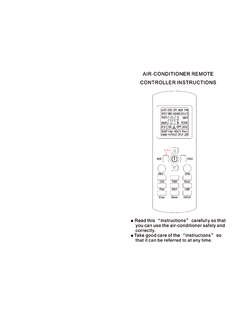
8 Operating the unit within the recommended temperature could induce energy mode : 20 C ~ 24 mode : 26 C ~ 28 mode : 1 C ~ 2 C lower than room SELECT OPERATION MODEAUTO mode - For your convenience To set the temperature by pressing or . During Automatic Operation, the operation mode will be selected automatically in accordance with the room temperature, outdoor air temperature and set temperature of remote control. The operation mode changes every half hour if Temperature (Example) Setting Temp at 25 Outdoor Temperature 22 HEAT mode - To enjoy warm air Unit takes a while to warm up. COOL mode - To enjoy cool airDRY mode - To dehumidify the environment Unit operates at low fan speed to give a gentle cooling distances: 8mRemote control displayWARNING Be careful not to insert your fi ngers into the unit to avoid injuring by cross-fl ow (GREEN)(ORANGE)(GREEN)(RED) 2 2:42009-6-15 10:32:132009-6-15 10:32:135 ENGLISHTO SELECT FAN SPEED (5 OPTIONS) For AUTO, the indoor fan speed is automatically adjusted according to the operation ADJUST VERTICAL AIRFLOW DIRECTION (5 OPTIONS) Keeps the room ventilated.
9 If AUTO is set, the louvers swing up/down SWITCH AMONG POWERFUL , QUIET AND NORMAL OPERATION : TO ACHIEVE TEMPERATURE QUICKLY This setting enables the desired set temperature to be reached QUIET : TO ENJOY QUIET ENVIRONMENT This setting provides a quiet environment by reducing the airfl ow noise. OPTIONAL SETTINGS OPTIONAL SETTINGSRESETRESETP ress to restore the remote control's default RESETRESETNot used in normal the temperature 1 C higher in cool mode or 2 C lower in heat mode than the desired temperature to achieve a 10% power curtains to screen off sunlight and outdoor heat to reduce power consumption during cool mode. TO SET THE TIMER TO SET THE TIMER When you want the air Conditioner to turn ON or OFF OFF-TIMERFor example, to stop the air Conditioner 5 hours To select the Delay OFF-TIMER, press the button Press the button to select the delay hour.
10 The OFF-TIMER can only be set while the air- Conditioner is in ON-TIMERFor example, to start the air Conditioner 2 hours later. 1 To select the Delay ON-TIMER, press the button Press the button to select the delay hour. The ON-TIMER can only be set while the air- Conditioner is not in OFF AND ON TIMERFor example, to stop the air Conditioner 3 hours later and start 4 hours To select the Delay OFF and ON Timer, press the button 2 Press the button to select the delay hour for OFF Press the button to select the delay hour for ON Timer. This mode of timer can only be set while the air- Conditioner is in ON AND OFF TIMERFor example, to start the air Conditioner 7 hours later and stop 10 hours To select the Delay ON and OFF Timer, press the button 2 Press the button to select the delay hour for ON Press the button to select delay hour for OFF Timer.