Transcription of PERFORMING A BLOOD GLUCOSE TEST - ARKRAY …
1 Was the sample deep red in color and free of watery fluid? Was the drop large enough (at least L)? Did the reaction site fill with enough BLOOD all at once? IF NOT, REPEAT meter will count down and display result in 7 YOUR ALTERNATE SITE TEST: IF the BLOOD sample appeared to be diluted with clear fluid. IF you did not vigorously rub the test site. IF the test was accidentally marked as a Control result. IF your result was not consistent with how you feel. IF the BLOOD drop was not large enough to fill the reaction of the above situations can lead to an inaccurate test the repeated alternate site result is still not consistent with how you feel, confirm your BLOOD GLUCOSE level with fingertip testing.<<a) Remove GLUCOCARD Vital test strip from the bottle. Immediately replace the bottle cap tightly. Insert test strip as shown in diagram.
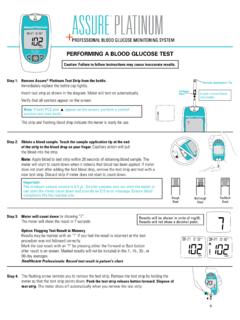
2 Be sure to align test strip with test strip ) Make sure all parts of the display screen Strip Port Contact BarsReaction SiteSample Application TipInsert strip into meter this wayIMPORTANT!EnoughBloodNot EnoughBloodToo MuchBloodEnoughBloodNot EnoughBloodPick up the meter. Touch the end of the test strip to the BLOOD sample until the reaction site is full. Immediately remove the meter and test strip from the BLOOD 4 TROUBLESHOOTINGStep 1 Step 2 PERFORMING A BLOOD GLUCOSE TESTR emove GLUCOCARD Vital Test Strip from the bottle. Immediately replace the bottle cap tightly. Insert test strip as shown in diagram. The meter will turn on automatically. Choose a Site: Select a soft, fleshy area on the palm that is free of visible veins and moles and away from bone. Wash the area with warm, soapy water. Rinse and dry completely. If you use alcohol wipes to cleanse the site, make sure the area is dry before lancing the 1 Insert lancet and cock lancing 2 Step 3d) Once a large enough drop of BLOOD has formed, remove the lancing device.
3 Step 4b) Firmly hold the cocked lancing device against the clean skin for 5-10 ) VIGOROUSLY RUB THE SELECTED AREA for 5 to 10 SECONDS until it starts to feel warm to the BLOOD draw if fluid is not a deep red colorc) Press the release button on the lancing device to lance the skin. Continue to hold the lancing device firmly against the skin until a L BLOOD drop 5 Step 6 Always record your results in your self-testing logbook along with other information such as insulin dosage, diet, and result is automatically stored in memory with the time and 7 Step 8 Remove the test strip and dispose of it meter shuts off automatically when the test strip is forARKRAY USA, W. 76th , MN 55439 USATEL is a registered trademark of ARKRAYP/N 1855-01 Rev 5/11 When the test is done, remove test strip. Dispose of test strip carefully. The meter shuts off automatically when you remove the test lancet should only be used once.
4 After use, put the protective cap back on and dispose of in a safe manner to avoid accidental lancet stick a BLOOD sample. Apply BLOOD to the end of the test strip. Capillary action will pull the BLOOD to the reaction site. The meter will start to count down when it detects that BLOOD has been not add BLOOD on top of the test strip, as you may receive an inaccurate strip if meter does not start to count down after BLOOD drop is : The minimum sample volume is L. Smaller samples may not start the meter or can start the meter count down and provide an E13 error message. Ensure BLOOD completely fills reaction test result and date/time is displayed in 7 seconds. The result will be automatically stored in memoryResults will be shown in units of mg/dL. Record result in your NOT add BLOOD to the top of the strip. You may receive an abnormal (high) into meter this wayMake sure all parts of the display screen to the GLUCOCARD Vital BLOOD GLUCOSE Monitoring System user instruction manual for further all other errors call Customer Service at BLOOD GLUCOSE level is less than 20 mg/dL.
5 Repeat the test using a new test strip. If this message appears again, contact your healthcare professional battery power is too low for with a new CR2032 battery power is is only enough power for about 20 more tests . Replace with a new CR2032 battery as soon as MuchBloodCORRECTINCORRECT<<IMPORTANT!Ste p 3 Your BLOOD GLUCOSE level is more than 600 the test using a new test strip. If this message appears again, contact your healthcare professional battery has been that the time and date are set used strip has been inserted or the meter is having difficulty reading the the test with a new test meter and test strips are outside the optimum temperature range of 50 F - 104 F (10 C - 40 C). Treat test result obtained where the thermometer is flashing with caution. The flashing thermometer will be displayed on all screens during GLUCOSE testing until the meter has reached acceptable temperature.
6 Readings obtained with the flashing thermometer will show a thermometer when results are recalled in symbol - outside of acceptable range of 41 F - 113 F (5 C - 45 C). You will not obtain a reading. Allow the meter and strips to warm up or cool down slowly to between 50 F - 104 F (10 C - 40 C) or at least to 41 F - 113 F (5 C - 45 C).Not enough BLOOD was added to test with new test strip. Apply at least L of BLOOD to sample application tip. Test Strip Port Contact BarsReaction SiteSample Application TipConsider AST when: Testing before a meal You are in a fasting state Two hours have passed since a meal Two hours have passed since insulin dosing Two hours have passed since physical activityPERFORMING A BLOOD GLUCOSE TEST FROM AN ALTERNATE SITEQ uick Reference Gui