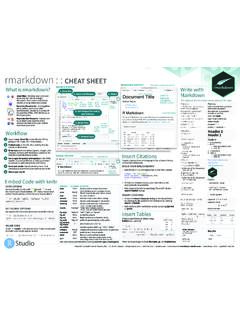
Transcription of R Markdown : : CHEAT SHEET
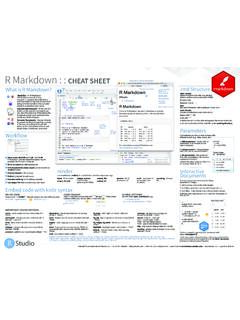
1 R Markdown : : CHEAT SHEET File path to output document 5. What is R Markdown ? 1 Find in document synch publish button to .rmd Structure rmarkdown accounts at YAML Header .Rmd files An R Markdown 4 , Optional section of render ( pandoc). 3 options written as key:value pairs (YAML). (.Rmd) file is a record of your research. It contains the code that a At start of file scientist needs to reproduce your work set insert run code RStudio Rmd along with the narration that a reader preview code chunk(s) Connect Between lines of - - - needs to understand your work. location chunk go to Text 2 code Reload document chunk publish Narration formatted with Markdown , mixed with: Reproducible Research At the click of a button, or the type of a command, you Code Chunks show Chunks of embedded code. Each chunk: can rerun the code in an R Markdown file outline to reproduce your work and export the Begins with ```{r}.
2 Results as a finished report. ends with ```. Dynamic Documents You can choose R Markdown will run the code and append the results to the doc. to export the finished report in a variety of formats, including html, pdf, MS It will use the location of the .Rmd file as the working directory run all Word, or RTF documents; html or pdf previous chunks Parameters based slides, Notebooks, and more. modify run chunk current Workflow options chunk Parameterize your documents to reuse with di erent inputs ( , data, values, etc.). --- 1. Add parameters Create and set params: parameters in the header as sub- n: 100. values of params d: !r (). --- 2. Call parameters Call parameter values in code as params$<name>. 6 Today's date 3. Set parameters Set values wth is `r params$d`. 1 Open a new .Rmd file at File New File Knit with parameters or the params R Markdown . Use the wizard that opens to pre- argument of render(): populate the file with a template 7 render(" ", params = list(n = 1, 2 Write document by editing template d = ("2015-01-01")).)
3 3 Knit document to create report; use knit button or render() to knit 4 Preview Output in IDE window render Interactive 5 Publish (optional) to web server 6 Examine build log in R Markdown console Use rmarkdown::render() to render/knit at cmd line. Important args: input - file to render output_options - output_file params - list of envir - environment encoding - of input Documents output_format List of render output_dir params to use to evaluate code file Turn your report into an interactive Shiny 7 Use output file that is saved along side .Rmd options (as in YAML) chunks in document in 4 steps 1. Add runtime: shiny to the YAML header. Embed code with knitr syntax 2. Call Shiny input functions to embed input objects. 3. Call Shiny render functions to embed reactive output. 4. Render with rmarkdown::run or click Run Document in INLINE CODE CODE CHUNKS GLOBAL OPTIONS RStudio IDE. Insert with `r <code>`.
4 Results appear as text without code. One or more lines surrounded with ```{r} and ```. Place chunk Set with knitr::opts_chunk$set(), Built with `r getRversion()` Built with options within curly braces, after r. Insert with ```{r include=FALSE}. ```{r echo=TRUE} knitr::opts_chunk$set(echo = TRUE) --- getRversion() ``` output: html_document ``` runtime: shiny --- IMPORTANT CHUNK OPTIONS. ```{r, echo = FALSE}. cache - cache results for future knits (default = dependson - chunk dependencies for caching - 'left', 'right', or 'center' (default = message - display code messages in numericInput("n", FALSE) (default = NULL) 'default') document (default = TRUE) "How many cars?", 5). - directory to save cached results in echo - Display code in output document (default = - figure caption as character string (default results (default = 'markup'). (default = "cache/") TRUE) = NULL) 'asis' - passthrough results renderTable({.)}
5 'hide' - do not display results head(cars, input$n). child - file(s) to knit and then include (default = engine - code language used in chunk (default = , - Dimensions of plots in }). NULL) 'R') inches 'hold' - put all results below all code ```. collapse - collapse all output into single block error - Display error messages in doc (TRUE) or highlight - highlight source code (default = TRUE) tidy - tidy code for display (default = FALSE). (default = FALSE) stop render when errors occur (FALSE) (default = include - Include chunk in doc after running warning - display code warnings in document comment - prefix for each line of results (default = '##') FALSE) (default = TRUE) (default = TRUE). Embed a complete app into your document with eval - Run code in chunk (default = TRUE) shiny::shinyAppDir(). Options not listed above: , aniopts, autodep, background, , , , , dev, , dpi, NOTE: Your report will rendered as a Shiny app, which means , , , , , , , , , , , , , , , interval, you must choose an html output format, like html_document, , , , prompt, purl, , render, size, split, and serve it with an active R Session.
6 RStudio is a trademark of RStudio, Inc. CC BY SA RStudio 844-448-1212 Learn more at rmarkdown Updated: 2016-02. Pandoc's Markdown Set render options with YAML. Write with syntax on the left to create e ect on right (after render). Plain text When you render, R Markdown rmarkdown 1. runs the R code, embeds results and text into .md file with knitr End a line with two spaces to start a new paragraph. 2. then converts the .md file into the finished format with pandoc *italics* and **bold**. beamer ioslides `verbatim code`. gituhb word html slidy sub/superscript^2^~2~ sub-option description odt pdf md rtf ~~strikethrough~~. escaped: \* \_ \\ citation_package The LaTeX package to process citations, natbib, biblatex or none X X X. endash: --, emdash: --- Set a document's code_folding Let readers to toggle the display of R code, "none", "hide", or "show" X. equation: $A = \pi*r^{2}$. default output format --- equation block: output: html_document colortheme Beamer color theme to use X.
7 In the YAML header: --- $$E = mc^{2}$$ # Body css CSS file to use to style document X X X. > block quote dev Graphics device to use for figure output ( "png") X X X X X X X. duration Add a countdown timer (in minutes) to footer of slides X. # Header1 {#anchor} output value creates fig_caption Should figures be rendered with captions? X X X X X X X. ## Header 2 {#css_id} html_document html fig_height, fig_width Default figure height and width (in inches) for document X X X X X X X X X X. ### Header 3 {.css_class}. pdf_document pdf (requires Tex ). word_document Microsoft Word (.docx) highlight Syntax highlighting: "tango", "pygments", "kate","zenburn", "textmate" X X X X X. #### Header 4 includes File of content to place in document (in_header, before_body, after_body) X X X X X X X X. odt_document OpenDocument Text ##### Header 5 rtf_document Rich Text Format incremental Should bullets appear one at a time (on presenter mouse clicks)?
8 X X X. ###### Header 6 md_document Markdown keep_md Save a copy of .md file that contains knitr output X X X X X X. <!--Text comment--> github_document Github compatible Markdown keep_tex Save a copy of .tex file that contains knitr output X X. ioslides_presentation ioslides HTML slides latex_engine Engine to render latex, "pdflatex", "xelatex", or "lualatex" X X. \textbf{Tex ignored in HTML}. <em>HTML ignored in pdfs</em> slidy_presentation slidy HTML slides lib_dir Directory of dependency files to use (Bootstrap, MathJax, etc.) X X X. < > beamer_presentation Beamer pdf slides (requires Tex) mathjax Set to local or a URL to use a local/URL version of MathJax to render equations X X X. [link]( ). Jump to [Header 1](#anchor) Indent 2 Indent 4 md_extensions Markdown extensions to add to default definition or R Markdown X X X X X X X X X X. image: Customize output with spaces spaces number_sections Add section numbering to headers X X.
9 --- sub-options (listed to output: html_document:  the right): code_folding: hide pandoc_args Additional arguments to pass to Pandoc X X X X X X X X X X. * unordered list toc_float: TRUE preserve_yaml Preserve YAML front matter in final document? X. + sub-item 1 --- + sub-item 2 # Body reference_docx docx file whose styles should be copied when producing docx output X. - sub-sub-item 1 self_contained Embed dependencies into the doc X X X. * item 2 html tabsets slide_level The lowest heading level that defines individual slides X. Continued (indent 4 spaces). Use tablet css class to place sub-headers into tabs smaller Use the smaller font size in the presentation? X. 1. ordered list # Tabset {.tabset .tabset-fade .tabset-pills} smart Convert straight quotes to curly, dashes to em-dashes, to ellipses, etc. X X X. 2. item 2 ## Tab 1 template Pandoc template to use when rendering file ).
10 X X X X X. i) sub-item 1. A. sub-sub-item 1 text 1 Tabset theme Bootswatch or Beamer theme to use for page X X. (@) A list whose numbering ## Tab 2 Tab 1 Tab 2 toc Add a table of contents at start of document X X X X X X X. text 2 toc_depth The lowest level of headings to add to table of contents X X X X X X. continues after text 1. ### End tabset End tabset toc_float Float the table of contents to the left of the main content X. (@) an interruption Term 1. : Definition 1. | Right | Left | Default | Center |. Create a Reusable Template Table Suggestions Citations and Bibliographies 1. Create a new package with a inst/rmarkdown/templates Several functions format R data into tables Create citations with .bib, .bibtex, .copac, .enl, .json, |------:|:-----|---------|:------:| directory .medline, .mods, .ris, .wos, and .xml files | 12 | 12 | 12 | 12 |. | 123 | 123 | 123 | 123 | 2. In the directory, Place a folder that contains: --- | 1 | 1| 1 | 1 | (see below) 1.