Transcription of R Markdown : : CHEAT SHEET - ETH Z
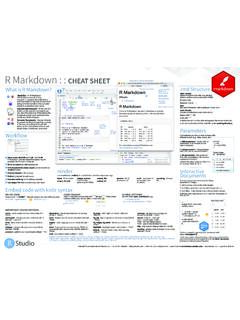
1 R Markdown : : CHEAT SHEET File path to output document 5. What is R Markdown ? 1 Find in document synch publish button to .rmd Structure rmarkdown accounts at YAML Header .Rmd files An R Markdown 4 , Optional section of render ( pandoc). 3 options written as key:value pairs (YAML). (.Rmd) file is a record of your research. It contains the code that a At start of file scientist needs to reproduce your work set insert run code RStudio Rmd along with the narration that a reader preview code chunk(s) Connect Between lines of - - - needs to understand your work. location chunk go to Text 2 code Reload document chunk publish Narration formatted with Markdown , mixed with: Reproducible Research At the click of a button, or the type of a command, you Code Chunks show Chunks of embedded code. Each chunk: can rerun the code in an R Markdown file outline to reproduce your work and export the Begins with ```{r}.
2 Results as a finished report. ends with ```. Dynamic Documents You can choose R Markdown will run the code and append the results to the doc. to export the finished report in a variety of formats, including html, pdf, MS It will use the location of the .Rmd file as the working directory run all Word, or RTF documents; html or pdf previous chunks Parameters based slides, Notebooks, and more. modify run chunk current Workflow options chunk Parameterize your documents to reuse with di erent inputs ( , data, values, etc.). --- 1. Add parameters Create and set params: parameters in the header as sub- n: 100. values of params d: !r (). --- 2. Call parameters Call parameter values in code as params$<name>. 6 Today's date 3. Set parameters Set values wth is `r params$d`. 1 Open a new .Rmd file at File New File Knit with parameters or the params R Markdown .
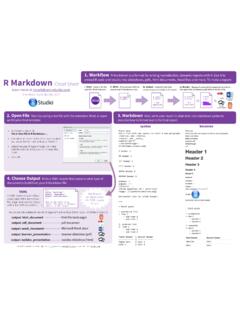
3 Use the wizard that opens to pre- argument of render(): populate the file with a template 7 render(" ", params = list(n = 1, 2 Write document by editing template d = ("2015-01-01")). 3 Knit document to create report; use knit button or render() to knit 4 Preview Output in IDE window render Interactive 5 Publish (optional) to web server 6 Examine build log in R Markdown console Use rmarkdown ::render() to render/knit at cmd line. Important args: input - file to render output_options - output_file params - list of envir - environment encoding - of input Documents output_format List of render output_dir params to use to evaluate code file Turn your report into an interactive Shiny 7 Use output file that is saved along side .Rmd options (as in YAML) chunks in document in 4 steps 1. Add runtime: shiny to the YAML header. Embed code with knitr syntax 2.)
4 Call Shiny input functions to embed input objects. 3. Call Shiny render functions to embed reactive output. 4. Render with rmarkdown ::run or click Run Document in INLINE CODE CODE CHUNKS GLOBAL OPTIONS RStudio IDE. Insert with `r <code>`. Results appear as text without code. One or more lines surrounded with ```{r} and ```. Place chunk Set with knitr::opts_chunk$set(), Built with `r getRversion()` Built with options within curly braces, after r. Insert with ```{r include=FALSE}. ```{r echo=TRUE} knitr::opts_chunk$set(echo = TRUE) --- getRversion() ``` output: html_document ``` runtime: shiny --- IMPORTANT CHUNK OPTIONS. ```{r, echo = FALSE}. cache - cache results for future knits (default = dependson - chunk dependencies for caching - 'left', 'right', or 'center' (default = message - display code messages in numericInput("n", FALSE) (default = NULL) 'default') document (default = TRUE) "How many cars?)
5 ", 5). - directory to save cached results in echo - Display code in output document (default = - figure caption as character string (default results (default = 'markup'). (default = "cache/") TRUE) = NULL) 'asis' - passthrough results renderTable({. 'hide' - do not display results head(cars, input$n). child - file(s) to knit and then include (default = engine - code language used in chunk (default = , - Dimensions of plots in }). NULL) 'R') inches 'hold' - put all results below all code ```. collapse - collapse all output into single block error - Display error messages in doc (TRUE) or highlight - highlight source code (default = TRUE) tidy - tidy code for display (default = FALSE). (default = FALSE) stop render when errors occur (FALSE) (default = include - Include chunk in doc after running warning - display code warnings in document comment - prefix for each line of results (default = '##') FALSE) (default = TRUE) (default = TRUE).
6 Embed a complete app into your document with eval - Run code in chunk (default = TRUE) shiny::shinyAppDir(). Options not listed above: , aniopts, autodep, background, , , , , dev, , dpi, NOTE: Your report will rendered as a Shiny app, which means , , , , , , , , , , , , , , , interval, you must choose an html output format, like html_document, , , , prompt, purl, , render, size, split, and serve it with an active R Session. RStudio is a trademark of RStudio, Inc. CC BY SA RStudio 844-448-1212 Learn more at rmarkdown Updated: 2016-02. Pandoc's Markdown Set render options with YAML. Write with syntax on the left to create e ect on right (after render). Plain text When you render, R Markdown rmarkdown 1. runs the R code, embeds results and text into .md file with knitr End a line with two spaces to start a new paragraph. 2. then converts the.
7 Md file into the finished format with pandoc *italics* and **bold**. beamer ioslides `verbatim code`. gituhb word html slidy sub/superscript^2^~2~ sub-option description odt pdf md rtf ~~strikethrough~~. escaped: \* \_ \\ citation_package The LaTeX package to process citations, natbib, biblatex or none X X X. endash: --, emdash: --- Set a document's code_folding Let readers to toggle the display of R code, "none", "hide", or "show" X. equation: $A = \pi*r^{2}$. default output format --- equation block: output: html_document colortheme Beamer color theme to use X. in the YAML header: --- $$E = mc^{2}$$ # Body css CSS file to use to style document X X X. > block quote dev Graphics device to use for figure output ( "png") X X X X X X X. duration Add a countdown timer (in minutes) to footer of slides X. # Header1 {#anchor} output value creates fig_caption Should figures be rendered with captions?
8 X X X X X X X. ## Header 2 {#css_id} html_document html fig_height, fig_width Default figure height and width (in inches) for document X X X X X X X X X X. ### Header 3 {.css_class}. pdf_document pdf (requires Tex ). word_document Microsoft Word (.docx) highlight Syntax highlighting: "tango", "pygments", "kate","zenburn", "textmate" X X X X X. #### Header 4 includes File of content to place in document (in_header, before_body, after_body) X X X X X X X X. odt_document OpenDocument Text ##### Header 5 rtf_document Rich Text Format incremental Should bullets appear one at a time (on presenter mouse clicks)? X X X. ###### Header 6 md_document Markdown keep_md Save a copy of .md file that contains knitr output X X X X X X. <!--Text comment--> github_document Github compatible Markdown keep_tex Save a copy of .tex file that contains knitr output X X.
9 Ioslides_presentation ioslides HTML slides latex_engine Engine to render latex, "pdflatex", "xelatex", or "lualatex" X X. \textbf{Tex ignored in HTML}. <em>HTML ignored in pdfs</em> slidy_presentation slidy HTML slides lib_dir Directory of dependency files to use (Bootstrap, MathJax, etc.) X X X. < > beamer_presentation Beamer pdf slides (requires Tex) mathjax Set to local or a URL to use a local/URL version of MathJax to render equations X X X. [link]( ). Jump to [Header 1](#anchor) Indent 2 Indent 4 md_extensions Markdown extensions to add to default definition or R Markdown X X X X X X X X X X. image: Customize output with spaces spaces number_sections Add section numbering to headers X X. --- sub-options (listed to output: html_document:  the right): code_folding: hide pandoc_args Additional arguments to pass to Pandoc X X X X X X X X X X.
10 * unordered list toc_float: TRUE preserve_yaml Preserve YAML front matter in final document? X. + sub-item 1 --- + sub-item 2 # Body reference_docx docx file whose styles should be copied when producing docx output X. - sub-sub-item 1 self_contained Embed dependencies into the doc X X X. * item 2 html tabsets slide_level The lowest heading level that defines individual slides X. Continued (indent 4 spaces). Use tablet css class to place sub-headers into tabs smaller Use the smaller font size in the presentation? X. 1. ordered list # Tabset {.tabset .tabset-fade .tabset-pills} smart Convert straight quotes to curly, dashes to em-dashes, to ellipses, etc. X X X. 2. item 2 ## Tab 1 template Pandoc template to use when rendering file ). X X X X X. i) sub-item 1. A. sub-sub-item 1 text 1 Tabset theme Bootswatch or Beamer theme to use for page X X.