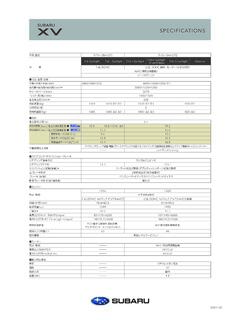
Transcription of Subaru SD Card Navigation System
1 Technical Support Guide Subaru SD Card Navigation System May 2013. 1. Technical Support Guide Subaru SD Card Navigation System 2. Contents 1. Introduction to the Subaru SD Card Navigation System - Overview to the Subaru SD Card Navigation System .. 5-6. - Hardware .. 7. - Screen Layout .. 8. - Software . 9. - Audio Functions 10-11. - Navigation Functions .. 12. - Other Functions 13. - Map Update .. 14. 2. Troubleshooting - System Diagram .. 15-16. - Connectors and Pin Layout of the Navigation System .. 17-19. - Specification of Line Diagnostics .. 20-22. - NO POWER . 23. - NO SOUND (All modes) .. 24. - NO SOUND (AM/FM) . 25. - NO SOUND (SAT RADIO) . 26. - NO SOUND (CD) .. 27. - NO SOUND (USB) .. 28. - NO SOUND (iPod).
2 29. - CD SKIP .. 30. - CD WON'T PLAY CORRECTLY .. 31. - SOUND IS DISTORTED OR TOO LOUD .. 32. - NO ILLUMINATION .. 33. - NO DISPLAY .. 34. - CURRENT GPS POSITION DOES NOT MOVE .. 35. - BLUETOOTH DOES NOT WORK .. 36. - REAR VIEW WON'T DISPLAY . 37. - AHA RADIO .. 38-57. 3. Supplemental Information - Subaru Technical Service Bulletins .. 59. 4. FAQ. - Navigation . 61-74. - Bluetooth Hands-free .. 75-92. - Audio / Visual .. 93-117. - Others .. 119-124. 3. Contents 5. Glossary - [A] - [M] .. 125. - [N] - [S] .. 126. - [U] - [number] .. 127. 4. 1. Introduction to the Subaru SD Card Navigation System Overview to the Subaru SD Card Navigation System Applicable Models Vehicle ID Subaru No. SD Part No. Map Version 12MY IMPREZA FM601US 86271FJ600 86283FJ600.
3 12MY IMPREZA STI FW602US 86271FG600 86283FG600 2010 Q3. 12MY FORESTER FP606US 86271SC600 86283SC600. 13MY BRZ FA601US 86271CA620 86283CA620. 13MY IMPREZA / XV CROSSTREK FM612US 86271FJ610 86283FJ610. 13MY IMPREZA STI FW602US 86271FG620 86283FG620. 2011 Q3. 13MY FORESTER FP606US 86271SC620 86283SC620. 14MY FORESTER (w/ Aha) FF605US 86271SG600. 86283SG600. 14MY FORESTER (w/ Aha, w/ H/K AMP) FF615US 86271SG610. 14MY FORESTER (w/ Aha) FF605US 86271SG620. 86283SG620. 14MY FORESTER (w/ Aha, w/ H/K AMP) FF615US 86271SG630. 14MY IMPREZA / XV CROSSTREK (w/ Aha) FM622US 86271FJ620 86283FJ620 2012 Q3. 14MY IMPREZA STI (w/ Aha) FW602US 86271FG630 86283FG630. 14MY BRZ (w/ Aha) FA632US 86271CA630 86283CA630. Head Unit and SD Card Combination Please verify that the corresponding SD Card is inserted based on the table above.
4 SD CARD. SD card must be returned with any SAMPLE. exchange unit core. 5. Overview to the Subaru SD Card Navigation System Up to 11MY 12MY and later DVD Navigation SD Card Navigation DVD/DVD AVN CD/SD Memory AVN. IMPREZA / XV CROSSTREK /. IMPREZA STI / FORESTER / BRZ. Summary of Features DVD Navigation SD Card Navigation Display 7-inch VGA WQVGA. Deck DVD CD. Traffic information - XM-Traffic Satellite radio Option XM. iPod/iPhone control Option Yes AV. HD Radio - Yes *1. Aha Radio - Yes *2. SD Picture - Yes SMS/Email read out - Yes Voice recognition - Yes (3 languages). Motorway service information - Yes Green route search - Yes Navi 3D Junction display - Yes Voice recognition - Yes (3 languages). Map Web download - Yes Other Rear view camera Option Option *1 HD Radio service available in USA only (as of May 2013).
5 *2 Aha Radio is not available for 12-13MY System . 6. 1. Introduction to the Subaru SD Card Navigation System Hardware POWER / VOL button EJECT button Press and Release : Audio Power ON or OFF. Press to eject the DISC. Rotating : Adjust the volume. CD slot SD memory card slot (Starting from top). AUDIO button Press to use the audio or hands-free function. Press for 1 second or more to adjust the picture quality or screen brightness. Voice Control button Press to use the voice recognition control. MAP button Press to display the Navigation screen. 7. Screen Layout Audio source Basic control of Control of change audio function Navigation function Navigation mode Dual screen Audio mode [AUDIO]. Full Audio screen Switching by touching icon in the screen Full Map screen [MAP].
6 8. 1. Introduction to the Subaru SD Card Navigation System Software The main unit functions are: (1) Audio (2) Navigation (3) Information (1) Audio function In addition to radio and CDs, the System can also play other sources such as iPods, iPhones, USB and Bluetooth Audio devices. Sound quality can also be adjusted using the operation screen. Audio select button (2) Navigation function Apart from the easy-to-view screen guides, other features offered include detailed location information displays, a variety of adjustable guide maps, and simple route changes. Properties such as map colors can be customized as desired. Navigation menu button (3) Information function In addition to display settings, other settings such as wallpapers are also possible.
7 9. Audio Functions HD radio, XM, Aha Integrated HD Radio, XM and Aha HD Radio, XM Tuner Control XM Traffic Information Aha Radio Smartphone with Data service is required for Aha functions. Aha Radio is not avail- able for 12-13MY Sys- tem. HD Radio service available in USA only XM is paid service and subscription is required (as of May 2013). Voice Control Operate without looking away while driving Microphone (Over Head). Voice Control button Talk back from vehicle speaker voice command please . Voice Change Audio Destination Hands-free iPod select USB select Control source control search dial songs folder function Yes Yes Yes Yes Yes Yes 10. 1. Introduction to the Subaru SD Card Navigation System Audio Functions Movie <USB memory>.
8 Max data size: 8GB. Class: USB mass storage class *Compressed video file is supported for USB only. <Read and play condition>. Max picture resolution size: 720*576 pixel Max layers of directory: 8 layers Max number of folders (overall): 3000. Max number of files (overall): 9999. <Video format> <Reference>. Audio Format DivX WMV MP4. MP3 WMA. Yes Yes Yes Yes Yes *Playback is dependent on the specific version of the file format. SD Picture <SD card>. Max data size: 64GB. SD card class: ALL. *Slide show supports SD card only. *Slide show cannot be displayed while Navi Mode is active *Some SD Cards functions above may not be supported based on SD Card manufacturer specifications. <Features> <Read and play condition>. 4 slideshow effects Format: JPEG.
9 Automatic resizing Max picture data size: 10MB. Setting as Opening screen Max layers of directory: 8 layers Max number of files (overall): 500. <Limitation while driving> Caution: Do not add photo data on Map SD Card. It The picture slide show will stop once start driving may damage the software file. Always use and the last picture will be displayed on the screen. a different SD card to store photo data. 11. Navigation Functions 3D Junction Display When approaching an ex- pressway exit or a compli- cated intersection, the map switches to a 3D display. Voice Recognition By using the voice control System , the destination can be set by speaking voice commands. This enables you to use functions that are usually inaccessible while driving.
10 Motorway Highway service area in- formation is useful for a long drive. Green Route The Green route function enables the search for routes that reduce fuel consumption and CO2. emissions. Altitude Reading The function shows the altitude of the road currently being driven and measured by the GPS receiver. The minimum of 4 acquired satellites is required to es- tablish Altitude. With 3 or less acquired satellites, "- -". may be displayed on the Navigation screen. 12. 1. Introduction to the Subaru SD Card Navigation System Other Functions Rear view camera (if applicable). Reverse On Visual guidance line (~ ). (~ ). (~ ). (~ ) from the edge of Vehicle Center of vehicle Read out SMS/Email Navigation Notification screen (received message).