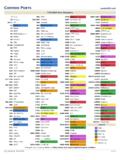
Transcription of Subversion Components Add Files or Folders Commit …
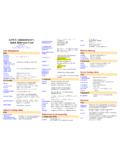
1 Add Files or Folders $ svn add * Add all items in folder, and recurse (ignores versioned directories)$ svn add itemname If itemname is folder, all subfolders and Files will also be added$ svn add * --force Force recurse into versioned directoriesDeleting, Copying and Moving$ svn delete "/path"$ svn -m "Deleting" delete "/path" Deletes with message Deleting $ svn copy "sourcepath" "targetpath" Copy source to target$ svn move "sourcepath" "targetpath" Move source to targetThis cheat sheet is based in largepart on the SVN book, free from: Between Files $ svn diff "/path/file" See what has changed in "/path/file"$ svn diff "/path/file@2" "/path/file@7" Compares file in revisions 2 and 7$ svn diff -r 2:7 "/path/folder" Compared all Files in revisions 2 and 7 Revert Local (Uncommitted) Changes$ svn revert "/path/filename" Reverts changes to file$ svn revert -R "/path/folder" Reverts changes to folder recursivelyLogs and Blame$ svn log "/path" Show log messages from repository$ svn blame "/path" Show commits with messages for pathMerge Changes$ svn merge -r 2:7 "item" "/path/file" Apply the diff between revisions 2 and 7 of "item" to "/path/file"$ svn merge "url1" "url2" "/path/file" Apply the diff between "url1" and "url2" to "/path/file"Local machineHTTP (Apache)HTTPS (SSL)SVN (svnserve)SVN over SSHS ubversion Protocolsfile://http://https://svn://svn +ssh.
2 // Subversion Help$ svn help$ svn help import Show help for import commandCommand line programRevision of working copyInspect repositoryRepository administrationFilter repository streamApache moduleSVN server (SVN protocol)Mirror repositorySubversion Componentssvnsvnversionsvnlooksvnadminsv ndumpfiltermod_dav_svnsvnservesvnsyncRep ository Administration$ svnadmin create "/path/to/repository" Create repository$ svnadmin setlog "path" -r 7 Change log message for revision 7 of "path" to contents of $ svnadmin dump "repository" > filename Dump contents of repository to file$ svnadmin load "repository" < filename Load contents of file into repositoryThe $ symbol is used to denotecommands to be Local Folder to Repository$ svn import folder "/path/to/repository"Checkout Working Copy$ svn checkout "/path/to/repository/folder" Creates working copy of "folder"$ svn checkout "/path" foldername Checkout into new folder "foldername"Update Working Copy from Repository$ svn update "/path"$ svn update -r9 "/path" Update to revision 9 Available free from Changes to
3 Repository$ svn Commit "/path" Commit changes to file or folder$ svn Commit -m "Message" "/path" Commit with message Message $ svn Commit -N "/path" Commit changes to folder without recurseItem and Property Statuses' ''A''D''M''R''C''X''I''?''!''~'No modificationsAdditionDeletionModifiedIte m replacedIn conflictExternals definitionIgnoredNot in repositoryItem missingObject type changedMiscellaneous Commands ($ svn .. )resolve "/path"cleanup "/path"lock "/path"unlock "/path"cat "/path"status "/path"Resolve conflictRecursively removelocks and completeoperationsLock pathUnlock pathView file contentsGet path statusProperty Commands ($ svn .. )proplist "/path"propset PROP VAL "/path"propget PROP "/path"propedit PROP "/path"propdel PROP "/path"List propertiesSet property PROP to value VAL Get value of PROP Edit PROP Delete PROP Argument Shortcuts-m "Message"-q-v-r-c-t-R-N--message--quiet- -verbose--revision--change--transaction- -recursive--non-recursiv