Transcription of Symbol LS3578-ER scanner programming guide …
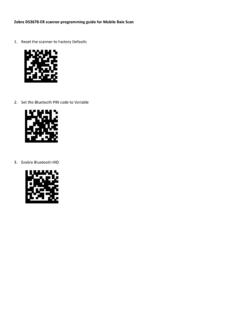
1 Symbol LS3578-ER scanner programming guide for mobile Bale scan 1. Reset the scanner to Factory Defaults 2. Set the Bluetooth PIN code to Variable 3. Enable Bluetooth HID 4. We need each scan to end in a . so that we know to advance to the next field scan Options <Data> <suffix> Save scan Suffix Please scan the following in order (1046) 1 -> 0 -> 4 -> 6 -> 5. Enable Discovery mode. Do this once the application has been downloaded and configured on the device that the scanner is being paired to.
2 Once the scanner is paired, you will no longer have a soft-key keyboard until the device is unpaired, or Bluetooth is disabled on the device. 6. Enable Bluetooth on your device and tell it to search for devices. You should see something similar to LS3578M1L06T47Y show up in the list. The device name may vary depending on the scanner . Select it to pair to the scanner and you will be prompted to enter a key. scan the barcodes on the following page that match the key presented on your device, followed by the save barcode. 7. scan the numbers as required from the device.
3 Followed by the Save barcode. 0 -> 1 -> 2 -> 3 -> 4 -> 5 -> 6 -> 7 -> 8 -> 9 -> Save -> Cancel ->