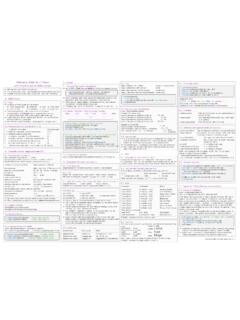
Transcription of Syntax Becomes - RStudio
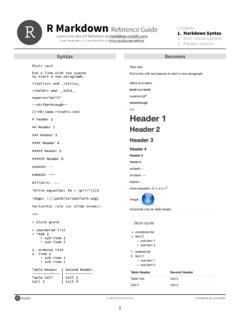
1 R Markdown Reference Guide Learn more about R Markdown at Contents: 1. Markdown Syntax Learn more about Interactive Docs at 2. Knitr chunk options 3. Pandoc options Syntax Becomes Plain text End a line with two spaces to start a new paragraph. *italics* and _italics_. **bold** and __bold__. superscript^2^. ~~strikethrough~~. [link]( ). # Header 1. ## Header 2. ### Header 3. #### Header 4. ##### Header 5. ###### Header 6. endash: -- emdash: --- ellipsis: .. inline equation: $A = \pi*r^{2}$. image: . horizontal rule (or slide break): **. > block quote * unordered list * item 2. + sub-item 1. + sub-item 2. 1. ordered list 2. item 2. + sub-item 1. + sub-item 2. Table Header | Second Header ------------- | ------------- Table Cell | Cell 2. Cell 3 | Cell 4. Updated 10/30/2014 2014 RStudio , Inc. CC BY RStudio . 1. R Markdown Reference Guide Learn more about R Markdown at Contents: 1. Markdown Syntax Learn more about Interactive Docs at 2.
2 Knitr chunk options 3. Pandoc options Syntax Becomes Make a code chunk with three back ticks followed by an r in braces. End the chunk with three back ticks: ```{r}. paste("Hello", "World!"). ```. Place code inline with a single back ticks. The first back tick must be followed by an R, like this `r paste("Hello", "World!")`. Add chunk options within braces. For example, `echo=FALSE` will prevent source code from being displayed: ```{r eval=TRUE, echo=FALSE}. paste("Hello", "World!"). ```. Learn more about chunk options at Chunk options option default value description Code evaluation child NULL A character vector of filenames. Knitr will knit the files and place them into the main document. code NULL Set to R code. Knitr will replace the code in the chunk with the code in the code option. Knitr will evaluate the chunk in the named language, engine = 'python'. Run names(knitr::knit_engines$get()) to engine 'R'. see supported languages.
3 Eval TRUE If FALSE, knitr will not run the code in the code chunk. include TRUE If FALSE, knitr will run the chunk but not include the chunk in the final document. purl TRUE If FALSE, knitr will not include the chunk when running purl() to extract the source code. Results collapse FALSE If TRUE, knitr will collapse all the source and output blocks created by the chunk into a single block. echo TRUE If FALSE, knitr will not display the code in the code chunk above it's results in the final document. If 'hide', knitr will not display the code's results in the final document. If 'hold', knitr will delay displaying all output results 'markup' pieces until the end of the chunk. If 'asis', knitr will pass through results without reformatting them (useful if results return raw HTML, etc.). error TRUE If FALSE, knitr will not display any error messages generated by the code. message TRUE If FALSE, knitr will not display any messages generated by the code.
4 Warning TRUE If FALSE, knitr will not display any warning messages generated by the code. Code Decoration comment '##' A character string. Knitr will append the string to the start of each line of results in the final document. highlight TRUE If TRUE, knitr will highlight the source code in the final output. prompt FALSE If TRUE, knitr will add > to the start of each line of code displayed in the final document. TRUE If TRUE, knitr will remove white spaces that appear at the beginning or end of a code chunk. tidy FALSE If TRUE, knitr will tidy code chunks for display with the tidy_source() function in the formatR package. Updated 10/30/2014 2014 RStudio , Inc. CC BY RStudio . 2. R Markdown Reference Guide Learn more about R Markdown at Contents: 1. Markdown Syntax Learn more about Interactive Docs at 2. Knitr chunk options 3. Pandoc options Chunk options (Continued). option default value description Chunks NULL The label of options set in knitr:: opts_template() to use with the chunk.
5 NULL Local R options to use with the chunk. Options are set with options() at start of chunk. Defaults are restored at end. NULL A character vector of labels of the chunks from which the code of the current chunk is inherited. Cache autodep FALSE If TRUE, knitr will attempt to figure out dependencies between chunks automatically by analyzing object names. cache FALSE If TRUE, knitr will cache the results to reuse in future knits. Knitr will reuse the results until the code chunk is altered. NULL If FALSE, knitr will not rerun the chunk if only a code comment has changed. TRUE If TRUE, knitr will use lazyload() to load objects in chunk. If FALSE, knitr will use load() to load objects in chunk. 'cache/' A file path to the directory to store cached results in. Path should begin in the directory that the .Rmd file is saved in. NULL A character vector of object names to cache if you do not wish to cache each object in the chunk. A character vector of chunk labels to specify which other chunks a chunk depends on.
6 Knitr will update a cached dependson NULL. chunk if its dependencies change. Animation anipots 'controls,loop' Extra options for animations (see the animate package). interval 1 The number of seconds to pause between animation frames. Plots dev 'png' The R function name that will be used as a graphical device to record plots, dev='CairoPDF'. NULL Arguments to be passed to the device, (bg='yellow', pointsize=10). dpi 72 A number for knitr to use as the dots per inch (dpi) in graphics (when applicable). external TRUE If TRUE, knitr will externalize tikz graphics to save LaTex compilation time (only for the tikzDevice::tikz() device). 'default' How to align graphics in the final document. One of 'left', 'right', or 'center'. NULL A character string to be used as a figure caption in LaTex. 'figure' The Latex environment for figures. NULL The file extension for figure output, 'png'. , 7 The width and height to use in R for plots created by the chunk (in inches).
7 If 'high', knitr will merge low-level changes into high level plots. If 'all', knitr will keep all plots (low-level changes may 'high' produce new plots). If 'first', knitr will keep the first plot only. If 'last', knitr will keep the last plot only. If 'none', knitr will discard all plots. 'fig:' A prefix to be used for figure labels in latex. 'figure/' A file path to the directory where knitr should store the graphics files created by the chunk. '' A character string to be used as the figure position arrangement in LaTex. NULL A function to post-process a figure file. Should take a filename and return a filename of a new figure source. 1 Dpi multiplier for displaying HTML output on retina screens. NULL A character string to be used as a short figure caption. NULL A character string to be used as captions in sub-figures in LaTex. If 'hide', knitr will generate the plots created in the chunk, but not include them in the final document.
8 If 'hold', knitr 'asis' will delay displaying the plots created by the chunk until the end of the chunk. If 'animate', knitr will combine all of the plots created by the chunk into an animation. NULL If TRUE, knitr will call () before drawing plots. NULL A character string of extra options for figures to be passed to LaTex or HTML. , NULL The width and height to scale plots to in the final output. Can be in units recognized by output, 8\\linewidth, 50px , NULL The width and height to resize tike graphics in LaTex, passed to \resizebox{}{}. sanitize FALSE If TRUE, knitr will sanitize tike graphics for LaTex. Updated 10/30/2014 2014 RStudio , Inc. CC BY RStudio . 3. R Markdown Reference Guide Learn more about R Markdown at Contents: 1. Markdown Syntax Learn more about Interactive Docs at 2. Knitr chunk options 3. Pandoc options Templates Basic YAML Template options Latex options Interactive Docs --- --- html_document --- --- title: "Chapters" title: "Slides".
9 Pdf_document title: "A Web Doc" title: "My PDF". output: output: word_document author: "John Doe" output: pdf_document md_document html_document: slidy_presentation: date: "May 1, 2015" fontsize: 11pt ioslides_presentation toc: true incremental: true output: md_document geometry : margin=1in slidy_presentation toc_depth: 2 runtime: shiny --- --- beamer_presentation --- --- Syntax for slide formats (ioslides, slidy, beamer). # Dividing slides 1. Pandoc will start a new slide at each first level header ## Header 2. as well as each second level header Becomes **. You can start a new slide with a horizontal rule`**` if you do not want a header. ## Bullets Render bullets with - a dash - another dash ## Incremental bullets >- Use this format >- to have bullets appear >- one at a time (incrementally). Slide display modes Press a key below during presentation to enter display mode. Press esc to exit display mode. ioslides slidy f - enable fullscreen mode C - show table of contents w - toggle widescreen mode F - toggle display of the footer o - enable overview mode A - toggle display of current vs all slides h - enable code highlight mode S - make fonts smaller p - show presenter notes B - make fonts bigger Top level options to customize LaTex (pdf) output option description lang Document language code fontsize Font size ( 10pt, 11pt, 12 pt).
10 Documentclass Latex document class ( article). classoption Option for document class ( oneside); may be repeated geometry Options for geometry class ( margin=1in); may be repeated mainfont, sansfont, monofont, mathfont Document fonts (works only with xelatex and lualatex, see the latex_engine option). linkcolor, urlcolor, citecolor Color for internal, external, and citation links (red, green, magenta, cyan, blue, black). Updated 10/30/2014 2014 RStudio , Inc. CC BY RStudio . 4. R Markdown Reference Guide Learn more about R Markdown at Contents: 1. Markdown Syntax Learn more about Interactive Docs at 2. Knitr chunk options 3. Pandoc options beamer ioslides word slidy html pdf md option description colortheme X Beamer color theme to use ( , colortheme: "dolphin"). css X X X Filepath to CSS style to use to style document ( , css: ). duration X Add a countdown timer (in minutes) to footer of slides ( , duration: 45). fig_caption X X X X X X Should figures be rendered with captions?