Transcription of UNDERSTANDING YOUR PAYCHECK - Paylocity
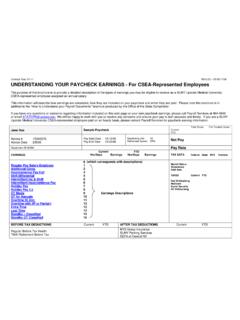
1 UNDERSTANDING your PAYCHECK Quick Tips on Calculating the Net Pay of a PAYCHECK (Using the above PAYCHECK as an example) Step 1: Calculate total earnings: $ Step 2: Calculate social security: - $ Step 3: Calculate Medicare: -$ Step 4: Calculate Federal Withholding: -$ Step 5: Calculate applicable state, local, disability, and unemployment insurance withholdings: -$ Step 6: Calculate adjustments (pretax and post-tax amounts). -$ Step 7: From total earnings, subtract all employee withholding taxes, then add or subtract all adjustments based on how they impact net pay. The end result is the net pay amount or take-home pay. $ 2 1 8 5 64 3 Number 1: Employer Information.
2 Employer Name and Address Information. Number 2: Check Date. The date that your check can be cashed or when you should expect Direct Deposit in your bank account(s). Number 3: Demographic Information. Employee Name and Address information. Number 4: Net Pay. Also known as take home pay . It is income after necessary taxes and deductions have been withheld. May include Direct Deposit Bank Account information as well. PAYCHECK INFORMATION EARNINGS STATEMENT INFORMATION 7 9 Number 5: Allowances and Exemptions. Personal exemptions reduce the employee's taxable income on the employee's Form 1040 (US Individual Income Tax Return). When entered into the payroll system, they reduce the same amount of wages from income tax withholding and therefore approximate the employee's tax liability at the end of the year.
3 Number 6: Earnings. Earnings are your gross pay before taxes and deductions. This area contains hour, wage and salary information for the current pay period including hours worked, type of earnings ( , regular, sick, vacation, holiday) and year- to date earnings. Number 7: Deductions. An amount that is or may be subtracted from an employee's PAYCHECK . They can be taken pre-tax or after tax depending on the type of deduction. There are also voluntary deductions (employee authorized) & involuntary deductions such as child support. Number 8: Taxes. Withholding amounts for each applicable tax authority. Federal taxes are the taxes that are paid to the federal government (the Internal Revenue Service or IRS).
4 FICA stands for Federal Insurance Contributions Act and this tax funds both Medicare and Social Security. State & Local taxes are paid to the city and/or state where you live, if applicable. Number 9: Direct Deposit and Account Type. Bank account information and amounts deposited per account, if applicable. Do you have a login to view your check online? If so, remember you can access your current and historical check information at any time by logging into Web Pay. Based on your company s configuration, you may land directly in the Self Service Portal upon logging in to Web Pay. From within the portal, simply click your most recent PAYCHECK date link under the Compensation section to access your current PAYCHECK information or to search for historical check dates.
5 If you do not have access directly into the Self Service Portal, you can click Employees from the top menu bar and select Current Checks to access the same check information. Note: Checks may vary slightly from company to company. In order to maintain confidentiality, employees must contact their Company Administrator with questions. Paylocity is not authorized to speak directly with employees. Anatomy of a PAYCHECK