Transcription of User guide - ResMed
1 User guideUser guide English Contents Introduction .. 1 Indications for use .. 1 Indications for use (USA only) .. 1 Contraindications .. 1 Adverse effects .. 2 General warnings and cautions .. 2 The astral device .. 4 The astral device interface .. 5 Touch screen .. 6 Information bar .. 7 Menu bar .. 8 Bottom bar .. 8 Main screen .. 8 Pressure bar .. 9 Using the astral device .. 10 Using the astral device for the first time .. 10 Powering on the device .. 11 Powering off the device .. 11 Enhanced access feature .. 12 Starting and stopping ventilation .. 14 Locking and unlocking the touch screen .. 14 Navigating the 15 Monitors menu.
2 15 Setup menu ..17 Alarms menu .. 17 Information menu ..18 Device 18 Adjusting device settings ..19 Programs .. 19 Manual Breath feature .. 20 Sigh Breath feature .. 20 Travelling with the astral device .. 21 Assembling patient circuits .. 21 Circuit options .. 21 Fitting the circuit adapter .. 23 Connecting a single limb circuit with intentional leak .. 23 Connecting a single limb circuit for invasive use ..24 Connecting a single limb circuit with expiratory valve .. 25 Connecting a double limb circuit ( astral 150 only) .. 27 Connecting a mouthpiece circuit .. 28 Learn Circuit .. 29 Accessories .. 32 Power accessories.
3 32 Optional accessories .. 32 Attaching patient circuit accessories .. 32 Attaching a humidifier .. 33 Attaching a Heat Moisture Exchange (HME) .. 34 Attaching an antibacterial filter .. 34 Adding supplemental oxygen .. 35 Monitoring delivered oxygen .. 37 Attaching a nebuliser .. 37 Attaching other accessories .. 38 Attaching a pulse oximeter .. 38 Attaching a remote alarm .. 40 Power 41 Connecting to mains power .. 42 Connecting the astral External Battery .. 43 Connecting to a ResMed Power Station (RPSII) .. 44 Connecting to an external DC power source .. 44 Using the internal battery .. 45 Device power source indicators.
4 47 astral Carry Bag .. 48 Alarms .. 49 Alarm priority .. 50 Viewing the active alarms .. 52 Muting alarms .. 52 Resetting alarms .. 53 Adjusting the alarm volume .. 53 Testing the alarm sounders and indicators .. 54 Testing the Remote Alarm .. 55 Testing the alarms .. 55 Power alarms .. 56 Detecting circuit disconnection and de-cannulation .. 57 astral Disconnection Alarm .. 58 Adjusting the Disconnection Alarm .. 58 Data management process .. 59 Cleaning and maintenance .. 60 Weekly .. 60 60 Servicing .. 61 Replacing the air filter .. 61 Maintenance Timetable .. 62 Internal Battery .. 62 Device information.
5 63 Troubleshooting .. 64 Alarm troubleshooting .. 64 Learn Circuit troubleshooting .. 68 General troubleshooting .. 71 Technical specifications .. 72 Guidance and Manufacturer s Declaration Electromagnetic Emissions & Immunity .. 77 Guidance and manufacturer s declaration electromagnetic Guidance and manufacturer s declaration electromagnetic Recommended separation distances between portable and mobile RF communications equipment and the life support device ..80 Potential impact of electromagnetic disturbances ..80 Symbols .. 81 Standards compliance .. 82 Training and support .. 82 Limited warranty.
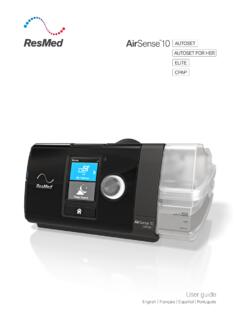
6 83 Appendix A: Definitions .. 84 Ventilation settings definitions .. 84 Measured and calculated parameter definitions .. 86 Introduction English 1 Introduction The astral device provides mechanical ventilation to both ventilation dependent and non-dependent patients. It delivers pressure and volume ventilation through either a valve or leak circuit, and is compatible with a range of accessories to support specific use cases. The information in this guide applies to both the astral 100 and the astral 150 devices. Where information applies to only one of these devices, that device will be specified. Note: Some features may not be available on your device.
7 This User guide is for a patient or carer user, and does not contain all the information provided in the Clinical guide . WARNING Read the entire manual before using the astral device. Use the astral device only as directed by a physician or healthcare provider. Use the astral device only for the intended use as described in this manual. Advice contained in this manual does not supersede instructions given by the prescribing physician. Install and configure the astral device in accordance with the instructions provided in this guide . CAUTION In the US, Federal law restricts this device to sale by or on the order of a physician.
8 Indications for use The astral 100/150 provides continuous or intermittent ventilatory support for patients weighing more than 5 kg who require mechanical ventilation. The astral device is intended to be used in home, institution/hospital and portable applications for both invasive and non-invasive ventilation. Indications for use (USA only) The astral 100/150 provides continuous or intermittent ventilatory support for patients weighing more than 11 lb (5 kg) who require mechanical ventilation. The iVAPS mode with optional AutoEPAP is intended for patients weighing more than 66 lb (30 kg). The astral device is intended to be used in home, institution/hospital and portable applications for both invasive and non-invasive ventilation.
9 CAUTION The astral device is not intended for use as an emergency transport ventilator. Contraindications The astral device is contraindicated in patients with the following pre-existing conditions: pneumothorax or pneumomediastinum pathologically low blood pressure, particularly if associated with intravascular volume depletion cerebrospinal fluid leak, recent cranial surgery or trauma severe bullous lung disease dehydration. Introduction 2 WARNING AutoEPAP is contraindicated when using an invasive interface. Adverse effects Report unusual chest pain, severe headache or increased breathlessness to your physician.
10 The following side effects may arise during use of the device: drying of the nose, mouth or throat nosebleed bloating ear or sinus discomfort eye irritations skin rashes. General warnings and cautions The following are general warnings and cautions. Further specific warnings, cautions and notes appear next to the relevant instruction in the manual. A warning alerts you to possible injury. WARNING If you notice any unexplained changes in the performance of the device, if it is making unusual or harsh sounds, if the device or the power supply are dropped or mishandled discontinue use and contact your healthcare provider.