Example: confidence
User’s Manual - Apricorn
This Admin PIN is used to set the Padlock DT’s various Admin features and also serves as the first of five User PINS for the Padlock DT’s standard operation. 1.Plug the Padlock 3 into a USB port and turn power switch to ON. (BLUE and GREEN LEDs will glow solidly, indicating no Admin PIN has been established.) 2. Press + 9 simultaneously.
Tags:
Information
Domain:
Source:
Link to this page:
Documents from same domain
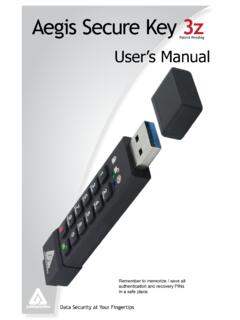
Patent Pending User’s Manual
apricorn.comAegis Secure Key Brute-Force Protection 14 Performing a Complete Reset 15 Initializing and Formatting After a Complete Reset 16 ... Both the BLUE and GREEN LEDs will glow solidly. 2. Press + 9 at the same time. The BLUE LED will glow solidly and the GREEN LED will be blinking. 3. Enter the series of numbers that you will use for the Admin PIN ...

Aegis Padlock 3 - Apricorn
apricorn.comEach Aegis padlock 3.0 is shipped without a preset Personal Identification Number (PIN) installed on the key. A 6 to 16-digit Admin PIN must first be established before the drive can be used. This Admin PIN can be used to set any and all of the Admin Mode Features of the drive, as well as to access its data.

Aegis Secure Key 3 - Apricorn | Home
apricorn.com4 5 2 3 1 About the Aegis Secure Key 3.0 PINs must be a minimum of seven digits and a maximum of 16 digits. Cannot contain all sequential numbers (e.g., 01234567, 9876543)
Related documents
BLUBRUe te - JM Eagle™: World's Largest Plastic and PVC ...
www.jmeagle.com2 BLUe BRUte™ pRodUCt desCRiption AWWA C900 BLUe BRUte™ FoUse R in distRiBUtion, MUniCipAL WAteR sYsteMs And otheR seRviCes DESCRIPTION JM gle’s Blue Brute ea ™ pipe, produced in blue or white, conforms to the AWWA C900 specification, with gaskets meeting AstM F477 and joints in compliance with AstM d3139.
BIG BLUE - JM Eagle
www.jmeagle.comJM Eagle’s Publication JME-03B, “Blue Brute ™, Big Blue ™ and Ultra Blue’s C900/C905/C909 Installation Guide” and Uni-Bell ® Publication UNI-PUB-0807, “Tapping Guide for PVC Pressure Pipe.” QUICK BURST TEST. Randomly selected samples tested in accordance with ANSI/UL 1285 shall withstand, without failure, the pres-
Patent Pending User’s Manual
apricorn.comAegis Secure Key Brute-Force Protection 14 Performing a Complete Reset 15 Initializing and Formatting After a Complete Reset 16 ... Both the BLUE and GREEN LEDs will glow solidly. 2. Press + 9 at the same time. The BLUE LED will glow solidly and the GREEN LED will be blinking. 3. Enter the series of numbers that you will use for the Admin PIN ...

User Manual - istorage-uk.com
istorage-uk.comAvailable in four colours: Blue, Red, Green and Black User Manual ... In Brute Force state, the drive is waiting for an operation to get more PIN entry attempts. 3. In Standby state, the drive is waiting for an operation to unlock the drive, or enter Admin mode, or reset the drive. ...
U.S. NAVAL INSTITUTE BALLOT BIOS
www.usni.org(SSGN-726) (BLUE), the third U.S. submarine to integrate junior enlisted women. Following graduation from the U.S. Naval Acad-emy in 2015, she was selected as a Marshall ... University’s Brute Krulak Center for Creativity and Innovation and a military fellow with the College of William and Mary’s Project for
Unearthed Arcana: The Mystic Class
media.wizards.comabout your character’s personality or background? Are they based on a specific incident or a belief? Mystic Quirks d20 Quirk 1 You never cut your hair. 2 You refuse to wear clothes of a specific color. 3 You never say your name. 4 You never wear footwear. 5 You always wear a mask. 6 You dye your hair bright blue or green.