
BATTERY GUIDE - ResMed
While we recommend using DC-to-DC converters, if you must use a DC-to-AC inverter, you can do so with some ResMed devices. The following questions step you through identification of the appropriate battery for use with a DC-to-AC inverter to power your ResMed device. We recommend using a pure sine wave inverter with a
Download BATTERY GUIDE - ResMed

Information
Domain:
Source:
Link to this page:
Documents from same domain

Indications for use System requirements Compatible ResMed ...
document.resmed.com• Android™ 5.0 and later. Compatible ResMed devices • AirSense 11 • AirSense 10 • AirCurve 10. Note: Bluetooth features are only available on AirSense 11. Security : Built-in security features, steps you take to protect your smart device against malware, and keeping

User guide - document.resmed.com
document.resmed.comUse only ResMed parts (eg, air inlet filter, power supplies), masks and accessories with the machine. Non ResMed parts may reduce the effectiveness of the treatment, may result in excess carbon dioxide rebreathing and/or damage the machine. For compatibility information, refer to ResMed.com for more information. When using the humidifier tub:
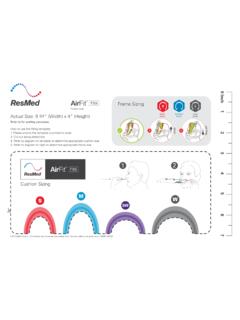
AirFit F30i - Fitting guide - ResMed
document.resmed.comTitle: AirFit F30i - Fitting guide Created Date: 8/13/2019 10:03:58 PM
Sleep Lab Titration Guide - ResMed
document.resmed.comFemale patients with mild to moderate OSA weighing more than weighing more than 66 lb (30 kg) 4–20 cm H 2O AutoSet/APAP (automatic positive airway pressure) Automatically adjusts pressure in response to flow limitation, snore and obstructive apneas OSA Patients weighing more than 66 lb (30 kg) 4–20 cm H 2O VAuto Automatically adjusts ...

Travel Compliance Letter for ResMed Therapy Devices
document.resmed.comPage 3 of 4 ResMed Corp 9001 Spectrum Center Blvd. San Diego, CA 92123 USA T 1 800 424 0737 F 1 858 836 5000 ResMed Pty Ltd 1 Elizabeth Macarthur Drive Bella Vista NSW 2153 Australia T +61 (2) 8884 1000 F +61 (2) 8884 2000 ResMed (UK) Ltd 8 Wimpole Street, London W1G 9SP, UK T +44 (1235) 862 997 F +44 (1235) 831 336 ResMed.com ...
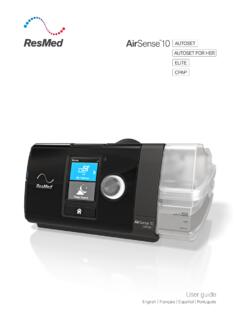
User guide - ResMed
document.resmed.comThe AirSense 10 CPAP device is indicated for the treatment of obstructive sleep apnea (OSA) in patients weighing more than 66 lb (30 kg). It is intended for home and hospital use. The humidifier is intended for single patient use in the home environment and re. use in a - hospital/institutional environment. Contraindications
Home Oxygen Qualifying Guidelines - ResMed
document.resmed.comThe qualifying blood gas study/oxygen saturation test was performed by a physician, qualified provider or supplier of laboratory services that is registered and able to bill for the test, and the necessity for such testing must be documented in the patient’s medical record. C. All three qualifying exercise tests should be performed during the ...

User guide - ResMed
document.resmed.com• The Astral device may be used in the vicinity of electronic article surveillance (EAS) systems during mobile situations when attached to th e patient or patient’s wheelchair. The Astral device may experience interference in the vicinity of EAS. Keep the Astral device at least 8” (20 cm) away from the EAS.

User guide - ResMed
document.resmed.comWhen Pressure Relief is enabled, you may find it easier to breathe out. This can help you get used to therapy. SmartStart* When SmartStart is enabled, therapy starts automatically when you breathe into your mask. When you remove your mask, it stops automatically after a

S9 Series AutoSet & Elite - ResMed
document.resmed.com• Do not wash the air tubing in a washing machine or dishwasher. Weekly: 1. Remove the air tubing from the S9 device and the mask. 2. Wash the air tubing in warm water using mild detergent. 3. Rinse thoroughly, hang, and allow to dry. 4. Before next use, reconnect the air tubing to the air outlet and mask. Monthly: 1.
Related documents

Wave SoundLink adapter - Bose
assets.bose.comthe DC power connector. 2. Plug the other end of the power cable into an AC power outlet that is close to your system. Adapter* power pack *In some regions, the kit includes a separate power cable that connects to the power supply. SOUNDLINK POWER CABLE UNPLUGGED scrolls across the Wave® system display if the required power pack is not connected
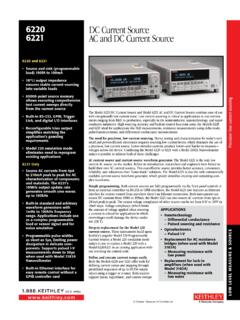
6220 DC Current Source 6221 AC and DC Current Source
download.tek.comas short as 5µs, limiting power dissipation in delicate com - ponents. supports pulsed I-V measurements down to 50µs when used with Model 2182a Nanovoltmeter • built-in Ethernet interface for easy remote control without a GPIb controller card The Model 6220 DC Current Source and Model 6221 AC and DC Current Source combine ease of use

Power Bank User’s Guide
www.altestore.com4.1. Before using the power bank, check the capacity of the power bank battery: connect the 3.5 mm DC connector digital camera or mobile phone / PDA adaptor to the DC jack of the power bank. Then switch the voltage to the DC 5.2 V and press the battery capacity indicator button. The

Dell WD15, TB16, TB18DC Commercial Docking Compatibility
www.delltechnologies.comMay 29, 2020 · power adapter TB16 with 240W power adapter TB18DC with 240W power adapter P Supported O Not supported Supported Docks. Created Date: 5/28/2020 9:06:04 AM ...

CST 280 Series - Miller
www.millerwelds.comDinse/Tweco® Adapter #042 465 A one-piece adapter which has a Dinse-style male plug (to power source) on one end and a female Tweco receptacle (for weld cable connection) on other end. Dinse/Cam-Lok Adapter #042 466 A one-piece adapter which has a Dinse-style male plug (to power source) on one end and a Cam-Lok receptacle (for weld

CHAdeMO Adapter Owners Manual - Tesla
www.tesla.comWARNINGS • Read this document before using the CHAdeMO Adapter. Failure to follow any of the instructions or warnings in this document can result in fire, electrical shock, serious injury or death. • The CHAdeMO Adapter is designed only for charging a …
MC33 Series Configuration and Accessories Guide
www.zebra.comLevel VI power supply (wall adapter) 100-240 VAC, 5V, 2.5A with Australia plug PWR-WUA5V12W0BR LevelVI power supply (wall adapter) 100-240 VAC, 5V, 2.5 A with Brazil plug PWR-WUA5V12W0CN LevelVI power supply (wall adapter) 100-240 VAC, 5V, 2.5A with China plug PWR-WUA5V12W0EU LevelVI power supply (wall adapter) 100-240 VAC, 5V, 2.5A with …

WT6000 / WT6300 RS4000/RS5000/RS6000
www.zebra.comLevel VI AC/DC Power Supply AC Input: 100-240V, 2.4A DC Output: 12V, 4.16A, 50W Requires: DC line cord and Country specific grounded AC line cord. CBL-DC-388A1-01 DC Line Cord for running the single slot cradles or battery chargers from a single Level VI power supply PWR-BGA12V50W0WW. PWR-BGA12V108W0WW Level VI AC/DC Power Supply