
BC 30 Wireless Backup Camera - Garmin
one of the license plate screws and clip the bracket in place so the hole on the bracket  lines up with the hole on the license plate. 3 Secure the bracket to the vehicle using either the included self-tapping screws à or the license-plate screw you removed in step 2 Ä. 4 Place the camera in the bracket, and determine the best
Download BC 30 Wireless Backup Camera - Garmin

Information
Domain:
Source:
Link to this page:
Documents from same domain

EDGE® 1030 Owner’s Manual - Garmin International
static.garmin.comCharging the Device NOTICE To prevent corrosion, thoroughly dry the USB port, the weather cap, and the surrounding area before charging or connecting to

Owner’s Manual - Garmin International
static.garmin.comIntroduction WARNING See the Important Safety and Product Information guide in the product box for product warnings and other important information.

Lidar Lite v3 Operation Manual 2 and Technical …
static.garmin.com1 Lidar Lite v3 Operation Manual and Technical Specifications Laser Safety WARNING This device requires no regular maintenance. In the event that the device

Printing a Mounting Template - Garmin
static.garmin.comPrinting a Mounting Template Notice It is not recommended that you print a mounting template on your own. Use the template that came in the product box.

GPSMAP 62 series - Garmin
static.garmin.comGPSMAP 62 Series Quick Start Manual 3 3. Replace the battery cover. For best results, after you install new batteries, update the battery type in the

Important Safety and Product Information 2 …
static.garmin.comIMPORTANT SAFETY AND PRODUCT INFORMATION WARNING Failure to heed the following warnings could result in an accident or collision resulting in death or

Important Safety and Product Information 2 …
static.garmin.comImportant Safety and Product Information 2 Informations importantes sur le produit et la sécurité 3 guida Informazioni importanti sulla sicurezza e sul

Instructions - Garmin
static.garmin.com1 GLO™ GLONASS and GPS Sensor Instructions August 2012 190-01492-00_0B Printed in Taiwan

GNS 430(A) - Garmin International
static.garmin.com190-00140-00 Rev. P GNS 430(A) Pilot’s Guide and Reference i RECORD OF REVISIONS Revision Date of Revision Description A 12/98 Initial Release B 4/99 Update to conform to recent SW changes

GNS 530(A) - Garmin International
static.garmin.com190-00181-00 Rev. H GNS 530(A) Pilot’s Guide and Reference i RECORD OF REVISIONS Revision Date of Revision Description A 5/00 Initial Release B 5/01 Update to reflect software changes through 2.06
Related documents
Inventory Control Form - synthes.vo.llnwd.net
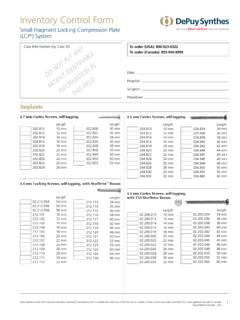
synthes.vo.llnwd.net3.5 mm Locking Screws, self-tapping, with StarDriveTM Recess Length 02.212.054 54 mm 02.212.056 56 mm 02.212.058 58 mm 212.101 10 mm 212.102 12 mm 212.103 14 mm 212.104 16 mm 212.105 18 mm 212.106 20 mm 212.107 22 mm 212.108 24 mm 212.109 26 mm 212.110 28 mm 212.111 30 mm 212.112 32 mm 2.7 mm Cortex Screws, self-tapping Length 202.810 10 mm
Inventory Control Form - synthes.vo.llnwd.net
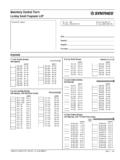
synthes.vo.llnwd.net2.7 mm Cortex Screws, self-tapping LENGTH LENGTH 202.810 10 mm 202.812 12 mm 202.814 14 mm 202.816 16 mm 202.818 18 mm 202.820 20 mm 202.822 22 mm 202.824 24 mm 202.826 26 mm 202.828 28 mm 202.830 30 mm 202.832 32 mm 202.834 34 mm 202.836 36 mm 202.838 38 mm 202.840 40 mm 202.845 45 mm 202.850 50 mm 202.855 55 mm 3.5 mm Locking Screws, self ...

Less Invasive Stabilization System (LISS). Allows ...
synthes.vo.llnwd.netUnicortical locking screws offer angular stability for optimal purchase and reduced stress on the bone. Locking screws perform drilling, tapping and locking to the plate. Optimized screw position in the condyles to avoid intercondylar notch and patellofemoral joint and maximize bone purchase.
Product Specification Manual - Screws
www.grabberman.comJan 05, 2005 · STREAKER® Fasteners - Self-tapping screws with a unique thread, and a hardened, extra-sharp 23° point that allows direct penetration of 20 to 25 gauge steel. Winged Fasteners - Used to attach plywood or particle board to 12-16 gauge steel. The wings bore a hole in the wood greater in diameter than the major diameter of the

DESIGN AND INSTALLATION GUIDE - Lysaght
www.lysaght.comSelf-drilling, self tapping hex. washer-head screws 10-16x16 Self-drilling, self tapping, long drill bit hex. head screw 12-24x32 Square (Tubular) Post 60 x 60 x 1.6, 65 x 65 x 2.5 Standard lengths: 2400, 3000 Ripple Screws (MINISCREEN® range only) Self-drilling, self tapping, hex. head screw 12-14x45 or RoofZips M6-11x50 or AutoTeks M5.5 ...
63-2700—11 - JADE™ Economizer Module
customer.honeywell.comsheet metal using self tapping sheet metal screws or in the air stream using the duct mounting kit. Duct mount kit is part number 50053060-001. Optional OA, RAa and DAb Sylkbus sensors communicate with the W7220 on the two-wire communication bus and can either be wired using a …

Installation and Setup Guide
resources.lennox.com2 - Mounting screws (M3.5x25mm self-tapping screws) 2 - Wall anchors 1 - Wall plate 1 - Warranty certificate 1 each - Homeowner and Installer Guides NOTE - This thermostat is equipped with automatic compressor protection to prevent potential damage due to short cycling or extended power outages. The short-cycle protection
GPSMAP 400/500 Series Installation Instructions
static.garmin.comNotIce: Use pan-head machine bolts or self-tapping screws to secure the swivel base. If you use screws with countersunk heads, you may damage the mounting bracket. To mount the bracket assembly: 1. Using the swivel base as a template, mark the location of the three holes that secure the bracket to the mounting surface. 2. Drill the mounting holes.
4. Manufacturing screws and nuts
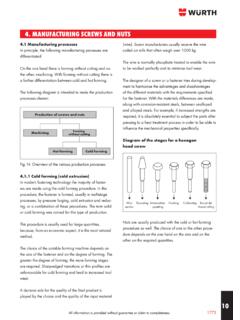
www.wuerth-industrie.comThis procedure is used among other things for tapping screws, thread grooving and self-drilling screws. In this case, very hard surfaces are decisive, so that these screws are able to make their own thread automatically. The screw core, in contrast, is soft. Steels with a carbon content of 0.05% to 0.2% are used for these types of screws.
ULTIMATE DOUBLE HUNG TILT PAC Table of Contents
www3.marvin.comAug 30, 2021 · 1 - 1 5/8, Phillips trimhead self tapping screw NOTE: Pivot handing is viewed from the interior. LH RH 11869348 11869347 Sash Retainer Plate Includes: 1 - Sash retainer plate 2 - #7x7/8, Phillips flathead wood screws LH Bronze RH Bronze LH White RH White 11870474 11870473 11870476 11870475 Sash Limiter M726 Includes: 1 - Sash limiter