Chapter 15 Construction Survey Procedures
Oct 18, 2004 · pivot offsets, pivot elevations and slope ratios from our computer generated Slope Staking reports at any desired station. A customizable slope staking report in TXT or CSV format can be stored in the controller for later downloading. In the latter case, it is impractical to input unique templates for every station and
Download Chapter 15 Construction Survey Procedures

Information
Domain:
Source:
Link to this page:
Documents from same domain
Chapter 6 Seismic Design
www.wsdot.wa.govChapter 6 Seismic Design 6.1 Seismic Design Responsibility and Policy 6.1.1 Responsibility of the Geotechnical Designer The geotechnical designer is responsible for providing geotechnical/seismic input

Project Management Manual - wsdot.wa.gov
www.wsdot.wa.govCommunication Management Plan [Output/Input] The document that describes: the communications needs and expectations for the project; how and in what format information will be

Project Risk Management Guide
www.wsdot.wa.govProject Management Online Guide in the Risk Management Plan spreadsheet. Larger, more complex projects may wish to use more robust analysis techniques via Monte Carlo simulation models.
Chapter 6 Storm Drains - Washington State …
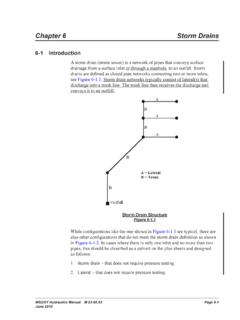
www.wsdot.wa.govWSDOT Hydraulics Manual M 23-03.03 Page 6-1 June 2010 Chapter 6 Storm Drains 6-1 Introduction A storm drain (storm sewer) is a network of pipes that conveys surface

Cost Estimating Manual for Projects
www.wsdot.wa.govWSDOT Cost Estimating Manual for Projects M 3034.03 Page i April 2015 Foreword WSDOT’s vision is to be the best at providing a sustainable and
Maintenance Manual - Washington State …
www.wsdot.wa.govForeword Reliable, well-maintained highway transportation facilities are essential to the well being of the state, its citizens, and its commerce.
Chapter 4 Soil and Rock Classification and Logging
www.wsdot.wa.govChapter 4 Soil and Rock Classification and Logging 4.1 Overview The detailed description and classification of soil and rock are an essential part of the
Chapter 1310 Intersections
www.wsdot.wa.govIntersections Chapter 1310 Page 1310-2 WSDOT Design Manual M 22-01.14 July 2017 1310.02 Design Considerations Consider all potential …
Chapter 25 Right of Way - Washington State …
www.wsdot.wa.govRight of Way Chapter 25 Page 25-2 WSDOT Local Agency Guidelines M 36-63.36 June 2018.11 WSDOT Services – At the earliest possible date, the local agency should notify
Chapter 1510 Pedestrian Facilities
www.wsdot.wa.govWSDOT Design Manual M 22-01.10 Page 1510-1 July 2013 Chapter 1510 Pedestrian Facilities 1510.01 General. 1510.02 References. 1510.03 Definitions
Related documents
Microsoft Excel Manual - Administration and Finance
adminfinance.umw.eduPivot Tables A pivot table is a data summarization tool within Excel. A pivot table can sort, count, total and average the data within a table or spreadsheet. To Insert a Pivot Table: 1. Select any cell in your data range. 2. Select Pivot Table located on the Insert tab. The Create PivotTable dialogue box will appear.

239 Excel Keyboard Shortcuts
d13ot9o61jdzpp.cloudfront.netPivot Tables Back To Index Create pivot table Alt + N, V Select entire pivot table Ctrl + A Group pivot table items Alt + Shift + → Ungroup pivot table items Alt + Shift + ← Hide (lter out) pivot table item Ctrl + -Unhide (clear lter on) pivot table item Alt + H, S C Insert pivot chart Alt + N, S Z C Dialog Boxes Back To Index Move to next ...
Advanced Excel: Pivot Tables - Elmhurst Public Library
elmhurstpubliclibrary.orgFigure 13: Renaming Pivot Tables and Fields Selecting, Copying, Pasting, and Deleting Pivot Tables: In order to copy or delete a pivot table, you need to first select it. To select a pivot table, simply click in the pivot table and then choose Select Entire PivotTable from the ribbon under the Analyze tab (see Figure 14).
CHAPTER 6 - FOUNDATION DESIGN - HUD
www.hud.govLoad Tables, is used to determine the required footing sizes and the required vertical and horizontal an-chorage forces to be transferred to ... for the unit to rotate about a pivot point either at the bearing point between chassis beam and support pier, or the bearing between the unit and the longitudinal exterior wall. This rota-
IRWIN Rafter Square Reference Guide
www.irwin.comrafter as in figure 7. Pivot the layout square so that the number 7 on the common scale lines up with the edge of the rafter. Starting at the pivot point along the top edge of the square, mark your line while holding the pivot point firmly against the rafter and keeping the number 7 lined up properly. This will be the top plumb cut. 2.

About the Tutorial
www.tutorialspoint.comi About the Tutorial Microsoft Excel is a commercial spreadsheet application, written and distributed by Microsoft for Microsoft Windows and Mac OS X.

Excel Pivot Tables Tutorial
www.tutorialspoint.comClick PivotTable in the Tables group. The Create PivotTable dialog box appears. In Create PivotTable dialog box, under Choose the data that you want to analyze, you can either select a Table or Range from the current workbook or use an external data source. As you are creating a PivotTable from a data range, select the following from the dialog ...
SPSS Instruction Manual
www.westga.eduThe Pivot Table Editor Output displayed in pivot tables can be modified in many ways with the Pivot Table Editor. You can edit text, swap data in rows and columns, add color, create multidimensional tables, and selectively hide and show results. The Chart Editor You can modify and save high-resolution charts and plots by invoking the Chart ...