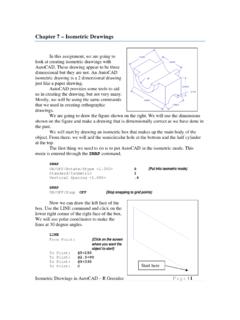
Chapter 7 – Isometric Drawings
Select objects: {Select the outer arc on the left side of the object} <Base point of displacement>: END of {Select the end of the arc} Second point of displacement: @.75<210 Copy the arc on the other side of the object using a similar command sequence. When you finish you should have the picture shown on the right. Move these Copy these
Download Chapter 7 – Isometric Drawings

Information
Domain:
Source:
Link to this page:
Documents from same domain

Critical Approaches to Literature - University of …
www.unm.eduCritical Approaches to Literature Deconstruction is a school of literary criticism that suggests that language is not a stable entity, and that we can never exactly say what we mean.
Step'by-step guide to critiquing research. Part 1 ...
www.unm.eduStep'by-step guide to critiquing research. Part 1: quantitative research Michaei Coughian, Patricia Cronin, Frances Ryan Abstract When caring for patients it is essential that nurses are using the

Inclusion and Exclusion Criteria - New Mexico's …
www.unm.eduPEP 604 Summer, 2010 Dr. Robergs 1 PEP507: Research Methods Inclusion and Exclusion Criteria Inclusion criteria = attributes of subjects that are essential for their
Design for Manufacturing - Guidelines
www.unm.edu1Information taken from Computer-Aided Manufacturing, Second Edition, Tien-Chien chang, Richard A Wysk, and Hsu-Pin Wang. Pages 596 to 598. Prentice Hall 1998 Design for Manufacturing - Guidelines
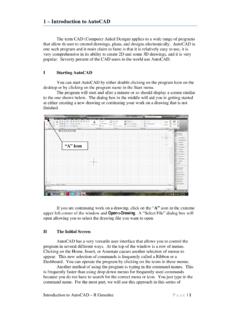
1 – Introduction to AutoCAD
www.unm.eduIntroduction to AutoCAD – R Greenlee Pag e | 1 1 – Introduction to AutoCAD The term CAD (Computer Aided Design) applies to a wide range of programs
AUDIT OF REAL ESTATE OPERATIONS - The …
www.unm.eduAUDIT OF REAL ESTATE OPERATIONS THE UNIVERSITY OF NEW MEXICO Report 2010-08 October 11, 2011 Audit Committee Members J.E. “Gene” Gallegos, Chair

Chapter 6 – Title Blocks - The University of New …
www.unm.eduTitle Blocks in AutoCAD – R Greenlee Page | 1 Chapter 6 – Title Blocks In previous exercises, every drawing started by creating a number of layers.
8 – Working Drawings in AutoCAD
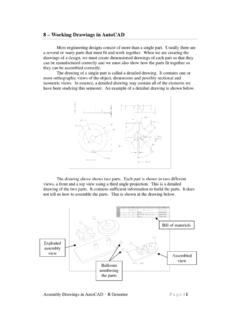
www.unm.eduAssembly Drawings in AutoCAD – R Greenlee Pag e | 1 8 – Working Drawings in AutoCAD Most engineering designs consist of more than a single part.
Chapter 4 – Dimensioning Drawings
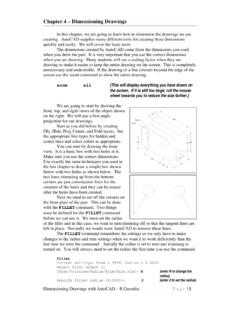
www.unm.eduDimensioning Drawings with AutoCAD – R Greenlee Page | 3 Continue as we have before and complete the three views. These are shown on the right.
2 – Orthographic Drawings
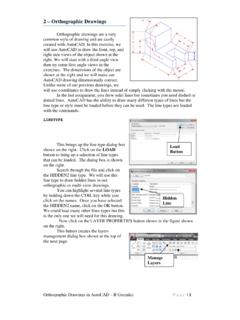
www.unm.eduOrthographic Drawings in AutoCAD – R Greenlee Pag e | 4 To point: C {Close the outline of the object} Next, draw the circle that represents the hole through the object.
Related documents

AN/ARC-210 Integrated Communications System
jproc.caThe AN/ARC-210 receiver-transmitter (RT) is the nucleus of an AN/ARC-210 integrated communications system. The AN/ARC-210 RT is available in several models and may be coupled with a full complement of ancillary equipment to provide the user community with exceptional capability and versatility. Modes > Normal single channel > ATC – 25 kHz channel
BY ORDER OF THE SECRETARY AIR FORCE INSTRUCTION 10 …
static.e-publishing.af.mil4 AFI10-210 9 JULY 2019 Attachment 2— PRIME BEEF TRAINING 34 Attachment 3— PRIME BEEF VEHICLE and EQUIPMENT TRAINING 42 Attachment 4— PRIME BEEF MISSION ESSENTIAL EQUIPMENT TRAINING 44 Attachment 5— PRIME BEEF SPECIAL TRAINING SITES and LOCATIONS 45 Attachment 6— Air Reserve Component (ARC) Prime BEEF …

AMCA 210: Laboratory Methods of Testing Fans for Ratings
law.resource.orgThe principal changes compared to ANSI/AMCA 210-85//ANSIIASHRAE 51-85 Laboratory Methods of Testing Fans for Rating are: 1) Incorporation of SI units in the text. SI units are primary, I-P units ar_e secondary. 2) Addition of SI equations. 3) Numbering of equations for easier reference.

Copper-nickel Welding and Fabrication
www.copper.orgModulus of elasticity GPa 135 152 210 Modulus of rigidity GPa 50 56 81 Table 4 compares various physical properties with those of steel. Additionally, the 70-30 alloy is essentially non-magnetic and has a magnetic permeability very close to unity. The 90-10 alloy has a higher iron content and can have a permeability between 1.01 and in excess ...
Syncrowave 210 Welding Power Source TIG/Stick/MIG
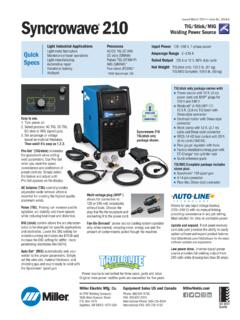
www.millerwelds.comSyncrowave® 210 Runner TIG/Stick Only Pkg. 907596 Auto-Line™ 120–240 V, 50/60 Hz. See page 1 for includes list Syncrowave® 210 Runner TIG/MIG Complete Pkg. 951684 Auto-Line™ 120–240 V, 50/60 Hz. See page 1 for includes list Accessories Dual EZ-Change Low Cylinder Rack 300337 Includes Elevated Gun and Cable Rack
Multimatic 220 AC/DC - millerwelds.com
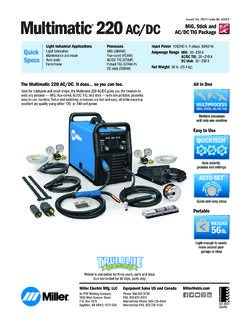
www.millerwelds.com210 A at 18.4 V, 20% duty cycle 90 A at 23.6 V, 40% duty cycle 200 A at 28.4 V, 15% duty cycle Welding Amperage Range 30–125 A 30–230 A 20–140 A 20–210 A 30–90 A 30–200 A Max. Open- Circuit Voltage 45 VDC 46 VDC Net Weight 56 lb. (25.3 kg) Amps Input at Rated Output, 50/60 Hz 120 V 240 V KVA KW 23.3 — 2.8 2.8